LOVE THE CORE2!!! - Possible bug in UIFlow Desktop - Compiler code order - Function buttons stop responding

-
Only affects the 3 built-in function buttons:
PC: Windows 10 Pro, Version 10.0.19402 (Build 19042), 16 Physical Cores, 16GB RAM, UEFI BIOS...
-
I started with UIFlow Desktop version 1.7.4, and FW version 1.9.0 for the Core2, and everything worked perfectly.
-
After updating to UIFlow Desktop version 1.7.5, and FW version 1.9.1 on the Core2, my script failed to register the built-in button presses.
-
Tested the web GUI - the same behavior persists using the web GUI, in the same versions.
-
Restoring the earlier versions of UIFlow and Core2 firmware caused the buttons to start responding again.
(I did not try updating the Core2 firmware only, using the older UIFlow Desktop version)
CAUSE:
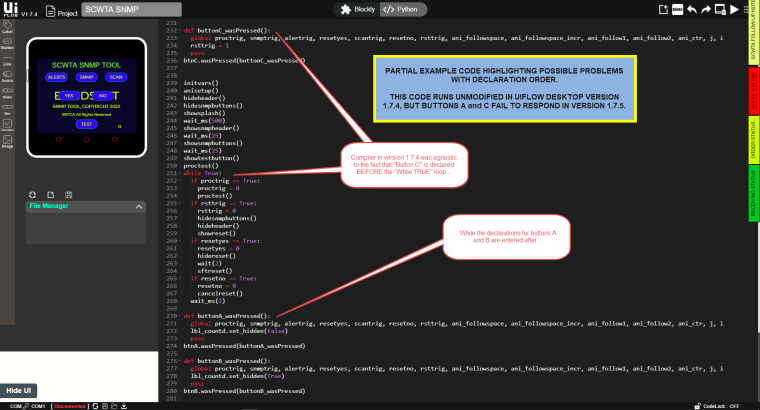
- While testing by moving elements, recreating the project in the different versions, and in different orders, I found that for some reason, (using the copy of the very first, fully functional script as an example for troubleshooting) the new UIFlow version 1.7.5 editor placed the declarations for the button 1,2, and 3 event responder functions into the code window AFTER the declaration for the infinite loop. And this was not consistent, either, because sometimes it would place the responder for one or two of the buttons BEFORE the infinite loop, causing THOSE to respond, but not the one declared after the loop.
Using the new version of UIFlow to create a project seems to have some influence on the order in which the function descriptors are entered, but I am still working to learn if the declaration order remains fixed.
WORKAROUND:
By going into the code editor, I cut the declarations for the button events out from under the infinite loop, and place them above the loop declaration, trying to remember that these will be overwritten if I use the UIFlow "side" to expand the project.
EXAMPLE OF PYTHON CODE, WORKING IN VERSION 1.7.4, BUT NOT IN VERSION 1.7.5:
-
-
Hi @mbunds
Thanks for feedback and sorry for this,actually the UIFlow desktop version not updated for a while,we are aim for web UIFlow current, and plan release the new UIFlow(we call it UIFlow 2.0).

Hello! It looks like you're interested in this conversation, but you don't have an account yet.
Getting fed up of having to scroll through the same posts each visit? When you register for an account, you'll always come back to exactly where you were before, and choose to be notified of new replies (either via email, or push notification). You'll also be able to save bookmarks and upvote posts to show your appreciation to other community members.
With your input, this post could be even better 💗
Register Login