How to put the Atom Lite into USB (Desktop) mode?
-
Selecting "USB" mode in the burner config results in an error.
The quick start docs only say how to get the Atom Matrix version (not the Atom Lite version) into USB mode: "Press and hold the middle button while powering on, and do not release it until LED color change to blue". With the Atom Lite version the LED never changes blue when holding the button - just flashes green...
-
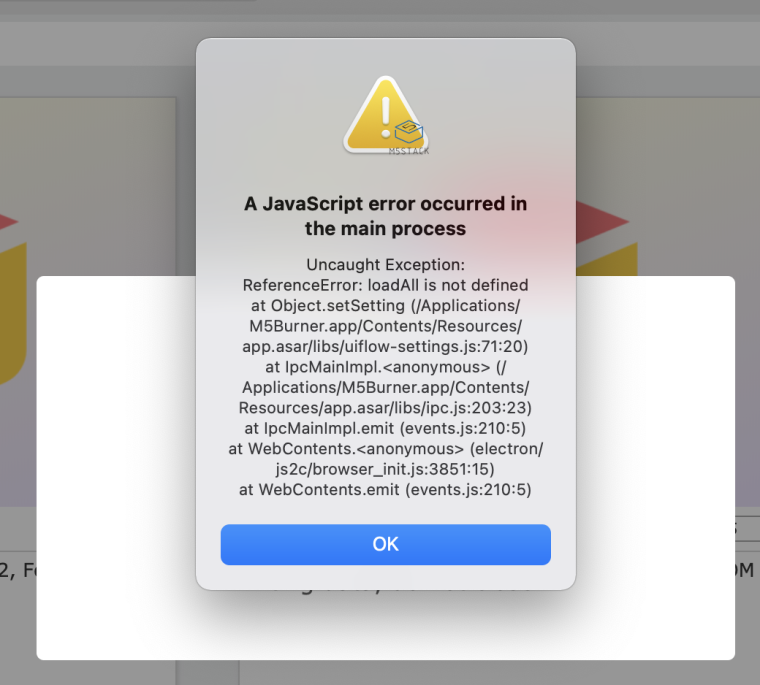
This is the error I get from M5Burner when string to select "USB Mode" in the UIFlow_Lite item in M5Burner:
-
Surely this is a simple question? Is it impossible to put the Atom Lite into USB mode?
-
@davelondon No
Hello! It looks like you're interested in this conversation, but you don't have an account yet.
Getting fed up of having to scroll through the same posts each visit? When you register for an account, you'll always come back to exactly where you were before, and choose to be notified of new replies (either via email, or push notification). You'll also be able to save bookmarks and upvote posts to show your appreciation to other community members.
With your input, this post could be even better 💗
Register Login