M5stack Tough Mac Address
-
Hi,
Is there anyway to get the WiFi Mac Address for an M5stack Tough via the M5BlockMaker. I need a unique ID for the device to write in a Database.
I tried some code but always gets the devices hanging and not responding, the latest was:import ubinascii
import network
ubinascii.hexlify(network.WLAN(network.STA_IF)).decode()The above was obtained from: link text
Thanks in advance
-
Hello @RASBR
try something like below. Works for me.
import network
import binascii

label0 = M5Label('label0', x=13, y=16, color=0x000, font=FONT_MONT_22, parent=None)
wlan = network.WLAN(network.STA_IF)
mac_bytes = wlan.config('mac')
mac_str = binascii.hexlify(mac_bytes).decode()
label0.set_text(mac_str)
Thanks
Felix -
Hi @felmue .
Thanks for the reply. I think I got the solution the same time you sent me yours. I did use the code in here as below:I did an 'Execute' Block:
 import ubinascii
 import network
 wlan_sta = network.WLAN(network.STA_IF)
 wlan_sta.active(True)
 wlan_mac = wlan_sta.config('mac')
 wlan_mac=ubinascii.hexlify(wlan_mac).decode().upper()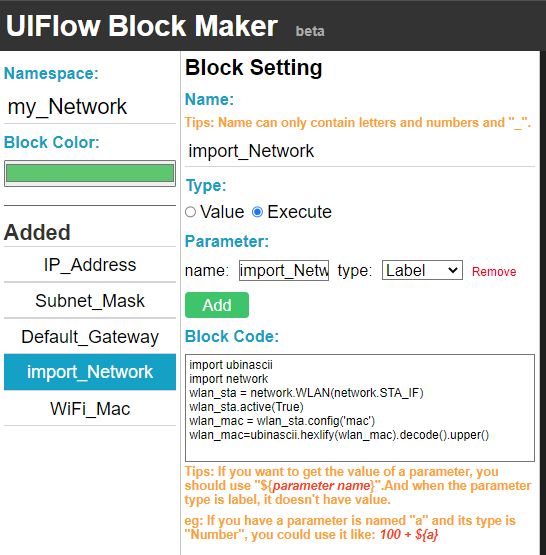
then a Label Block:
wlan_mac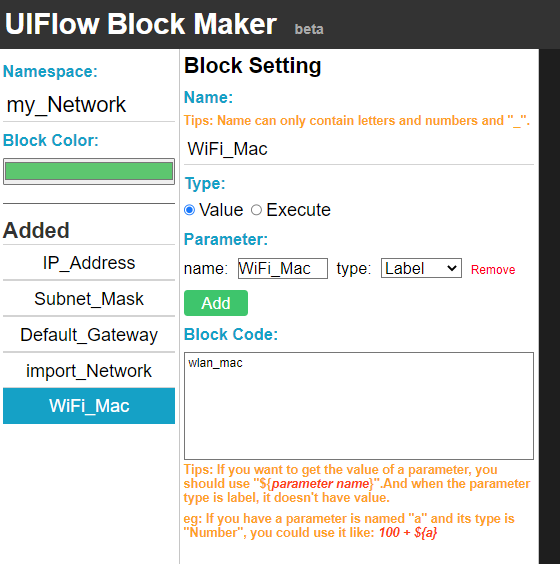
Anyway, thanks for taking the time and effort to reply.
Rami

Hello! It looks like you're interested in this conversation, but you don't have an account yet.
Getting fed up of having to scroll through the same posts each visit? When you register for an account, you'll always come back to exactly where you were before, and choose to be notified of new replies (either via email, or push notification). You'll also be able to save bookmarks and upvote posts to show your appreciation to other community members.
With your input, this post could be even better 💗
Register Login