Stepmotor Driver Module v1.1 (HR8825) M5STACK SKU: M039-V11 Question
-
Hi with Stepmotor Driver Module v1.1 I need to drive my stepper with the command in UI flow that's step/direction number /of steps but I can't find this when I load this module .
This is like what I required but this command is from another module.
 image url)
 -
Hi @AshimotoK0
These two modules are different, stepmotor[sku m012 & m035] modules support g-code command and stepmotor driver[SKU:M039] does not support g-code command -
@pandian-nano Thanks .. with the M039-V11 is there a command in UIflow to Step a certain number of pulses ? As in the image I posted. I only need to use one axis (i.e only controlling one stepper motor)
-
Hi @AshimotoK0, please try this example code. x, y and z motors can be controlled
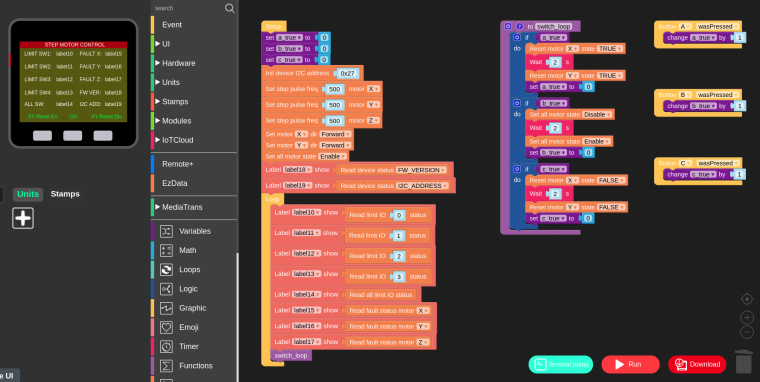
-
I confirmed that the sample code works. However, the micro step does not work well. The step width is the same even if I change the settings. Is there a special setup procedure?
Hello! It looks like you're interested in this conversation, but you don't have an account yet.
Getting fed up of having to scroll through the same posts each visit? When you register for an account, you'll always come back to exactly where you were before, and choose to be notified of new replies (either via email, or push notification). You'll also be able to save bookmarks and upvote posts to show your appreciation to other community members.
With your input, this post could be even better 💗
Register Login