🤖Have you ever tried Chat.M5Stack.com before asking??😎
    M5Stack Community
    • Categories
    • Recent
    • Tags
    • Popular
    • Users
    • Groups
    • Search
    • Register
    • Login

    lvgl on m5sack cores3

    Scheduled Pinned Locked Moved Squareline Studio / LVGL
    9 Posts 3 Posters 7.2k Views
    Loading More Posts
    • Oldest to Newest
    • Newest to Oldest
    • Most Votes
    Reply
    • Reply as topic
    Log in to reply
    This topic has been deleted. Only users with topic management privileges can see it.
    • M Offline
      mnhj
      last edited by

      hi i got a new m5stack core s3 and i want to use squreline studio with lovyan gfx and it does not work . can somone help

      ajb2k3A 1 Reply Last reply Reply Quote 0
      • ajb2k3A Offline
        ajb2k3 @mnhj
        last edited by

        @mnhj what do you mean by doesn't work?

        UIFlow, so easy an adult can learn it!
        If I don't know it, be patient!
        I've ether not learned it or am too drunk to remember it!
        Author of the WIP UIFlow Handbook!
        M5Black, Go, Stick, Core2, and so much more it cant be fit in here!

        M 1 Reply Last reply Reply Quote 0
        • M Offline
          mnhj @ajb2k3
          last edited by

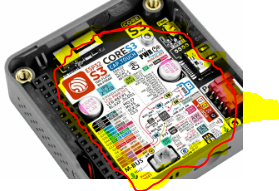
          @ajb2k3 I want to use arduino ide for programing not uiflow and if you know about tft espi user setup then can you please share the configuration for m5core s3 and when I follow the sticker inside the m5core s3 the screen does not work it just stays blank and no backlight so can you share a code that works

          robskiR 1 Reply Last reply Reply Quote 0
          • robskiR Offline
            robski @mnhj
            last edited by

            @mnhj said in lvgl on m5sack cores3:

            @ajb2k3 I want to use arduino ide for programing not uiflow and if you know about tft espi user setup then can you please share the configuration for m5core s3 and when I follow the sticker inside the m5core s3 the screen does not work it just stays blank and no backlight so can you share a code that works

            show us a sample of your code which isn't working
            "when I follow the sticker inside the m5core s3 the screen does not work" - what is this?

            M5StickC, M5StickCPlus, M5StickCplus2,M5GO, M5Core, M5Tough, M5Core2, M5 Demo Board, M5Dial, M5Paper, M5Atom, M5Cardputer, M5StampS3, CoreMP135, StamPLC, AirQ, M5Tab, M5CardputerAdv, M5StackChan

            M 2 Replies Last reply Reply Quote 0
            • M Offline
              mnhj @robski
              last edited by

              @robski
              //sample code arduino

              #include <LovyanGFX.hpp>

              // Custom class derived from LGFX_Device for M5Core S3
              class LGFX : public lgfx::LGFX_Device
              {
              // Panel instance for ILI9342
              lgfx::Panel_ILI9342 _panel_instance;
              // SPI bus instance
              lgfx::Bus_SPI _bus_instance;
              // PWM light instance
              lgfx::Light_PWM _light_instance;
              // Touch screen instance for FT5x06
              lgfx::Touch_FT5x06 _touch_instance;

              public:
              LGFX(void)
              {
              { // Bus configuration
              auto cfg = _bus_instance.config();

                // SPI bus settings
                cfg.spi_host = SPI3_HOST;
                cfg.spi_mode = 0;
                cfg.freq_write = 40000000;
                cfg.freq_read  = 16000000;
                cfg.spi_3wire  = false;
                cfg.use_lock   = true;
                cfg.dma_channel = SPI_DMA_CH_AUTO;
                cfg.pin_sclk = 7;
                cfg.pin_mosi = 6;
                cfg.pin_miso = 0;
                cfg.pin_dc   = 4;
              
                _bus_instance.config(cfg);
                _panel_instance.setBus(&_bus_instance);
              }
              
              { // Panel configuration
                auto cfg = _panel_instance.config();
              
                cfg.pin_cs           = 5;
                cfg.pin_rst          = 48;
                cfg.pin_busy         = 6;
              
                cfg.panel_width      = 320;
                cfg.panel_height     = 240;
                cfg.offset_x         = 0;
                cfg.offset_y         = 0;
                cfg.offset_rotation  = 0;
                cfg.dummy_read_pixel = 8;
                cfg.dummy_read_bits  = 1;
                cfg.readable         = true;
                cfg.invert           = false;
                cfg.rgb_order        = false;
                cfg.dlen_16bit       = false;
                cfg.bus_shared       = true;
              
                _panel_instance.config(cfg);
              }
              
              { // Backlight configuration
                auto cfg = _light_instance.config();
              
                cfg.pin_bl = 45;
                cfg.invert = false;
                cfg.freq   = 44100;
                cfg.pwm_channel = 7;
              
                _light_instance.config(cfg);
                _panel_instance.setLight(&_light_instance);
              }
              
              { // Touch screen configuration
                auto cfg = _touch_instance.config();
              
                cfg.x_min      = 0;
                cfg.x_max      = 319;
                cfg.y_min      = 0;
                cfg.y_max      = 239;
                cfg.pin_int    = 38;
                cfg.bus_shared = true;
                cfg.offset_rotation = 0;
              
                cfg.spi_host = SPI3_HOST;
                cfg.freq = 1000000;
                cfg.pin_sclk = 18;
                cfg.pin_mosi = 23;
                cfg.pin_miso = 19;
                cfg.pin_cs   = 5;
              
                _touch_instance.config(cfg);
                _panel_instance.setTouch(&_touch_instance);
              }
              
              setPanel(&_panel_instance);
              

              }
              };

              // Create an instance of the class
              LGFX display;

              void setup(void)
              {
              display.init();
              display.setTextSize((std::max(display.width(), display.height()) + 255) >> 8);

              if (display.touch())
              {
              if (display.width() < display.height()) display.setRotation(display.getRotation() ^ 1);

              display.setTextDatum(textdatum_t::middle_center);
              display.drawString("touch the arrow marker.", display.width() >> 1, display.height() >> 1);
              display.setTextDatum(textdatum_t::top_left);
              
              std::uint16_t fg = TFT_WHITE;
              std::uint16_t bg = TFT_BLACK;
              if (display.isEPD()) std::swap(fg, bg);
              display.calibrateTouch(nullptr, fg, bg, std::max(display.width(), display.height()) >> 3);
              

              }

              display.fillScreen(TFT_BLACK);
              }

              uint32_t count = ~0;
              void loop(void)
              {
              display.startWrite();
              display.setRotation(++count & 7);
              display.setColorDepth((count & 8) ? 16 : 24);

              display.setTextColor(TFT_WHITE);
              display.drawNumber(display.getRotation(), 16, 0);

              display.setTextColor(0xFF0000U);
              display.drawString("R", 30, 16);
              display.setTextColor(0x00FF00U);
              display.drawString("G", 40, 16);
              display.setTextColor(0x0000FFU);
              display.drawString("B", 50, 16);

              display.drawRect(30, 30, display.width() - 60, display.height() - 60, count * 7);
              display.drawFastHLine(0, 0, 10);

              display.endWrite();

              int32_t x, y;
              if (display.getTouch(&x, &y)) {
              display.fillRect(x - 2, y - 2, 5, 5, count * 7);
              }
              }

              robskiR 1 Reply Last reply Reply Quote 0
              • M Offline
                mnhj @robski
                last edited by

                @robski ```
                core s3.PNG
                this image

                M 1 Reply Last reply Reply Quote 0
                • M Offline
                  mnhj @mnhj
                  last edited by

                  @mnhj said in lvgl on m5sack cores3:

                  @robski ```
                  core s3.PNG
                  this image

                  the circled area is the sticker ia am talking about

                  1 Reply Last reply Reply Quote 0
                  • robskiR Offline
                    robski @mnhj
                    last edited by

                    @mnhj have you tried something simple first to start with it ?

                    M5StickC, M5StickCPlus, M5StickCplus2,M5GO, M5Core, M5Tough, M5Core2, M5 Demo Board, M5Dial, M5Paper, M5Atom, M5Cardputer, M5StampS3, CoreMP135, StamPLC, AirQ, M5Tab, M5CardputerAdv, M5StackChan

                    M 1 Reply Last reply Reply Quote 2
                    • M Offline
                      mnhj @robski
                      last edited by

                      @robski yes the simple use example I have used before

                      1 Reply Last reply Reply Quote 0

                      Hello! It looks like you're interested in this conversation, but you don't have an account yet.

                      Getting fed up of having to scroll through the same posts each visit? When you register for an account, you'll always come back to exactly where you were before, and choose to be notified of new replies (either via email, or push notification). You'll also be able to save bookmarks and upvote posts to show your appreciation to other community members.

                      With your input, this post could be even better 💗

                      Register Login
                      • First post
                        Last post