How to configurate MPU6886 for over 8G? (Change MAX +/-8G to +/-16G)
-
Hi M5 community,
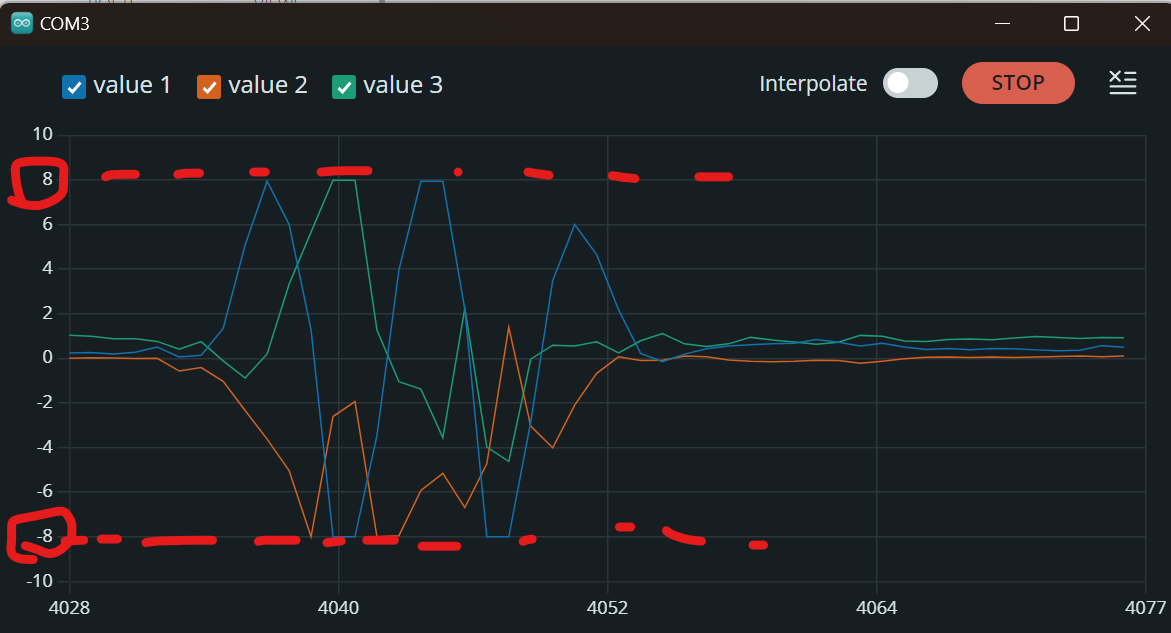
I'm using the M5StickC PLUS2 as an accelerometer in my project. It seems that the M5 detected accelerations over 8G, so I need to configure the MPU6886 to measure accelerations above 8G. However, I couldn't find an option to increase the max acceleration range in the IMU. I'm not very familiar with M5 or C++ programming, so if my explanation is unclear, please feel free to point it out.Below is the actual measurement data, which is capped at +/-8G.
below is my project code, just in case.
#include "M5StickCPlus2.h" #define SAMPLE_PERIOD 10 // サンプリング間隔(ミリ秒) #define BUFFER_SIZE 100 // 1秒間に10回データを保持する(100ms * 10 = 1秒) #define THRESHOLD 3 // 加速度の閾値 (例: 1.5G) #define STOP_DELAY 1000 // 閾値を超えてから1秒で記録停止(1000ミリ秒) // 状態管理のためのenum定義 enum State { INITIAL_SCREEN, MEASURING, STOPPED, RESULT_SCREEN }; State currentState = INITIAL_SCREEN; // 現在の状態を初期画面に設定 float accelX[BUFFER_SIZE]; // X軸加速度のバッファ float accelY[BUFFER_SIZE]; // Y軸加速度のバッファ float accelZ[BUFFER_SIZE]; // Z軸加速度のバッファ int bufferIndex = 0; // バッファの現在のインデックス bool thresholdExceeded = false; // 閾値が超えたかどうかを管理 unsigned long thresholdExceededTime = 0; // 閾値を超えた時刻を記録 float maxTotalAccel = 0; // 最大合成加速度を記録する変数 void setup() { auto cfg = M5.config(); StickCP2.begin(cfg); StickCP2.Display.setRotation(1); StickCP2.Display.setTextColor(GREEN); StickCP2.Display.setTextDatum(middle_center); StickCP2.Display.setFont(&fonts::FreeSansBold9pt7b); StickCP2.Display.setTextSize(2); Serial.begin(115200); showInitialScreen(); // 初期画面を表示 } void loop(void) { M5.update(); // ボタンの状態を更新 if (M5.BtnA.wasPressed()) { // G83ボタンが押されたら handleButtonPress(); // ボタン押下に応じた処理を行う } // 測定中の処理 if (currentState == MEASURING) { measureShock(); // 加速度を測定 } delay(SAMPLE_PERIOD); // サンプリング間隔 } // G83ボタンが押されたときの処理 void handleButtonPress() { switch (currentState) { case INITIAL_SCREEN: currentState = MEASURING; thresholdExceeded = false; maxTotalAccel = 0; // 最大加速度をリセット showMeasuringScreen(); break; case MEASURING: currentState = STOPPED; showStoppedScreen(); break; case STOPPED: currentState = RESULT_SCREEN; sendBufferData(); // シリアル送信を開始 showResultScreen(); break; case RESULT_SCREEN: currentState = INITIAL_SCREEN; showInitialScreen(); break; } } // 加速度測定を行う void measureShock() { auto imu_update = StickCP2.Imu.update(); if (imu_update) { auto data = StickCP2.Imu.getImuData(); // リングバッファに加速度データを保存 accelX[bufferIndex] = data.accel.x; accelY[bufferIndex] = data.accel.y; accelZ[bufferIndex] = data.accel.z; // バッファインデックスを更新(0~BUFFER_SIZE-1を循環) bufferIndex = (bufferIndex + 1) % BUFFER_SIZE; // 合成加速度を計算 float totalAccel = sqrt(data.accel.x * data.accel.x + data.accel.y * data.accel.y + data.accel.z * data.accel.z); // 画面に加速度データを表示 StickCP2.Display.setCursor(0, 40); StickCP2.Display.clear(); // 画面をクリア StickCP2.Display.printf("Accel: %.2f G\n", totalAccel); // 最大合成加速度を更新 if (totalAccel > maxTotalAccel) { maxTotalAccel = totalAccel; } // 閾値を超えたかどうかを確認 if (totalAccel > THRESHOLD && !thresholdExceeded) { thresholdExceeded = true; thresholdExceededTime = millis(); // 閾値を超えた時刻を記録 Serial.println("Threshold exceeded! Starting countdown..."); } // 閾値を超えてから1秒が経過したら測定を停止 if (thresholdExceeded && (millis() - thresholdExceededTime >= STOP_DELAY)) { currentState = STOPPED; showStoppedScreen(); // 測定終了画面を表示 } } } // 初期画面を表示 void showInitialScreen() { StickCP2.Display.clear(); StickCP2.Display.setCursor(0, 20); StickCP2.Display.printf("Press G83 to Start\n"); int bat = StickCP2.Power.getBatteryLevel(); StickCP2.Display.printf("BAT:%d%" , bat); } // 測定中画面を表示 void showMeasuringScreen() { StickCP2.Display.clear(); StickCP2.Display.setCursor(0, 20); StickCP2.Display.printf("Measuring..."); } // 測定停止画面を表示し、最大合成Gを表示する void showStoppedScreen() { StickCP2.Display.clear(); StickCP2.Display.setCursor(0, 20); StickCP2.Display.printf("Measurement Stopped\n"); StickCP2.Display.printf("Max G: %.2f G\n", maxTotalAccel); } // 結果画面を表示 void showResultScreen() { StickCP2.Display.clear(); StickCP2.Display.setCursor(0, 20); StickCP2.Display.printf("Results Sent via Serial"); } // バッファ内のデータをすべてシリアル通信で送信 void sendBufferData() { int time = 10; // 開始時間(ミリ秒単位) // CSV形式のヘッダーを送信 Serial.println("TIME,ACCEL_X,ACCEL_Y,ACCEL_Z"); // バッファ内のデータを送信 for (int i = 0; i < BUFFER_SIZE; i++) { // データのインデックスがリングバッファの先頭から始まるように調整 int index = (bufferIndex + i) % BUFFER_SIZE; //Serial.printf("%d,%0.2f,%0.2f,%0.2f\r\n", time, accelX[index], accelY[index], accelZ[index]); Serial.printf("%0.2f,%0.2f,%0.2f\r\n", accelX[index], accelY[index], accelZ[index]); // 10ミリ秒ごとに時間を更新 time += 10; } // データの送信終了を示すメッセージ Serial.println("---- END_OF_DATA ----"); } -
-
Hi, @felmue
Thank you for your advice!
It seems that I needed, I will try.

Hello! It looks like you're interested in this conversation, but you don't have an account yet.
Getting fed up of having to scroll through the same posts each visit? When you register for an account, you'll always come back to exactly where you were before, and choose to be notified of new replies (either via email, or push notification). You'll also be able to save bookmarks and upvote posts to show your appreciation to other community members.
With your input, this post could be even better 💗
Register Login