How can I use AtomS3R's PSRAM with UIFlow2.0?
-
How can I use AtomS3R's PSRAM with UIFlow2.0?
I thought I could use 8MB of AtomS3R's PSRAM.
However I could only use about 100kBytes by with UIFlow2.0.
(Memory usage was checked using gc.mem_alloc() and gc.mem_free(). )- Hardware: AtomS3R
- Firmware: UIFlow2.0 AtomS3R v2.1.9
Memory Check Sample Program
import os, sys, io
import M5
from M5 import *
import gc

def setup():

  print("Allocated:", gc.mem_alloc(), "bytes")
  print("Free:", gc.mem_free(), "bytes")


def loop():
  M5.update()


if __name__ == '__main__':
  try:
    setup()
    while True:
      loop()
  except (Exception, KeyboardInterrupt) as e:
    try:
      from utility import print_error_msg
      print_error_msg(e)
    except ImportError:
      print("please update to latest firmware")
Result
Allocated: 27488 bytes Free: 87712 bytes -
@UIgAVvwEs
You can try to manually allocate a larger buffer to verify whether the PSRAM is loaded correctly:

-
@kuriko
Thank you for the information.But I want to reserve as heap memory.
Because I want to allocate memory as a buffer to be used for HTTP communication by "request2".However this problem would be solved if there was a way to allocate the memory allocated by bytearray to the "request2" buffer.
-
@kuriko
Hello kuriko,
I tried manual memory allocation, but it failed.
Is there any difference from your environment? Did you know anything?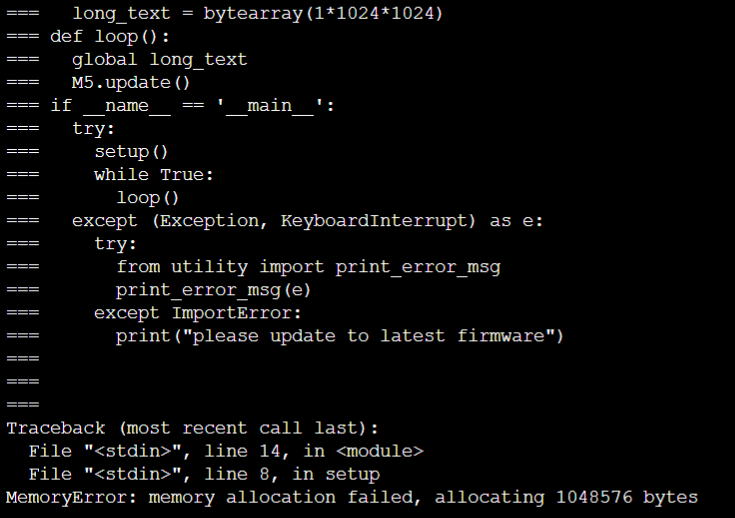
import os, sys, io import M5 from M5 import * long_text = None def setup(): global long_text M5.begin() long_text = bytearray(1*1024*1024) def loop(): global long_text M5.update() if __name__ == '__main__': try: setup() while True: loop() except (Exception, KeyboardInterrupt) as e: try: from utility import print_error_msg print_error_msg(e) except ImportError: print("please update to latest firmware") -
@kuriko
Thank you for advice.
The problem of AtomS3R's PSRAM not being usable in UIFlow2.0 has been resolved.Cause:
The PSARM enable setting in the following file, which sets the build settings, was missing.uiflow_micropython/m5stack/boards/sdkconfig.spiram_oct
Solution:
Modify the missing description as shown below, then build the firmware and write it to AtomS3R.Before:
# MicroPython on ESP32-S2 and ESP32-PAD1_subscript_3, ESP IDF configuration with SPIRAM support in Octal mode
CONFIG_SPIRAM_MODE_QUAD=
CONFIG_SPIRAM_MODE_OCT=y
After:
# MicroPython on ESP32-S2 and ESP32-PAD1_subscript_3, ESP IDF configuration with SPIRAM support in Octal mode
CONFIG_SPIRAM_MODE_QUAD=
CONFIG_SPIRAM_MODE_OCT=y

# MicroPython on ESP32, ESP IDF configuration with SPIRAM support

CONFIG_SPIRAM=y
CONFIG_SPIRAM_CACHE_WORKAROUND=y
CONFIG_SPIRAM_IGNORE_NOTFOUND=y
CONFIG_SPIRAM_USE_MALLOC=y

# This is the threshold for preferring small allocations from internal memory
# first, before failing over to PSRAM.
CONFIG_SPIRAM_MALLOC_ALWAYSINTERNAL=8192

# SPIRAM increases the size of the firmware and overflows iram0_0_seg, due
# to PSRAM bug workarounds.  Apply some options to reduce the firmware size.
CONFIG_COMPILER_OPTIMIZATION_SIZE=y
CONFIG_COMPILER_OPTIMIZATION_CHECKS_SILENT=y
# CONFIG_RINGBUF_PLACE_FUNCTIONS_INTO_FLASH=y # Workaround required: see main_esp32/linker.lf
CONFIG_FREERTOS_PLACE_FUNCTIONS_INTO_FLASH=y
CONFIG_FREERTOS_PLACE_SNAPSHOT_FUNS_INTO_FLASH=y
Result:
8MB of memory space is now available as shown below.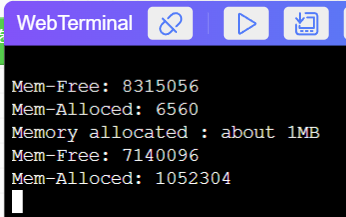
Souce Code Of "Rseult":
import os, sys, io
import M5
from M5 import *
import gc

a = None

def setup():
  global a

  M5.begin()
  print("--start--")
  print("Mem-Free: " + str(gc.mem_free()))
  print("Mem-Alloced: " + str(gc.mem_alloc()))
  a = bytearray(1*1024*1024)
  print("Memory allocated : about 1MB")
  print("Mem-Free: " + str(gc.mem_free()))
  print("Mem-Alloced: " + str(gc.mem_alloc()))


def loop():
  global a
  M5.update()


if __name__ == '__main__':
  try:
    setup()
    while True:
      loop()
  except (Exception, KeyboardInterrupt) as e:
    try:
      from utility import print_error_msg
      print_error_msg(e)
    except ImportError:
      print("please update to latest firmware")
==================================================
kuriko さんありがとうございます。AtomS3RのPSRAMがUIFlow2.0で使用できない問題が解決しました。
原因:
ビルド設定を行う下記のファイルのPSARM有効化の設定が不足していました。
uiflow_micropython/m5stack/boards/sdkconfig.spiram_oct対策:
不足ている記載を上記英文「After:」のように修正ししてからファームウェアをビルドしAtomS3Rに書き込みます。結果:
下記の様に8MBのメモリ空間が使用可能になりました。(日本の方にも情報共有できるよう、日本語併記としました。)
-
@UIgAVvwEs
Note:
Base Firmware:
https://github.com/m5stack/uiflow-micropython/tree/master
Ver.2.2.0
Hash: d0ff1edc97401edc0ab9063f0765730c44335b94Build Environment:
- OS: Linux Mint 21.3 Cinamon(*) ... on Hyper-V of Windows
(* : Because, it was difficult to set up a build environment for "uiflow-micropython" on Windows.)
-
@UIgAVvwEs Is there any way to do this without Linux? I need to do this exact thing but I can only be on windows
-
@ewoodier84
I don't know way to do the with out Linux.
I used Linux on virtual environment in windows.
How about trying virtual environments like Hyper-V or VirtualBox?

Hello! It looks like you're interested in this conversation, but you don't have an account yet.
Getting fed up of having to scroll through the same posts each visit? When you register for an account, you'll always come back to exactly where you were before, and choose to be notified of new replies (either via email, or push notification). You'll also be able to save bookmarks and upvote posts to show your appreciation to other community members.
With your input, this post could be even better 💗
Register Login