UHF-RFID JRD-4032 – Short Reading Distance Issue
-
Dear M5Stack Community,
I recently purchased the JRD-4032 UHF-RFID modules from M5stack store and am currently using one in a project based on a standard ESP32 (Arduino IDE) together with your official UHF-RFID library.
At the moment, I am experiencing significantly lower reading distances than specified in your documentation. I would greatly appreciate your support in resolving this issue, as I am working under time constraints due to project deadlines.
Current Setup:
- Controller: Standard ESP32
- RFID Module: JRD-4032 UHF-RFID
- Development Environment: Arduino IDE
- Library: Official M5Stack UHF-RFID library
- Main functions used:
- EPC scanning (pollingOnce and pollingMultiple)
- Memory read (readCard)
- Memory write (writeCard)
- (and of course other initializing functions and the select function for the readCard and writeCard)
Observed Reading Distance:
- With included M5Stack UHF tags: approx. 40 cm maximum
- With third-party Class Gen1 tags (860–960 MHz): approx. 50 cm maximum (Link: https://www.amazon.de/-/en/860-960MHz-Warehouse-Parking-Logistics-Applications/dp/B07H94DGC2?th=1)
This is considerably below the 1.5–2 m stable range stated in the documentation.
Troubleshooting Steps Taken:
-
Transmit Power
I verified in both the documentation and the library source code that the transmit power is set to maximum in my implementation.
-
Frequency Consideration
I understand from your FAQ that the antenna frequency is fixed at 922 MHz. Since I am currently only testing and have not modified the frequency in software, both hardware and software should still be operating at 922 MHz.
-
Power Supply Investigation
-
Initial setup: RFID module powered directly from the ESP32 (3.3V).
→ Reading distance: approx. 30 cm or less
-
Second setup: External stable power supply (separate regulated source). (Circuit schema below)
→ Reading distance improved to 40–50 cm
-
This suggests that insufficient current may have been affecting performance initially. However, even with a dedicated external power source, the reading distance remains far below the expected range.
Could you please advise:
- What current and voltage specifications are required for optimal performance?
- Whether additional hardware adjustments (e.g., antenna matching, grounding considerations) are necessary?
- If there are recommended configuration settings for EU operation that may improve range?
Additionally, I would like to clarify:
Does the achievable reading distance differ depending on the function used?
- EPC scan only (pollingOnce / pollingMultiple)
- Reading user memory (readCard)
- Writing user memory (writeCard)
#include <Arduino.h>
#include "UNIT_UHF_RFID.h"

Unit_UHF_RFID uhf;
String info = "";

// UART pins for ESP32
#define RFID_TX_PIN 16
#define RFID_RX_PIN 17

void setup() {
    // USB Serial Monitor
    Serial.begin(115200);
    delay(1000);
    Serial.println("ESP32 UHF RFID starting...");

    // Start RFID module
    uhf.begin(&Serial2, 115200, RFID_TX_PIN, RFID_RX_PIN, false);

    // Check module version
    while (true) {
        info = uhf.getVersion();
        if (info != "ERROR") {
            Serial.print("RFID Version: ");
            Serial.println(info);
            break;
        }
        Serial.println("Waiting for RFID module...");
        delay(500);
    }

    // Set TX power
    uhf.setTxPower(2600);
    Serial.println("RFID initialized successfully");
}

uint8_t write_buffer[] = {0xab, 0xcd, 0xef, 0xdd};
uint8_t read_buffer[4] = {0};

void loop() {
    Serial.println("\nPolling once...");
    uint8_t result = uhf.pollingMultiple(100);
    Serial.print("Scan result: ");
    Serial.println(result);

    if (result > 0) {
        for (uint8_t i = 0; i < result; i++) {
            Serial.print("PC: ");
            Serial.println(uhf.cards[i].pc_str);

            Serial.print("RSSI: ");
            Serial.println(uhf.cards[i].rssi_str);

            Serial.print("EPC: ");
            Serial.println(uhf.cards[i].epc_str);

            Serial.println("----------------------");
        }

        // Select first card
        Serial.println("Selecting first tag...");
        if (uhf.select(uhf.cards[0].epc)) {
            Serial.println("Select OK");
        } else {
            Serial.println("Select ERROR");
        }

        Serial.print("Selected EPC: ");
        Serial.println(uhf.selectInfo());

        // Write data
        Serial.println("Writing data...");
        if (uhf.writeCard(write_buffer, sizeof(write_buffer), 0x04, 0, 0x00000000)) {
            Serial.println("Write OK");
        } else {
            Serial.println("Write ERROR");
        }

        // Read data
        Serial.println("Reading data...");
        if (uhf.readCard(read_buffer, sizeof(read_buffer), 0x04, 0, 0x00000000)) {
            Serial.println("Read OK");
            Serial.print("Data: ");
            for (uint8_t i = 0; i < sizeof(read_buffer); i++) {
                Serial.printf("%02X ", read_buffer[i]);
            }
            Serial.println();
        } else {
            Serial.println("Read ERROR");
        }
    }

    delay(100);
}
I am using this library:
https://github.com/m5stack/M5Unit-UHF-RFID/tree/master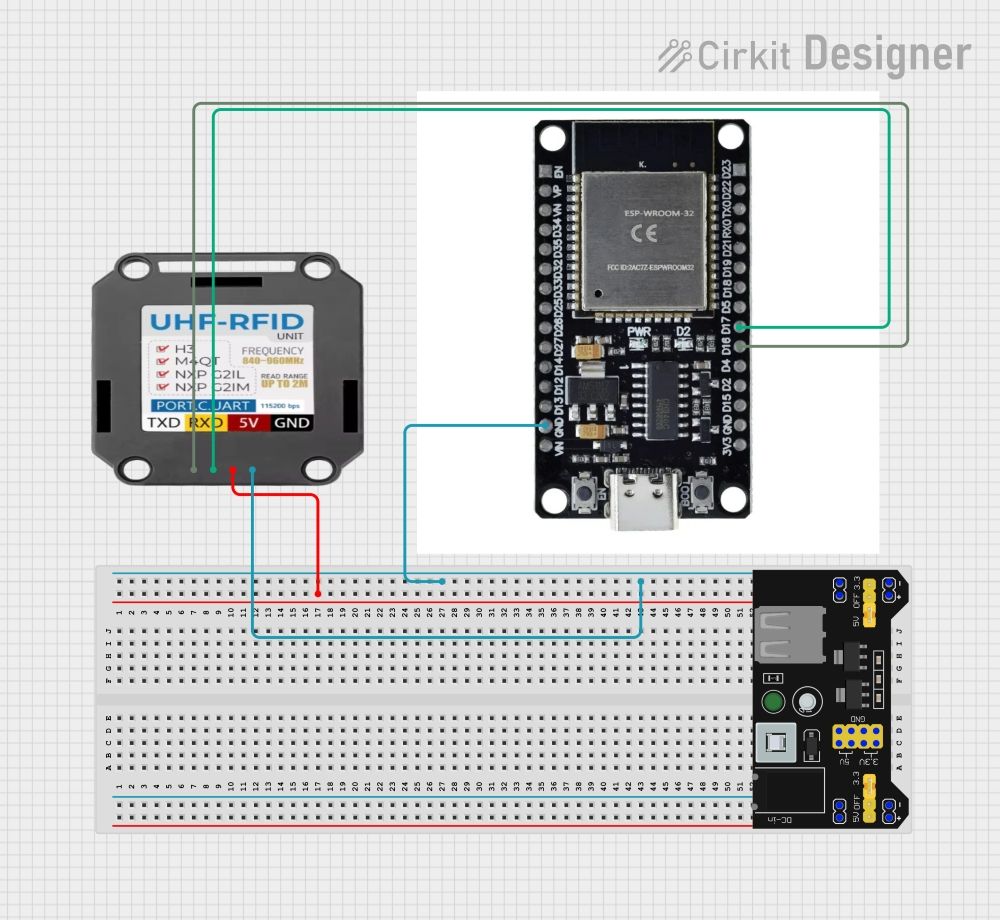
Hello! It looks like you're interested in this conversation, but you don't have an account yet.
Getting fed up of having to scroll through the same posts each visit? When you register for an account, you'll always come back to exactly where you were before, and choose to be notified of new replies (either via email, or push notification). You'll also be able to save bookmarks and upvote posts to show your appreciation to other community members.
With your input, this post could be even better 💗
Register Login