🤖Have you ever tried Chat.M5Stack.com before asking??😎
    M5Stack Community
    • Categories
    • Recent
    • Tags
    • Popular
    • Users
    • Groups
    • Search
    • Register
    • Login

    [Solved]M5stack core not recognizing Button Unit correctly

    Scheduled Pinned Locked Moved Bug Report
    12 Posts 3 Posters 21.4k Views 1 Watching
    Loading More Posts
    • Oldest to Newest
    • Newest to Oldest
    • Most Votes
    Reply
    • Reply as topic
    Log in to reply
    This topic has been deleted. Only users with topic management privileges can see it.
    • L Offline
      LastCaress
      last edited by m5-docs

      I was using the button unit (Port B) and it doesn't do anything. A press of the "A BUTTON" is recognized instead of the button unit.
      I tried the same code in my m5stack gray and worked. Both are at v1.2.2

      from m5stack import *
      from m5ui import *
      import units

      clear_bg(0x222222)
      btn0 = units.get(units.button,units.PORTB)
      a = 1

      title1 = M5Title(title="Title", fgcolor=0xFFFFFF, bgcolor=0x0000FF)

      def btn0_pressed():
      global a
      a = a +1
      title1 = M5Title(title=str(a), fgcolor=0xFFFFFF, bgcolor=0x0000FF)
      pass

      while True:
      btn0.wasPressed(callback=btn0_pressed)

      1 Reply Last reply Reply Quote 0
      • L Offline
        LastCaress
        last edited by

        Ok, this is a problem with the m5stack core (black). I tried in two different ones, and they had the same problem. Then I tried in two greys and they did not have the problem. Please fix this.

        1 Reply Last reply Reply Quote 0
        • ajb2k3A Offline
          ajb2k3
          last edited by

          The black doesn't have a port B which is the issue, on the black you need to use the A0 pin on the base.
          The black only has the red port which doesn't work.

          UIFlow, so easy an adult can learn it!
          If I don't know it, be patient!
          I've ether not learned it or am too drunk to remember it!
          Author of the WIP UIFlow Handbook!
          M5Black, Go, Stick, Core2, and so much more it cant be fit in here!

          1 Reply Last reply Reply Quote 0
          • L Offline
            LastCaress
            last edited by

            But it still recognizes the ButtonA as a unit press :| Also, can't I use the bottom with the Port B & C ?

            ajb2k3A 1 Reply Last reply Reply Quote 0
            • ajb2k3A Offline
              ajb2k3 @LastCaress
              last edited by

              @lastcaress The Button unit is not the same as button A, B and, C

              You have the go base?
              Then yes it works on Port B however Units seem to be unselectable at the moment.

              UIFlow, so easy an adult can learn it!
              If I don't know it, be patient!
              I've ether not learned it or am too drunk to remember it!
              Author of the WIP UIFlow Handbook!
              M5Black, Go, Stick, Core2, and so much more it cant be fit in here!

              1 Reply Last reply Reply Quote 0
              • ajb2k3A Offline
                ajb2k3
                last edited by

                @LastCaress Buttons A, B and, C use the event button loop and obtain button (Yellow blocks)

                Button units use a lightgreen block.(just using blocky for example)

                UIFlow, so easy an adult can learn it!
                If I don't know it, be patient!
                I've ether not learned it or am too drunk to remember it!
                Author of the WIP UIFlow Handbook!
                M5Black, Go, Stick, Core2, and so much more it cant be fit in here!

                1 Reply Last reply Reply Quote 0
                • L Offline
                  LastCaress
                  last edited by

                  Black works with port B:
                  alt text

                  1 Reply Last reply Reply Quote 0
                  • L Offline
                    LastCaress
                    last edited by

                    When coding in grey : Wait for press of UNIT button, works, no problem
                    When coding in black : Wait for press of UNIT button, doesn't work. If press button A, it thinks it was a press by UNIT button

                    L 1 Reply Last reply Reply Quote 0
                    • L Offline
                      LastCaress @LastCaress
                      last edited by

                      Reading pin 36 on the black cores is not possible right now. Please fix, thank you.

                      1 Reply Last reply Reply Quote 0
                      • m5-docsM Offline
                        m5-docs
                        last edited by

                        Hello @LastCaress

                        The hardware file if BLACK is same as GRAY expect that GRAY OWNS mpu9250.
                        So if the BUTTON Unit works weith GRAY, it wil also work with BLACK.
                        You can check the G36 on BLACK by reading the level of G36 after G36 attached to 3.3V pin.
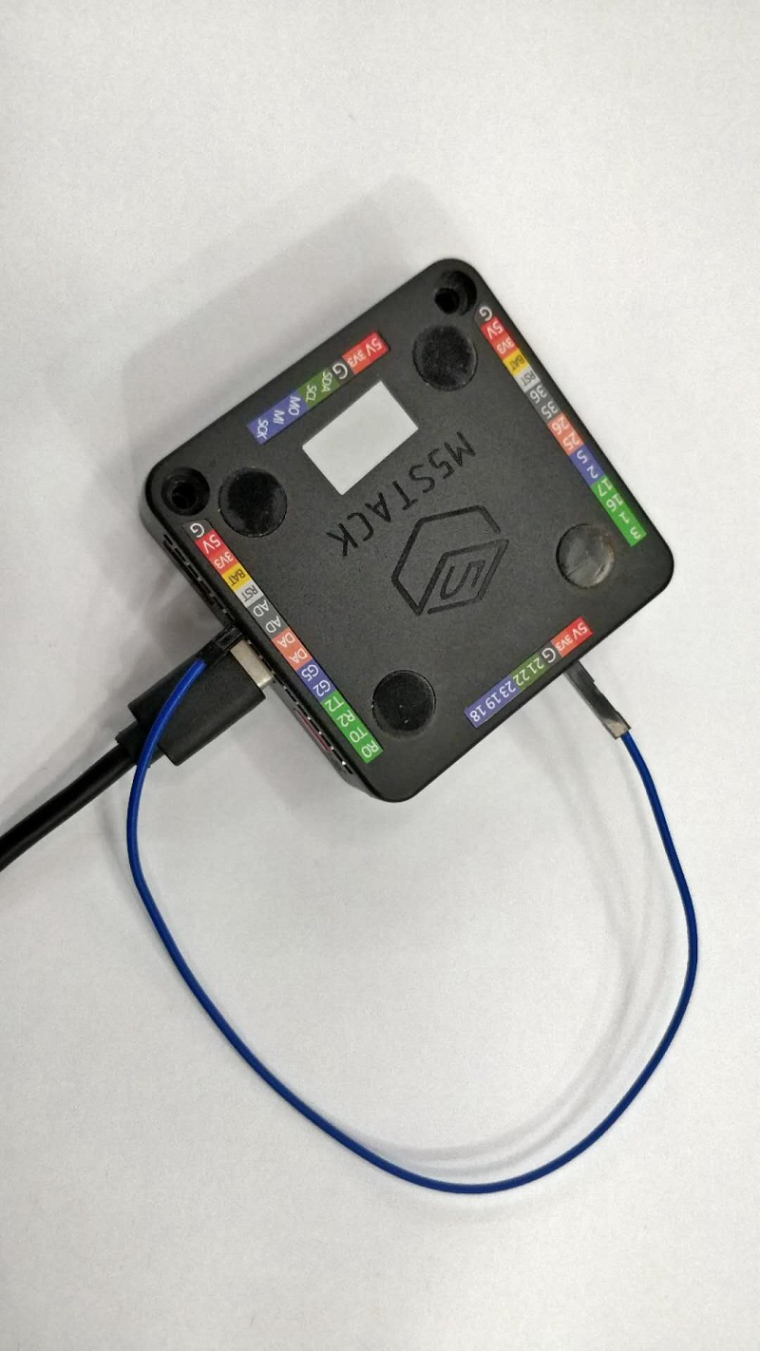
                        0_1555925445994_微信图片_20190419163740.jpg

                        M5Stack documentation URL

                        https://docs.m5stack.com

                        1 Reply Last reply Reply Quote 0
                        • L Offline
                          LastCaress
                          last edited by

                          Simple test, 4 units, two grey, two black, using the same portB and button add on:

                          alt text

                          and it is working now. Did you update the flow?

                          1 Reply Last reply Reply Quote 0
                          • m5-docsM Offline
                            m5-docs
                            last edited by

                            @LastCaress Maybe it has been updated. UIFlow is updated everyday.

                            M5Stack documentation URL

                            https://docs.m5stack.com

                            1 Reply Last reply Reply Quote 0

                            Hello! It looks like you're interested in this conversation, but you don't have an account yet.

                            Getting fed up of having to scroll through the same posts each visit? When you register for an account, you'll always come back to exactly where you were before, and choose to be notified of new replies (either via email, or push notification). You'll also be able to save bookmarks and upvote posts to show your appreciation to other community members.

                            With your input, this post could be even better 💗

                            Register Login
                            • First post
                              Last post