Recommendation @ M5Stack: provide instructions and required screws
-
Today my screws arrived for mounting the Core2 on Faces II with the FACE-RFID, I had to mail-order them. I was looking for documentation how to mount it: do I need to unscrew the Core2 bottom or do I need to unscrew the Faces II plate? Of course I did it wrong first, at the end the Core2 fitted nicely on the Faces II, just the FACE-RFID does not fit nicely. I got M3x10mm screws, of course the Core2 needs two longer ones, so I need to figure out the size and order them, that's a bit annoying again.
Finally, what happens with the Core2 battery? Should I detach it from the Core2 bottom and leave it connected to the Core2?
Recommendation for M5Stack:
1. Provide instructions with pictures how to mount Core2 with Faces II
(and have those listed on the product page)
2. Include the 8 screws required to mount a Core2 and Face on Faces II
(at least include the required screw specification in the instructions) -
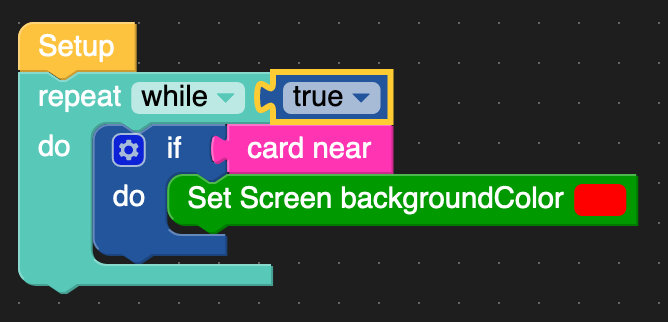
The first test on UIFlow with Core2 and FACE-RFID was really easy and seamless:
-
Two negative impressions with Core2 and FACE-RFID:
- When booting the Core2, it creates strange noise through the speaker for about 3 seconds
- When off, there is a constant quiet noise through the speaker when USB is connected
Hello! It looks like you're interested in this conversation, but you don't have an account yet.
Getting fed up of having to scroll through the same posts each visit? When you register for an account, you'll always come back to exactly where you were before, and choose to be notified of new replies (either via email, or push notification). You'll also be able to save bookmarks and upvote posts to show your appreciation to other community members.
With your input, this post could be even better 💗
Register Login