M5Burner: enable setting WiFi on "advanced" devices like Core2
-
I can use the M5Burner software to easily set the WiFi connection on the Atom.
Why can't I use M5Burner to set the WiFi connection on my Core2?
Sometimes after flashing the Core2 has lost the WiFi data and I find it cumbersome to use the integrated device setup.
It would be great to use M5Burner to optionally set WiFi when burning UIFlow to Core2.
-
Hello @mb
you can, at least with M5Burner 2.2.4 on MacOSX I can.
- start M5Burner
- connect M5Core2 to your computer
- select correct COM
- click on Core2
Configuration - change settings
- click
Save
Note: the 'Configuration' button is only available after downloading the UIFlow firmware and only works if M5Core2 is attached to the computer via USB.
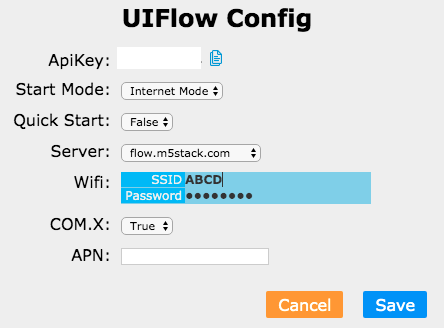
Thanks
Felix -
Thanks @felmue, I just updated M5Burner to the latest version and now it works :-)

Hello! It looks like you're interested in this conversation, but you don't have an account yet.
Getting fed up of having to scroll through the same posts each visit? When you register for an account, you'll always come back to exactly where you were before, and choose to be notified of new replies (either via email, or push notification). You'll also be able to save bookmarks and upvote posts to show your appreciation to other community members.
With your input, this post could be even better 💗
Register Login