🤖Have you ever tried Chat.M5Stack.com before asking??😎
  • Binance API stopped working?

    1
    0 Votes
    1 Posts
    3k Views
    No one has replied
  • myCobot 280-Ard conveyor control in an industrial simulation

    3
    3 Votes
    3 Posts
    5k Views
    ElephantRoboticsE
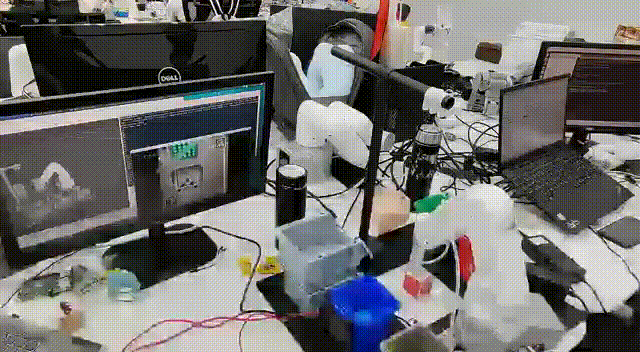
    Not quite correct, it is the computer that is needed to transfer the data and send the commands to mycobot.
  • 1 Votes
    1 Posts
    3k Views
    No one has replied
  • 7 Votes
    3 Posts
    5k Views
    ElephantRoboticsE
    I'm very sorry about that. This forum does not allow GIFs. Watch it on hackster if you're interested in watching it!
  • My first try with the little six-axis robotic arm| mechArm 270-M5Stack

    6
    8 Votes
    6 Posts
    10k Views
    ElephantRoboticsE
    @pengyuyan The m5stack-basic esp32 is mainly used for the Internet of Things. The robotic arm needs a bridge to connect to the computer, where the m5stack-basic esp32 development board is used, which also powers the arm. We have set up some microPython in the m5 to facilitate using some functions.
  • EspNow Error - positional arguments

    1
    0 Votes
    1 Posts
    2k Views
    No one has replied
  • celestron wifi telescope wifi

    2
    0 Votes
    2 Posts
    3k Views
    H
    For my Celestron Nextstar SE I simply added a cheap Bluetooth module into the Hand held controller. There are many different versions of the controller board so there are many different instructions available. One is here: https://www.instructables.com/Bluetooth-enabled-Nexstar-handcontroller/ In my device it was a version where no instructions were availlable but it was easy to identify the RX and TX line between the USB chip and the microcontroller (which is the bigest chip inside). It was also easy to find a line that offers 3.3V for the HC06 bluetooth module. Adding a small switch into the data line allows the choice of USB (for SW updates) or Bluetooth (for normal use). It works fine with Stellarium software on my laptop and WiFi is still available for internet connection.
  • 0 Votes
    1 Posts
    4k Views
    No one has replied
  • Turn your M5Stack into a space clock

    5
    2 Votes
    5 Posts
    8k Views
    pavelprostoP
    if you want the same stand as in the photo. This is a free 3d printer model https://www.thingiverse.com/thing:4883660
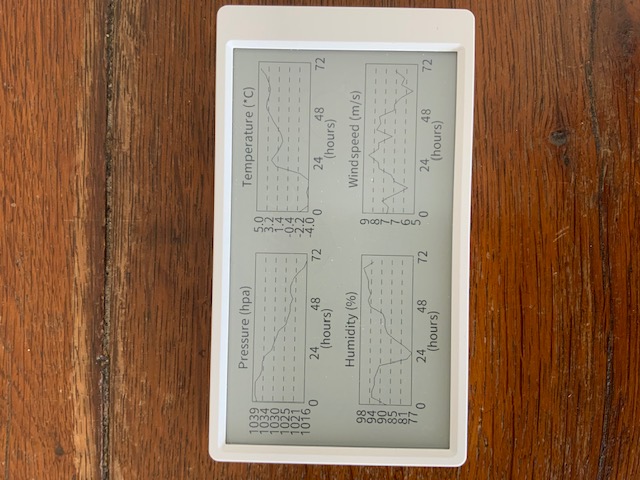
  • My OpenWeatherMap display wth M%Paper

    m5paper
    6
    3
    3 Votes
    6 Posts
    13k Views
    C
    @powersoft Hi, it is a very nice project! Maybe you can share your code with me?
  • CAS Graphics calculator implemented in Core2 with faces keyborad

    5
    2 Votes
    5 Posts
    8k Views
    ajb2k3A
    Very nice.
  • M5Stack product scan times (moved post to here!)

    1
    0 Votes
    1 Posts
    3k Views
    No one has replied
  • Library for Hex Module SK6812

    2
    1 Votes
    2 Posts
    4k Views
    teastainT
    @sebastien Nice to see other enthusiasts contribute to the knowledge base!
  • RF Unit 433 R (SYN513R) to sniff - 433Mhz traffic

    1
    0 Votes
    1 Posts
    3k Views
    No one has replied
  • WIP ACSSR Guide

    4
    1 Votes
    4 Posts
    5k Views
    felmueF
    Hello @ajb2k3 I've just checked. Above blocks work for me with an M5Core2 as well. Instead of TX=17 / RX=16 I use TX=14 / RX=13. That said I do not have the RS485 unit so I am using the little RS485 board (which came with the LAN module) albeit outside the LAN module connected via a BUS module. The ACSSR is powered from an external 12 V power supply. The little RS485 board is powered with 5 V from the M5Core2. There are only two wires between the ACSSR and the little RS485 board: A <-> A and B <-> B. I also added an 120 Ohm resistor between A and B of the little RS485 board. The ACSSR already has that resistor in place internally. Thanks Felix
  • M5Stack Core Basic LCD stop displaying properly after connecting to WiFi

    1
    0 Votes
    1 Posts
    2k Views
    No one has replied
  • M5Stack speaker not working

    12
    0 Votes
    12 Posts
    20k Views
    felmueF
    Hello guys The issue is a divide by zero, caused by the ledcSetup(TON_PIN_CHANNEL, 0, 13); function call found by @a4x4kiwi (thanks for that). I found that the outcome is different depending on the Arduino version used: Arduino 1.0.6 - no error, no crash Arduino 2.0.1 - no error, no crash Arduino 2.0.2 - crash Arduino 2.0.3 - error, no crash E (4532) ledc: freq_hz=0 duty_resolution=13 [ 4537][E][esp32-hal-ledc.c:75] ledcSetup(): ledc setup failed! Thanks Felix

  • HTTPS using LTE/4G on M5Stack Fire

    6
    0 Votes
    6 Posts
    8k Views
    felmueF
    Hello @jimmyb thank you for reporting back. I am glad you found a solution. And good luck with your project. Thanks Felix
  • looking for an example of graphical representation of sensor values

    2
    0 Votes
    2 Posts
    4k Views
    F
    https://shop.m5stack.com/pages/download choose M5Burner download The picture is a factory test example(Core2 factory test firmware)
  • I2CHomeAssistant Gateway

    4
    0 Votes
    4 Posts
    5k Views
    G
    Ok, will order the "new" version when its back in stock.