🤖Have you ever tried Chat.M5Stack.com before asking??😎
  • Arduino to M5Stick

    1
    0 Votes
    1 Posts
    3k Views
    No one has replied
  • Simple Applications Menu

    1
    0 Votes
    1 Posts
    3k Views
    No one has replied
  • M5Paper UI Framework Sample Project

    3
    2 Votes
    3 Posts
    9k Views
    G
    @fonix232 Thanks! For me the exercise is much more exploring how the epaper display works when drawing the different components and how to optimize partial updates. I will have a look at the projects you mentioned and see if I can find some inspiration!
  • Question to Project: Real-time integration of stock quotes via HTML5

    1
    0 Votes
    1 Posts
    3k Views
    No one has replied
  • Question: Groove DMX512 integration in UIFlow Project

    1
    0 Votes
    1 Posts
    2k Views
    No one has replied
  • M5Paper and BME280 Sensor

    2
    0 Votes
    2 Posts
    5k Views
    P
    Make an improvement in the main call routine. The return value of getBME280 is a boolean. now it is possible to check whether a BME280 is connected correctly. bool getBME280(TwoWire *theWire, double *t, double *p, double *h) { _i2c = theWire; /* check of BME280 is avilable */ uint8_t value = read8(0xD0); if (value == 0x60) // BME280 detected { reset_BME280(); // Reset BME280 write8(BME280_REGISTER_CONTROLHUMID,(uint8_t)0x01); // Select control humidity register write8(BME280_REGISTER_CONTROL, (uint8_t)0x27); // Select control measurement register write8(BME280_REGISTER_CONFIG, (uint8_t)0xA0); // Select config register readCoefficients(); // Read coefficients from BME280 *t = get_Temperature(); // Get temperature *p = get_Pressure()/100.0; // Get pressure *h = get_Humidity(); // Get Humidity return true; } else { return false; // No BME280 detected } } Cheers, Jan

  • M5Stack (Stick|Atom) with Xiaomi LYWSD03MMC

    4
    0 Votes
    4 Posts
    10k Views
    alperianA
    did you find any micropython code any bluetooth communication for arduino. with arduino c code communication is not hard.i made reader [image: mireader.png] it is reads actual values and creates array for histogram.half part of the screen show histograms graph [image: mireader2.png] i used nRF Connect app on android which bt id and details will be used on the code.
  • Low power GPS with maps for hiking

    1
    0 Votes
    1 Posts
    3k Views
    No one has replied
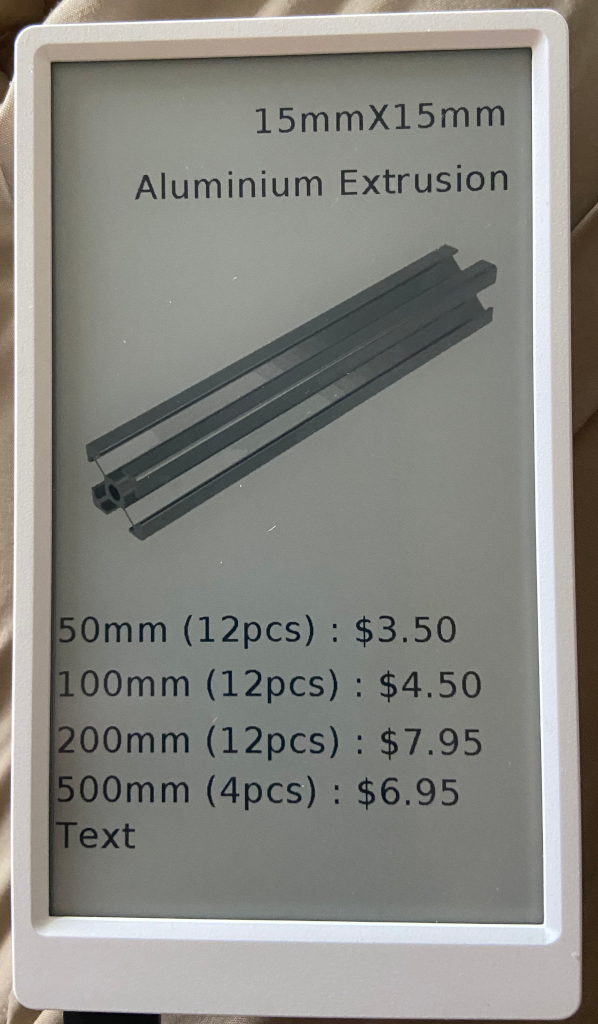
  • M5Paper Price tag

    3
    1
    1 Votes
    3 Posts
    4k Views
    ajb2k3A
    Manually as I haven't worked out the server side of things. I hit a ram issue on the coreink preventing me pulling it from online so I need to work out how to make a server to do the lifting and parsing.
  • 0 Votes
    2 Posts
    3k Views
    felmueF
    Hello @calmasacow I get the impression you are trying to do to many things at once. May I suggest you start slow and take it step by step? first make sure you can upload a program from your computer successfully and multiple times start with a simple program like this then try to modify it, for instance by changing the text Only if above steps work reliably it makes sense to continue with your own stuff. Good luck! Felix
  • Check your uPython version

    5
    1
    0 Votes
    5 Posts
    10k Views
    ajb2k3A
    I'm trying to push for a unified API but the problem is that some of the devices are slightly different and require slightly different commands. Please add your request for a unified API to the suggestions list.
  • Super simple RGB mixer

    2
    1
    0 Votes
    2 Posts
    5k Views
    felmueF
    Hello @LasNiko nice project! You can use three backticks before and after the code. Full description here. Thanks Felix
  • Lighpaint project

    2
    0 Votes
    2 Posts
    3k Views
    No one has replied
  • M5Stack - Simple Applications Menu + some APPs

    40
    3
    3 Votes
    40 Posts
    245k Views
    T
    Hi Guys, ihm new with M5Stack. I have a MCore2 and try compile this in visual code with plattform.io. How i must use the code in Plattform.io ? If i compile the code, the device showing black screen. Can anyone help me ?
  • M5stack Fire mit Lego Powered Up verbinden

    1
    0 Votes
    1 Posts
    3k Views
    No one has replied
  • M5StickC Joystick+ESP32 robot+Protocol Buffers (nanopb)+3dprint

    1
    0 Votes
    1 Posts
    4k Views
    No one has replied
  • Update. Is it possible to update to M5Stakch version 0.3.1 ? Thanks

    1
    0 Votes
    1 Posts
    3k Views
    No one has replied
  • First Project - UIFlow Sleep Training Clock

    1
    1 Votes
    1 Posts
    3k Views
    No one has replied
  • Please mesh network

    2
    0 Votes
    2 Posts
    5k Views
    felmueF
    Hi @vgamlc I haven't tried it myself but according to this document the library should be included in the Arduino IDE library manager: Installation painlessMesh is included in both the Arduino Library Manager and the platformio library registry and can easily be installed via either of those methods. Cheers Felix
  • Core2 portable COâ‚‚ sensor

    2
    0 Votes
    2 Posts
    5k Views
    felmueF
    Hello David wow, nice project! Regarding power supply via 5v bus. There is a function called SetBusPowerMode() which allows to switch between internal 5v boost (default) and being powered externally, e.g. from 5v bus. Unfortunately it is broken and the pull-request I've posted a while ago has not been merged yet. If you're interested you can still give it a try: https://github.com/m5stack/M5Core2/pull/10 Calling the function in setup() with input parameter set to 1 switches to external power and the 5v from the bus are taken to power the Core2. It also charges the battery. e.g. M5.Axp.SetBusPowerMode(1); Note: Without battery installed you'll need to modify the existing call to this function in void AXP192::begin(void) else the M5Core2 cuts itself off shorty after booting. Greetings from Winterthur Felix