cardputer use built in speaker to play wav file error
-

the init of the I2S speaker is failed
I cannot find any demo on the web and in official doc, the demo is not as what I can find in UIflow, any one know how to use it ? -
currently I can play wav file, but I found it cannot run in background, if I started one wav, loop will be blocked till this wav finished.
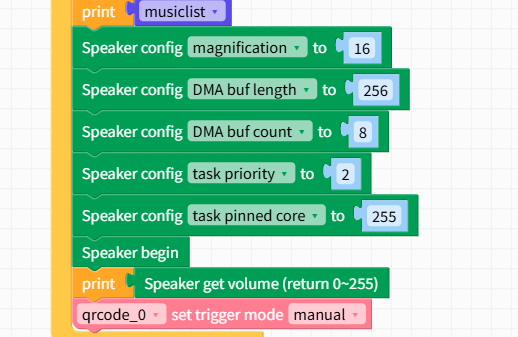
I have tried to change the priority. any one know how to fix this ? -
@zhouyousong
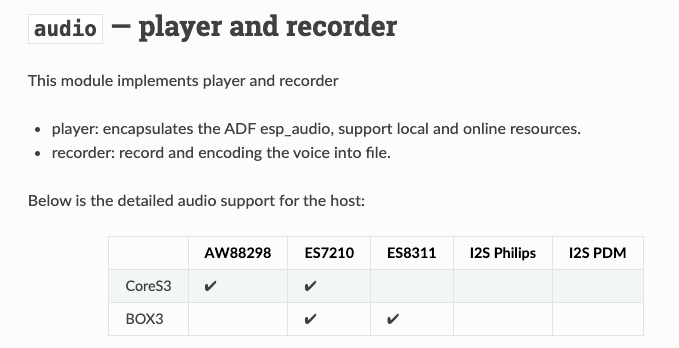
Currently, only CoreS3 and Box support using the ESP-ADF Audio Player library, and only these two devices support background audio playback.
https://uiflow-micropython.readthedocs.io/en/latest/system/audio.html
-
@kuriko will the cardputer implement the background ability ? maybe in the future?
-
@zhouyousong said in cardputer use built in speaker to play wav file error:
Reply
hmmm i think that will be bit of hard, but we will keep trying it
-
@zhouyousong For anyone else who is curious about how to get around this problem, the
playRaw()method ofM5.Speakeris non-blocking, but requires you to provide the PCM data directly as abytearrayor similar, as well as the sample rate.If you look up the encoding of a .WAV file, it is fairly trivial to extract the sample rate (it's bytes 24:28 in the 44-byte header included at the start of any .Wav file). Getting the PCM data is then simply a case of reading the byte values from byte 44 onwards, until you reach the end of the file.
Here's a basic sketch:
fd = open('wavfile.wav', 'rb') # Open .wav file in read (bytes) mode

header = fd.read(44) # Read .wav file header
sample_rate = int.from_bytes(header[24:28], 'little') # Extract sample-rate
... # Can also extract other header information, such as bits per sample, number of channels, etc.

buffer_time = 1 # 1s worth of audio data
buf = bytearray(sample_rate*(bits_per_sample//8)*buffer_time) # Buffer large enough to contain 1s of audio

# Loop
fd.readinto(buf, sample_rate) # Read from file into buffer
Speaker.playRaw(buf, sample_rate) # Non-blocking playback of audio data in buffer
... # and repeat for each additional second of audio in .wav file
This is a useful link to understand the contents of .WAV file header.
The only potentially tricky part in this is timing the file reads so they don't block the rest of your program for a long time.
I found that reading 1 second of 8000 samples per second, 16-bit, mono audio from the SD card takes about 67ms for the M5 FIRE (v1.0). Using a smaller buffer (0.5s/0.25s of audio etc.) will mean correspondingly shorter read times, with the caveat that you will have to read more often.You can try the following code in the Block Designer: (note - it uses Timer 0 to time the periodic file reads, so if you are using Timers for other things, you will need to adjust accordingly).
"""
file     NonBlockingSpeaker
time     2026-02-24
author   Tom Fahey
email   tomp.fahey@gmail.com
license  MIT
"""

from machine import Timer
from M5 import Speaker
import micropython
"""
file     NonBlockingSpeaker
time     2026-02-24
author   Tom Fahey
email   tomp.fahey@gmail.com
license  MIT License
"""

class NonBlockingSpeaker:
    """
    note:
        en: ''
    details:
        color: '#0fb1d2'
        link: https://github.com/m5stack
        image: ''
        category: Custom
    example: ''
    """


    def __init__(self):
        """
        label:
            en: '%1 init'
        """
        self.tim = Timer(0)

    def __setup(self, wav_file):
        """
        label:
            en: ' %1 setup, wav_file: %2'
        params:
            wav_file:
                name: wav_file
        """
        self.fd = open(wav_file, 'rb')
        self.header = self.fd.read(44)
        self.file_size = int.from_bytes(self.header[0:4], 'little')
        self.fmt_type = int.from_bytes(self.header[20:22], 'little')
        self.channels = int.from_bytes(self.header[22:24], 'little')
        self.sample_rate = int.from_bytes(self.header[24:28], 'little')
        self.bits_per_sample = int.from_bytes(self.header[34:36], 'little')
        self.data_size = int.from_bytes(self.header[40:44], 'little')
        self.buffer = bytearray(self.sample_rate*(self.bits_per_sample//8))

    def playWav(self, wav_file):
        """
        label:
            en: ' %1 playWav, wav_file: %2'
        params:
            wav_file:
                name: wav_file
        """
        self.__setup(wav_file)
        self.counter = self.data_size//len(self.buffer)
        self.fd.seek(44)
        self.fd.readinto(self.buffer, len(self.buffer))
        self.tim.init(mode=Timer.ONE_SHOT, period=1000, callback=self.__timer_cb)
        Speaker.playRaw(self.buffer, self.sample_rate)

    def __continue_playback(self, x):
        """
        label:
            en: ' %1 continue_playback, _: %2'
        params:
            x:
                name: x
        """
        self.fd.readinto(self.buffer, len(self.buffer))
        Speaker.playRaw(self.buffer, self.sample_rate)

    def __timer_cb(self, _):
        """
        label:
            en: 'method %1 param1  param2 '
        """
        if self.counter > 0:
            self.counter -= 1
            self.tim.init(mode=Timer.ONE_SHOT, period=1000, callback=self.__timer_cb)
            micropython.schedule(self.__continue_playback, 1)

Hello! It looks like you're interested in this conversation, but you don't have an account yet.
Getting fed up of having to scroll through the same posts each visit? When you register for an account, you'll always come back to exactly where you were before, and choose to be notified of new replies (either via email, or push notification). You'll also be able to save bookmarks and upvote posts to show your appreciation to other community members.
With your input, this post could be even better 💗
Register Login