Issue With Module GPS v2.1 and M5Core2
-
Hi,
I've been trying to receive any data from the GPS module connected to the M5Core2. Nothing seems to be working. I've followed all the instructions on the official documentation and configured the PINs correctly. It doesn't receive any raw data, but the blue led in the module is blinking.
Has anyone had this problem and found any solution/any page to further investigate??
Thanks in advance!
-
@aaapl any code?
-
@robski I'm completely new to M5Stack so I'm not sure if this should be working. Here it is:
#include <M5Core2.h> #include <TinyGPS++.h> TinyGPSPlus gps; HardwareSerial GPSRaw(2); void setup() { M5.begin(); M5.Lcd.setTextSize(2); M5.Lcd.setTextColor(TFT_YELLOW); M5.Lcd.println("Test GPS v2.1 - Core2"); M5.Lcd.setTextColor(TFT_WHITE); M5.Lcd.println("Waiting satellites..."); GPSRaw.begin(9600, SERIAL_8N1, 13, 14); } void loop() { M5.update(); while (GPSRaw.available() > 0) { gps.encode(GPSRaw.read()); } if (gps.location.isUpdated()) { M5.Lcd.fillRect(0, 60, 320, 180, BLACK); M5.Lcd.setCursor(0, 60); M5.Lcd.setTextColor(TFT_GREEN); M5.Lcd.printf("Connected satellites: %d\n\n", gps.satellites.value()); M5.Lcd.setTextColor(TFT_WHITE); M5.Lcd.printf("LAT: %.6f\n", gps.location.lat()); M5.Lcd.printf("LNG: %.6f\n", gps.location.lng()); M5.Lcd.printf("HGH: %.1f meters\n\n", gps.altitude.meters()); // UTC hour sync with satell if (gps.time.isValid()) { M5.Lcd.setTextColor(TFT_CYAN); M5.Lcd.printf("UTC hour: %02d:%02d:%02d\n", gps.time.hour(), gps.time.minute(), gps.time.second()); } } }``` -
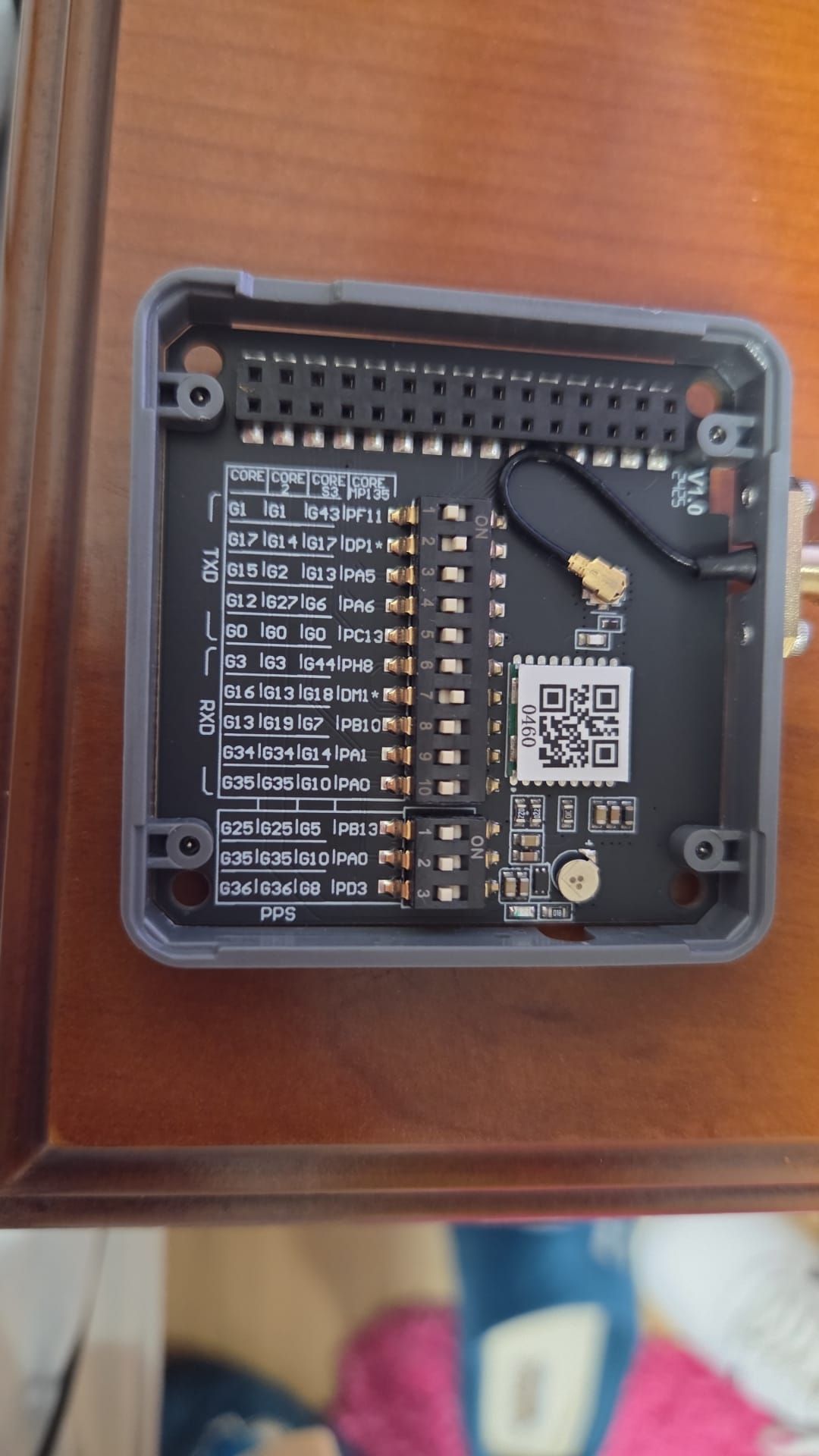
@aaapl and module dip switches are set to?
-
-
@aaapl have you tried pps set to say 25?
-
@robski yes, I've already tried that and it still didn't work
-
Hi.
Have you tried reading bytes from the GPS and displaying them on a serial monitor as they arrive as below, just to show you are getting data (if the serial setup is incorrect you should still receive data but it will be gibberish):// Serial is the serial monitor
// Serial1 is the GPS dataint intChar;
char charChar;
intChar = Serial1.read();
if(inChar != -1){
charChar = (char)intChar;
Serial.print(charChar);
}I have been using the M5Stack GPS v1.1 and it was set to 115200@7N1, not the advertised 115200@8N1 so might be an issue there (I got gibberish at first)
Finally my M5Stack GPSv1.1 works fine with an Adafruit Itsy Bitsy 3v controller and an ESP32S3 based controller but not with the Seeed Wio Terminal. With the Seeed Wio Terminal I get nothing at all - no gibberish, absolutely nothing. It's as if the signal is not there (but it is !!).

Hello! It looks like you're interested in this conversation, but you don't have an account yet.
Getting fed up of having to scroll through the same posts each visit? When you register for an account, you'll always come back to exactly where you were before, and choose to be notified of new replies (either via email, or push notification). You'll also be able to save bookmarks and upvote posts to show your appreciation to other community members.
With your input, this post could be even better 💗
Register Login