[Solved]Upload Button shows "Welcome Screen"
-
I try to reproduce the steps shown on
https://m5stack.readthedocs.io/en/master/get-started/m5stack_core_get_started_MicroPython.html
After burning UIFlow-1.2.3 and restarting the M5Stack for a short time a black screen with three buttons "Upload, AppList, Setup". Then I see a welcome screen wich I can not leave.
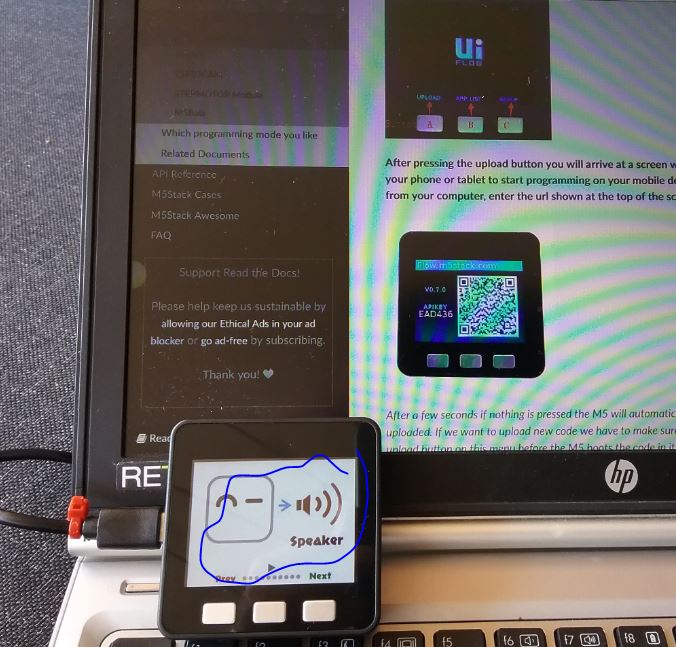
How can I leave the welcome screen? Thanks, Regards
Mario -
That is the m5go default program that comes with the firmware. The black screen with Upload, AppList, and Setup has a 1 second timeout. So just reset your M5Stack by pressing the red button on the side and then within 1 second, press the AppList button to get a list of other pre-built apps that come with the firmware. Or if you want to run your own program from UIFlow, press the Upload button within 1 second.
Another tip, if you want the M5Stack to launch your custom program by default (after the 1 second timeout), then use the Download feature of UIFlow, which is found here.
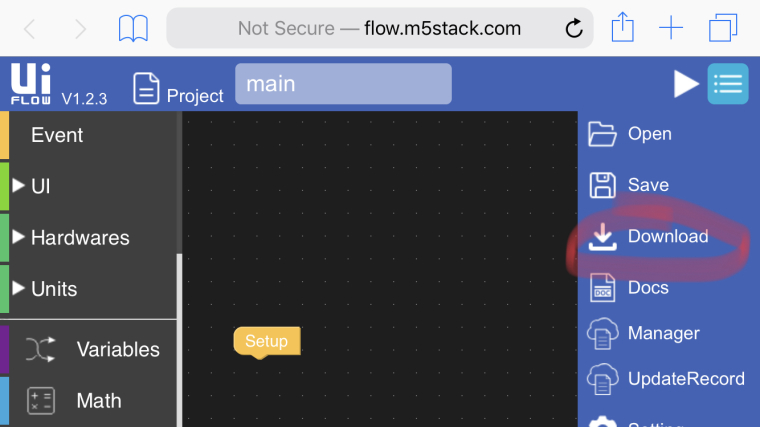 ]
] -
@mariomueller said in Upload Button shows "Welcome Screen":
I try to reproduce the steps shown on
https://m5stack.readthedocs.io/en/master/get-started/m5stack_core_get_started_MicroPython.html
After burning UIFlow-1.2.3 and restarting the M5Stack for a short time a black screen with three buttons "Upload, AppList, Setup". Then I see a welcome screen wich I can not leave.
How can I leave the welcome screen? Thanks, Regards
MarioTo get to the setup screen show in the docs press the red button to restart the M5Go then hit the right had button (Button C) to enter the setup menu.
-
@mariomueller Please read the lastest docs. Thanks a lot.
https://docs.m5stack.com/#/en/quick_start/m5core/m5stack_core_get_started_MicroPython
Here's the lastest docs URL.


Hello! It looks like you're interested in this conversation, but you don't have an account yet.
Getting fed up of having to scroll through the same posts each visit? When you register for an account, you'll always come back to exactly where you were before, and choose to be notified of new replies (either via email, or push notification). You'll also be able to save bookmarks and upvote posts to show your appreciation to other community members.
With your input, this post could be even better 💗
Register Login