🤖Have you ever tried Chat.M5Stack.com before asking??😎
    M5Stack Community
    • Categories
    • Recent
    • Tags
    • Popular
    • Users
    • Groups
    • Search
    • Register
    • Login

    Uiflow HTTP request

    Scheduled Pinned Locked Moved UIFlow
    9 Posts 7 Posters 27.4k Views 2 Watching
    Loading More Posts
    • Oldest to Newest
    • Newest to Oldest
    • Most Votes
    Reply
    • Reply as topic
    Log in to reply
    This topic has been deleted. Only users with topic management privileges can see it.
    • H Offline
      hetzer
      last edited by

      Did anyone manage to make this new ui function work?

      ajb2k3A 1 Reply Last reply Reply Quote 0
      • ajb2k3A Offline
        ajb2k3 @hetzer
        last edited by

        @hetzer not yet, just seen the new functions that have been added

        UIFlow, so easy an adult can learn it!
        If I don't know it, be patient!
        I've ether not learned it or am too drunk to remember it!
        Author of the WIP UIFlow Handbook!
        M5Black, Go, Stick, Core2, and so much more it cant be fit in here!

        1 Reply Last reply Reply Quote 0
        • R Offline
          rupin.chheda
          last edited by

          Yes, Kind of. But there is weird Behaviour.
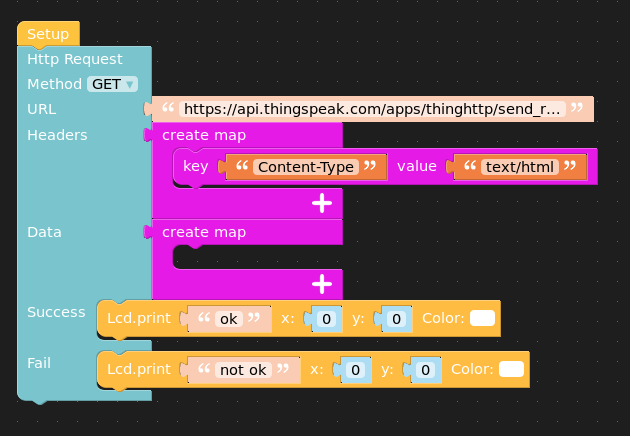
          I used the following simple block
          0_1570255790792_d78f81f7-e728-4887-9a6d-3f4ae5163d4f-image.png ![alt text](image url)

          When I run the program using the play button on UIFlow, I get the text "Ok" printed on the LCD.

          I get excited and I download the code into the Device, and I get to see the text " Not OK"

          The Python Error I get is "list index out of range"

          Here is my modified code
          from m5stack import *
          from m5ui import *
          from uiflow import *
          import urequests

          setScreenColor(0x222222)

          label0 = M5TextBox(40, 93, "Text", lcd.FONT_Default,0xFFFFFF, rotate=0)

          try:
          req = urequests.request(method='GET', url='https://api.thingspeak.com/apps/thinghttp/send_request?api_key=AAXWP1R39OHJW1U1', headers={'Content-Type':'text/html'})
          lcd.print('ok', 0, 0, 0xffffff)
          except Exception as e:
          lcd.print('not ok', 0, 0, 0xffffff)
          label0.setText(str(e))

          1 Reply Last reply Reply Quote 0
          • lukasmaximusL Offline
            lukasmaximus
            last edited by

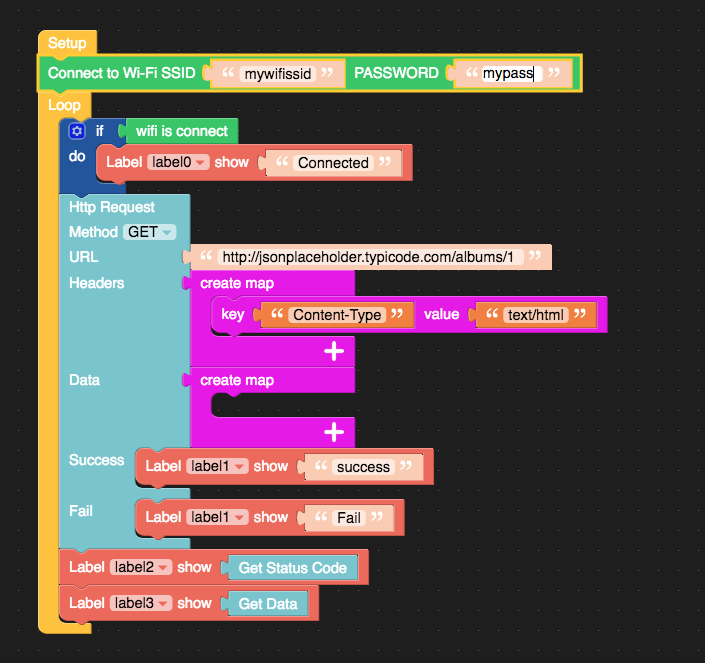
            @rupin-chheda It works fine for me after downloading. I think it could be that when running a downloaded program it doesn't auto connect to the wifi, so you have to use the network blocks to setup your wifi, heres my example:
            0_1570533301433_Screen Shot 2019-10-08 at 12.13.33.png

            R 1 Reply Last reply Reply Quote 0
            • W Offline
              Wolli01
              last edited by

              With https it's not just with http!
              Use this solution for now

                url = str(settings.Gateway.replace("https", "http")) #Es darf nur http genutzt werden kein https
                res3 = urequests.get(url)
              
              1 Reply Last reply Reply Quote 0
              • R Offline
                rupin.chheda @lukasmaximus
                last edited by

                @lukasmaximus This worked! thanks!

                1 Reply Last reply Reply Quote 0
                • J Offline
                  jpilarski
                  last edited by

                  Where is the key value block, it no longer is in the map blocks. Can I please get an example of how to use one of the newer alternate blocks currently available.

                  world101W 1 Reply Last reply Reply Quote 0
                  • world101W Offline
                    world101 @jpilarski
                    last edited by

                    @jpilarski said in Uiflow HTTP request:

                    Where is the key value block, it no longer is in the map blocks. Can I please get an example of how to use one of the newer alternate blocks currently available.

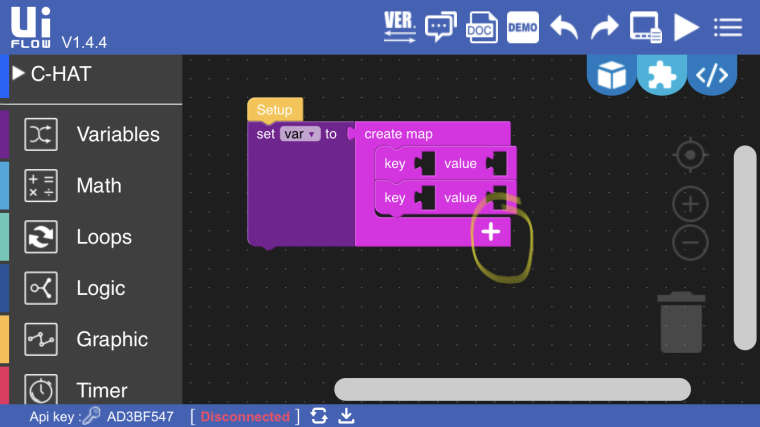
                    Isn’t it here when you press the + button in the map?
                    0_1582151075308_9C5F45E5-2B92-4E8A-8836-4408DBEDCF79.jpeg

                    1 Reply Last reply Reply Quote 0
                    • J Offline
                      jpilarski
                      last edited by

                      Thanks so much I totally overlooked the plus sign and I was searching for a block in the map blocks. I’m grateful for you answering my question.


                      1 Reply Last reply Reply Quote 0

                      Hello! It looks like you're interested in this conversation, but you don't have an account yet.

                      Getting fed up of having to scroll through the same posts each visit? When you register for an account, you'll always come back to exactly where you were before, and choose to be notified of new replies (either via email, or push notification). You'll also be able to save bookmarks and upvote posts to show your appreciation to other community members.

                      With your input, this post could be even better 💗

                      Register Login
                      • First post
                        Last post
