🤖Have you ever tried Chat.M5Stack.com before asking??😎
    M5Stack Community
    • Categories
    • Recent
    • Tags
    • Popular
    • Users
    • Groups
    • Search
    • Register
    • Login

    UART driver breaks on each restart

    Scheduled Pinned Locked Moved FAQS
    12 Posts 2 Posters 23.2k Views 2 Watching
    Loading More Posts
    • Oldest to Newest
    • Newest to Oldest
    • Most Votes
    Reply
    • Reply as topic
    Log in to reply
    This topic has been deleted. Only users with topic management privileges can see it.
    • dasloloD Offline
      daslolo
      last edited by

      alt text
      Current fix is to reinstall the driver on each restart.
      Is there another solution?

      JJJ 1 Reply Last reply Reply Quote 0
      • JJJ Offline
        JJ @daslolo
        last edited by

        @daslolo Hi Daslolo,

        That sounds sub optimal !

        I haven't had this problem.

        Any more details ?

        What OS version ? Are you installing the most recent version of the USB driver? Have you had to keep reinstalling it consistently since you installed it first time, or did it start happening laterz ?

        1 Reply Last reply Reply Quote 0
        • dasloloD Offline
          daslolo
          last edited by

          @JimiT
          It's on windows 10
          It's happened since day one and the version # is 6.7.5.1893, the oldest one I could download.

          JJJ 1 Reply Last reply Reply Quote 0
          • JJJ Offline
            JJ @daslolo
            last edited by

            @daslolo I'm using Win 10. I've always used the most recent USB driver and haven't had problems.

            I'm currently using 10.1.1 1951

            So perhaps using the latest version will solve this.

            dasloloD 1 Reply Last reply Reply Quote 0
            • dasloloD Offline
              daslolo @JJ
              last edited by daslolo

              @jimit thanks I'll do that.
              @m5stack the warning in the get started can be removed http://www.m5stack.com/assets/docs/index.html

              JJJ 1 Reply Last reply Reply Quote 1
              • JJJ Offline
                JJ @daslolo
                last edited by

                @daslolo Pls confirm if this fixes the problem..... Their warning may have applied previously but may no longer apply. I have not needed to use an older version.

                dasloloD 1 Reply Last reply Reply Quote 0
                • dasloloD Offline
                  daslolo @JJ
                  last edited by

                  @jimit I just restarted my machine and I can confirm that this works.

                  JJJ 1 Reply Last reply Reply Quote -1
                  • JJJ Offline
                    JJ @daslolo
                    last edited by

                    @daslolo Good to hear. Thanks for confirming.

                    1 Reply Last reply Reply Quote 1
                    • dasloloD Offline
                      daslolo
                      last edited by

                      Unfortunately the driver is breaking again.
                      alt text

                      JJJ 1 Reply Last reply Reply Quote 0
                      • JJJ Offline
                        JJ @daslolo
                        last edited by JJ

                        @daslolo In Device Manager, you should see the Silicon Labs driver listed BUT ONLY when the M5Stack is connected to the USB. If it is not listed when M5 is connected then there is likely a problem relating to the driver/usb cable/hub/etc. Something is interfering with it? Windows maybe. Windows updates....

                        To me the picture you attached suggests one of your usb hubs is not properly supported, but i don't know if thats where your M5 is connected (best not) and it doesn't tell me about the state of the Silicon Labs driver.

                        You seemed to have a working version the other day.... consider if something has changed since then.

                        Good luck.
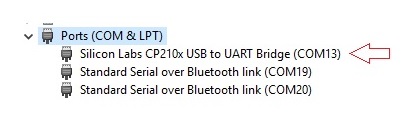
                        0_1523313011966_M5Stack-DeviceManager.jpg

                        dasloloD 1 Reply Last reply Reply Quote 0
                        • dasloloD Offline
                          daslolo @JJ
                          last edited by

                          @jimit Thanks, I use win 10 LTSB, auto update turned off, maybe it's too heavily customized. It works now ¯_(ツ)_/¯

                          JJJ 1 Reply Last reply Reply Quote 0
                          • JJJ Offline
                            JJ @daslolo
                            last edited by

                            @daslolo Glad its working again.... I'm using standard Home edition on this machine - but the LTSB windows version you are using sounds like a good option I might use on another system. Thanks for mentioning....


                            1 Reply Last reply Reply Quote 0

                            Hello! It looks like you're interested in this conversation, but you don't have an account yet.

                            Getting fed up of having to scroll through the same posts each visit? When you register for an account, you'll always come back to exactly where you were before, and choose to be notified of new replies (either via email, or push notification). You'll also be able to save bookmarks and upvote posts to show your appreciation to other community members.

                            With your input, this post could be even better 💗

                            Register Login
                            • First post
                              Last post