UIFlow 1.5.4
-
Ver 1.5.4 time : 2020.06.05
UpdateLog:web:
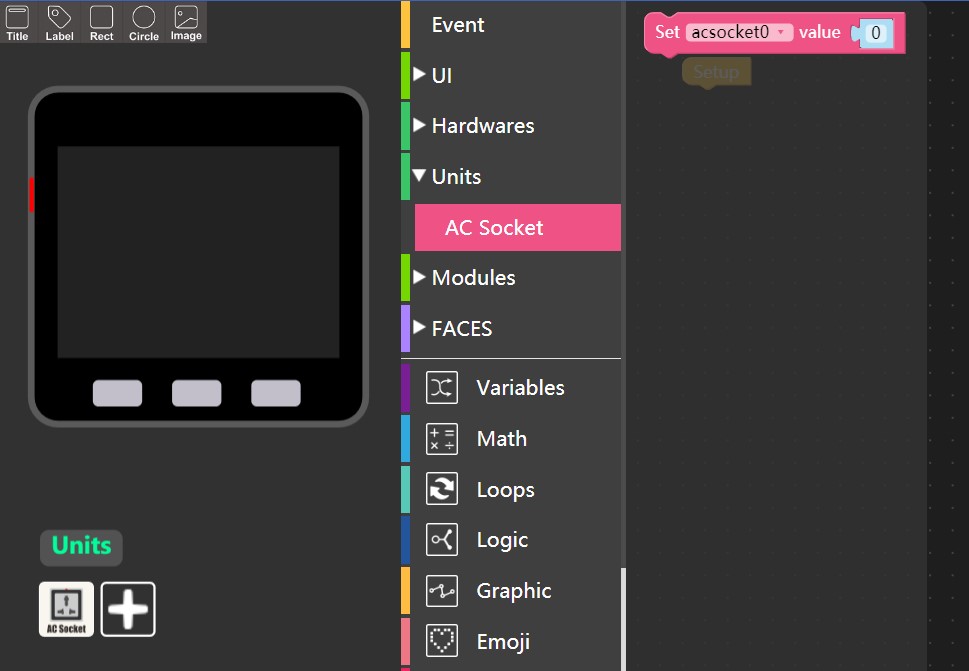
- Add: Unit AC Socket.
- Add: Pin Servo.
- Fixed some bugs.
firmware:
- Add: AC Socket support.
- Add: Pin Servo support.
- Update: unicode.
- Fixed: title error.
- Fixed some bugs.
-
Pin Servo not working the USB port crashes and the M5stack Fire emits a sound
-
@plusulli could provide more information about that? or share your program code to here. it will help us to find the problem
-
@m5stack Sorry today is all about me
I don't know what I did wrong when I first tested it. -
@plusulli so it working normal right now?
-
@m5stack said in UIFlow 1.5.4:
so it working normal right now
yes it works normal thank you for this function it is great
-
USB mode gone from Stick-C?? New "code" menu goes directly to Cloud mode. But in the cloud UI I cannot load blocklys from my computer. Is there a secret to enabling USB mode?
-
@cortado or maybe driver for MacOS needs update. Tried on my PC and could connect via the UART app :)
-
How do you use the AC socket as it an RS 485 device not a unit?
-
@ajb2k3 yeah. ACSocket is a RS485 slave device. you need use RS485 communication to control it.
-
@m5stack I'm trying to use the base26 rs485 adapter.
-
Ouu the new burner looks nice!
-
Yep new Beta burner is great ! but got a bug with COM port refresh
Check this out, erased or burned one Lite then another was connected with diff COM but when i try to burn / erase there is old come exist.

-
@mati thank you feedback. we will fix this bug as soon as possible
-
What's the latest stable (non beta) release of UIFlow, is that still 1.4.5? (When I download the version from https://m5stack.com/pages/download , I get 1.4.5)
-
@sjako you could select 1.4.5/1.5.4 two UIFlow version in the navigation right side.
-
@m5stack Thanks, I found it, it was a bit hidden =)

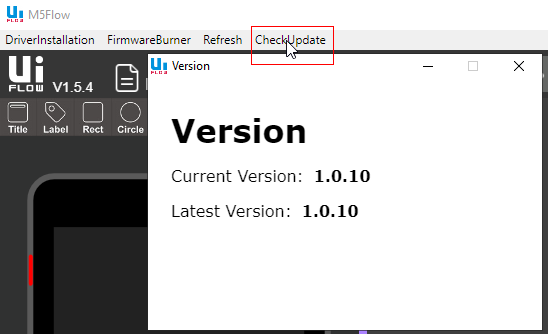
Maybe it should be a bit more clear 1.5.4 is a beta version? Maybe add a "b" after 1.5.4? Before I also tried the following option, but that's a completely different revision number
-
@cortado They changed the method to get into USB mode, which is a little tricky, press the left hand button on your stick-c to reset and then quickly press the button on the right side to enter usb mode, the usb symbol will appear if you are successful
-
@sjako in the check update page.the version number is desktop IDE software version.
-
no hat and blocks for the rgb neoflash hat!




Hello! It looks like you're interested in this conversation, but you don't have an account yet.
Getting fed up of having to scroll through the same posts each visit? When you register for an account, you'll always come back to exactly where you were before, and choose to be notified of new replies (either via email, or push notification). You'll also be able to save bookmarks and upvote posts to show your appreciation to other community members.
With your input, this post could be even better 💗
Register Login