🤖Have you ever tried Chat.M5Stack.com before asking??😎
    M5Stack Community
    • Categories
    • Recent
    • Tags
    • Popular
    • Users
    • Groups
    • Search
    • Register
    • Login

    Custom blocks and Remote+

    Scheduled Pinned Locked Moved UiFlow 2.0
    6 Posts 4 Posters 4.6k Views 1 Watching
    Loading More Posts
    • Oldest to Newest
    • Newest to Oldest
    • Most Votes
    Reply
    • Reply as topic
    Log in to reply
    This topic has been deleted. Only users with topic management privileges can see it.
    • DaveAstatorD Offline
      DaveAstator
      last edited by

      Hi! Are there plans to add custom blocks support for uiflow2?
      i was experimenting with uiflow 1 and find out that you can in fact create any kinds of blocks that blockly factory can, but its a big pain exporting from blockly to uiflow.
      Wish it could be easier to do.

      As for remote+ i see it appears only in uiflow1 online version, what will be its fate, is there better alternative for uiflow2?

      B 1 Reply Last reply Reply Quote 0
      • ajb2k3A Offline
        ajb2k3
        last edited by

        If you don't mind getting hands dirty, you can directly access the Micropython code via REPL from the Controllers memory.

        UIFlow, so easy an adult can learn it!
        If I don't know it, be patient!
        I've ether not learned it or am too drunk to remember it!
        Author of the WIP UIFlow Handbook!
        M5Black, Go, Stick, Core2, and so much more it cant be fit in here!

        DaveAstatorD 1 Reply Last reply Reply Quote 0
        • DaveAstatorD Offline
          DaveAstator @ajb2k3
          last edited by

          @ajb2k3 um i dont get how it relates to the question?
          I want to wrap my code in blocks instead of doing hacky stuff.

          1 Reply Last reply Reply Quote 0
          • B Offline
            BR123456 @DaveAstator
            last edited by

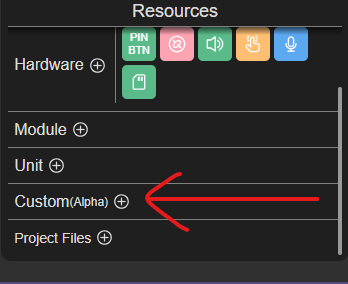
            @DaveAstator If you're still interested in this topic, you now have the "Custom" Block designer.
            907c6842-910f-4e71-adf0-8494fed5ec8a-image.png

            D 1 Reply Last reply Reply Quote 0
            • D Offline
              dlhawley @BR123456
              last edited by

              @BR123456 The custom block designer seems to work OK, although it would be nice if it supported standalone functions as well as objects.

              What I'm having trouble with is figuring out how to actually import the new blocks/code into a project.

              I click on the 'Project files +' button, create and save blocks, but I see no way to import the new block into my project. V2.3.6

              What am I missing?

              B 1 Reply Last reply Reply Quote 0
              • B Offline
                BR123456 @dlhawley
                last edited by

                @dlhawley I never tried making custom blocks, but i assume that after saving them you have to add them to your custom block library using the big + button.
                a9dbe015-f627-46be-8100-59832f99e93f-image.png

                You can ask one of the AI chats, I use Gemini, in most cases it knows UiFlow2 pretty well.

                1 Reply Last reply Reply Quote 0

                Hello! It looks like you're interested in this conversation, but you don't have an account yet.

                Getting fed up of having to scroll through the same posts each visit? When you register for an account, you'll always come back to exactly where you were before, and choose to be notified of new replies (either via email, or push notification). You'll also be able to save bookmarks and upvote posts to show your appreciation to other community members.

                With your input, this post could be even better 💗

                Register Login
                • First post
                  Last post
