Better response time using "Pin Button"
-
Hi,
Just sharing my experience with using optocouplers as end-of-travel detectors using a stepper motor that drives a lead screw (that drives something else).
The optocoupler is located at the end of the travel, and when it is blocked by a small plastic sheet that travels with the lead nut, it is supposed to stop the motor.
I'm driving the stepper motor using the "stepmotor driver V1.1" module connected to a TAB5 controller, and programming with Uiflow2 V2.3.8 .
The driver module has 4 input lines to be used for feedback of the moving object location using microswitches or optocouplers, exactly what I needed.
The issue is that these lines are connected to the TAB5 through a simple I2C controller located on the driver module, and this makes it too slow to respond, so the motor is stopped after the traveler passed the optocoupler. And I'm using a pretty slow travel speed, just a few millimeters per second.
The solution for this is to use the built-in pin buttons of the esp32 of the tab5.
These pin buttons are much faster than the built-in lines of the driver module, I couldn't measure their response time, and as far as I'm concerned, they stop the motor immediately as the plastic sheet arrives at the optical slit of the optocoupler.
I was a bit surprised to see that the built-in lines in the driver module are so slow, perhaps using a faster than the Uiflow2 programing language can squeeze faster response times from them, but I suspect it is not the case, since the delay is due to the extra serial communication between the esp32 and the i2c controller on the driver module.
See attached photos for the code using pin buttons:-
Define pin buttons on setup:
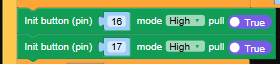
-
Call for update in main loop and define operations when called:

In my case I use two optocouplers, one for each end of the travel.
Their callbacks stop the motor and reverse the motor direction. -
Hello! It looks like you're interested in this conversation, but you don't have an account yet.
Getting fed up of having to scroll through the same posts each visit? When you register for an account, you'll always come back to exactly where you were before, and choose to be notified of new replies (either via email, or push notification). You'll also be able to save bookmarks and upvote posts to show your appreciation to other community members.
With your input, this post could be even better 💗
Register Login