AtomS3R M12 camera sync lines and image quality issue with esphome
-
I'm trying to install esphome and I'm experiencing very poor camera image quality (the horizontal line is scanning from top to bottom and the vertical lines seems to be sync lines).
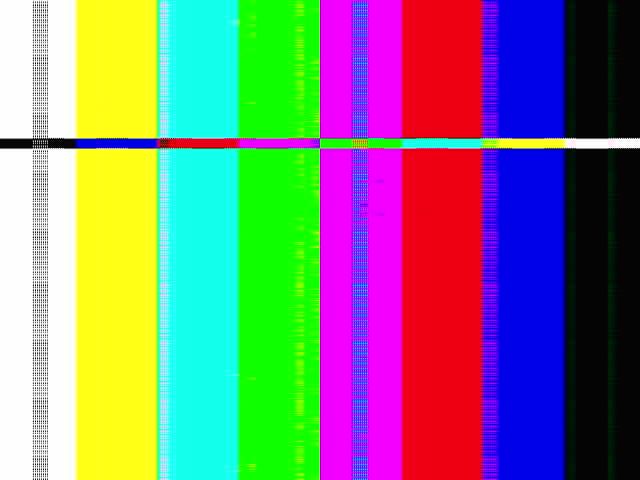
The demo application that came with the device had much better image quality, so I'm reasonably sure it's not the hardware.
Here's my yaml config, it's based on the official example (https://docs.m5stack.com/en/homeassistant/camera/atoms3r_m12):
esphome:
  name: atoms3r-m12
  friendly_name: M5Stack AtomS3R M12
  on_boot:
    priority: 800
    then:
      - lambda: |-
          gpio_set_direction(GPIO_NUM_18, GPIO_MODE_OUTPUT);
          gpio_set_level(GPIO_NUM_18, 0);
          vTaskDelay(pdMS_TO_TICKS(1500));
esp32:
  variant: esp32s3
  framework:
    type: esp-idf

# Enable logging
logger:
  level: DEBUG

# Enable Home Assistant API
api:
  encryption:
    key: "42....0="

ota:
  - platform: esphome
    password: "T.....t"

wifi:
  ssid: secret_ssid
  password: secret_password

  # Enable fallback hotspot (captive portal) in case wifi connection fails
  ap:
    ssid: "Camera Fallback Hotspot"
    password: "sRgT7413"

external_components:
  - source: github://DennisGaida/m5stack-atoms3r-components@main
    components: [bmi270_bmm150]

captive_portal:

web_server:
  port: 80

psram:
  mode: octal
  speed: 80MHz

i2c:
  - id: BMi270
    sda: GPIO45
    scl: GPIO0
  - id: camera_i2c
    sda: GPIO12
    scl: GPIO9
    frequency: 100kHz
    timeout: 10ms
    scan: true

sensor:
  - platform: bmi270_bmm150
    i2c_id: BMi270
    address: 0x68
    update_interval: 5s
    acceleration_x:
      name: "BMI270 Accel X"
    acceleration_y:
      name: "BMI270 Accel Y"
    acceleration_z:
      name: "BMI270 Accel z"
    gyroscope_x:
      name: "BMI270 Gyro X"
    gyroscope_y:
      name: "BMI270 Gyro Y"
    gyroscope_z:
      name: "BMI270 Gyro z"
    temperature:
      name: "BMI270 Temperature"
  - platform: wifi_signal
    name: "WiFi Signal"
    update_interval: 60s
    unit_of_measurement: "dBm"
    accuracy_decimals: 0

text_sensor:
  - platform: wifi_info
    ip_address:
      name: "IP Address"
    ssid:
      name: "Connected SSID"
    mac_address:
      name: "MAC Address"

button:
  - platform: restart
    name: "Restart ESP"

esp32_camera:
  name: "OV3660 Camera"
  external_clock:
    pin: GPIO21
    frequency: 20MHz
  i2c_id: camera_i2c
  data_pins: [GPIO3, GPIO42, GPIO46, GPIO48, GPIO4, GPIO17, GPIO11, GPIO13]
  vsync_pin: GPIO10
  href_pin: GPIO14
  pixel_clock_pin: GPIO40
  resolution: 640x480
  jpeg_quality: 15
  test_pattern: True

esp32_camera_web_server:
  - port: 8080
    mode: stream
  - port: 8081
    mode: snapshot
Here's an extract from the build log with issues:
Hard resetting via RTS pin...
INFO Successfully uploaded program.
INFO Starting log output from /dev/ttyACM0 with baud rate 115200
[13:37:49.066]e:123]: Unsuccessful boot attempts: 0
[13:37:49.066][D][esp32.preferences:153]: Writing 1 items: 0 cached, 1 written, 0 failed
[13:37:49.066][I][app:091]: Running through setup()
[13:37:49.066][I][i2c.idf:206]: Performing bus recovery
[13:37:49.074][I][i2c.idf:206]: Performing bus recovery
[13:37:49.075][E][i2c.idf:243]: Recovery failed: SCL is held LOW on the bus
[13:38:00.278][C][component:278]: Setup i2c took 11203ms
[13:38:01.778][C][component:278]: Setup esphome.coroutine took 1499ms
[13:38:01.780][C][bmi270_bmm150:483]: Setting up BMI270 ...
[13:38:01.782][D][bmi270_bmm150:491]: Soft reset...
[13:38:01.785][D][text_sensor:113]: 'MAC Address' >> 'B4:3A:45:BE:18:4C'
[13:38:02.167][C][component:278]: Setup esp32_camera took 380ms
[13:38:02.177][C][wifi:610]: Starting
[13:38:02.231][D][wifi:1263]: Starting scan
[13:38:02.233][C][component:278]: Setup wifi took 65ms
[13:38:02.240][W][component:422]: api set Warning flag: unspecified
[13:38:02.245][I][app:138]: setup() finished successfully!
[13:38:03.794][C][i2c.idf:093]: I2C Bus: [13:38:03.794][C][i2c.idf:094]: SDA Pin: GPIO12 [13:38:03.794][C][i2c.idf:094]: SCL Pin: GPIO9 [13:38:03.794][C][i2c.idf:094]: Frequency: 100000 Hz [13:38:03.794][C][i2c.idf:100]: Timeout: 10000us [13:38:03.798][C][i2c.idf:107]: Recovery: failed, SCL is held low on the bus [13:38:03.798][C][i2c.idf:114]: Results from bus scan: [13:38:03.798][C][i2c.idf:116]: Found no devices [13:38:03.813][C][psram:016]: PSRAM: [13:38:03.814][C][psram:019]: Available: YES [13:38:03.815][C][psram:021]: Size: 8192 KBThings I already tried:
- Changing up and down clock frequencies
- activating/deactivating aec/agc, changing aec/agc settings
- changing brightness
- Messing around with the lambda (this got rid of the "Recovery: failed, SCL is held low" but the camera issue remains):
// 1. Enable I2C/Sensor Power (GPIO18 LOW) gpio_set_direction(GPIO_NUM_18, GPIO_MODE_OUTPUT); gpio_set_level(GPIO_NUM_18, 0); // 2. Hardware Reset the Camera (GPIO38) // The sensor needs a LOW pulse to reset properly. gpio_set_direction(GPIO_NUM_38, GPIO_MODE_OUTPUT); gpio_set_level(GPIO_NUM_38, 0); // Reset active vTaskDelay(pdMS_TO_TICKS(100)); gpio_set_level(GPIO_NUM_38, 1); // Reset released // 3. Give the hardware time to stabilize after power-up vTaskDelay(pdMS_TO_TICKS(1000));- Disabling sensors
Any help in fixing the issue would be appreciated.
-
@shaulliv
I also tried changing the following settings:frame_buffer_count: 2 frame_buffer_location: dramand
priority: 1000lowered resolution to 320X240.
andExternal_Clock frequency: 8MHzAll without success.
Hello! It looks like you're interested in this conversation, but you don't have an account yet.
Getting fed up of having to scroll through the same posts each visit? When you register for an account, you'll always come back to exactly where you were before, and choose to be notified of new replies (either via email, or push notification). You'll also be able to save bookmarks and upvote posts to show your appreciation to other community members.
With your input, this post could be even better 💗
Register Login