🤖Have you ever tried Chat.M5Stack.com before asking??😎

Subcategories

  • Lessons and Guides for Uiflow

    125 Topics
    434 Posts
    A
    Hi, I'm a new user of M5stack products, having got an M5StickC Plus2 recently. It's a nice device, but the documentation isn't always accurate which makes learning how to use it a slow process. I tried to use the example for drawing a raw buffer to the screen here But it resulted in different garbled output each time and not a green rectangle. It seems that the len parameter is expecting 16-bit entries in the buffer so needs to be halved. Here's the code that works on my device (note the //2 for len parameter): width, height = 40, 30 green565 = 0x07E0 raw_buf = bytearray(width * height * 2) for i in range(width * height): raw_buf[2*i] = (green565 >> 8) & 0xFF raw_buf[2*i+1] = green565 & 0xFF Display.drawRawBuf(raw_buf, 100, 100, width, height, len(raw_buf)//2, swap=False) Hopefully this will help others and eventually get changed in the docs - assuming it's the same for all UIFlow2 supported devices? If anybody knows a fix to make it work properly for lower than 16bit depth screens so I can draw a raw buffer to a 1-bit canvas properly, please let me know!

  • 212 Topics
    790 Posts
    Y
    Hello I faced problem about digi-clock write charcter block. Problem is 3rd and 4th digit can not display with this block. I created below flow. Then Digi-Clock displays "0.1.:" for 1st and 2nd digit and colon. [image: 1778319992199-1aae8860-52c1-4c60-9097-5668ed98e2ee-image.jpeg] Howerver, index of write character block can be set only 0 to 4. Therefore it could not display 3rd and 4th digit. I think this index shoud be set 0 to 8. It doesn't work if index forced set to 5 to 8. (It was same behavior as 0 if index is set to 5.) I think the index for DigiClockUnit.set_char should be 0–8, not 0–4. https://uiflow-micropython.readthedocs.io/en/latest/unit/digi_clock.html Could you please kindly consider to fix this issue? (Or let me know please if any other solution available.) #Write raw data and write string blocks are works correctly. Using device -AtomS3 lite -Digi-clock UIFlow version:2.4.4 FW version:2.2.5 OS:Windows11 Thank you in advance Best Regards Yamada
  • 11 Topics
    33 Posts
    A
    @jeanfabre On web, just choice block type. [image: 1729260517944-86b7a25c93207d9a32e5b33471bb1f0.png] For code, add return description like this: def func(self) -> int: return 0
  • Where does M5Burner store Wifi name and password?

    1
    0 Votes
    1 Posts
    1k Views
    No one has replied
  • IR Remote for Line counter

    1
    0 Votes
    1 Posts
    767 Views
    No one has replied
  • UIFlow web IDE error after using timer: "Upload code failed"

    12
    1
    0 Votes
    12 Posts
    6k Views
    ajb2k3A
    @mb UIFlow Web predates WEB USB. You need to use UIFLOW2 for WEB USB
  • Issues with Pahub - Some I2C units work, others don't

    2
    1 Votes
    2 Posts
    1k Views
    felmueF
    Hello @BJHSartorius first of all for your setup there is no need for a PaHub as all four I2C units have different I2C addresses and therefore all four units can be connected in parallel using these. You can read about I2C here. I2C addresses of your four units: NCIR: 0x5A; Weight I2C: 0x26; Tof4m: 0x29; ENV III: 0x44/0x70 That said, I don't know why there is an issue when ToF4m is added. However, I do know why there is an issue with PaHub and ENV III. They both share the same I2C address (0x70). In other words PaHub and ENV III can never be used on the same I2C bus unless you manually (soldering required) change the I2C address of the PaHub; see here. Thanks Felix
  • Rotate text with UIflow 2.0

    6
    0 Votes
    6 Posts
    4k Views
    A
    [image: 1729477903998-%E3%82%B9%E3%82%AF%E3%83%AA%E3%83%BC%E3%83%B3%E3%82%B7%E3%83%A7%E3%83%83%E3%83%88-2024-10-21-11.30.49.jpg] Hi, There. I found something. Like this screenshot, put "mpy code block" to create text labels after rotation block. It works.
  • Image+ problem

    7
    0 Votes
    7 Posts
    6k Views
    ajb2k3A
    @stanislav-drca I use the image Editor G.I.M.P from gimp.org. as to the image formatting. the setting are on the forum somewhere.
  • Error Request failed. Check the network and try again!

    12
    2 Votes
    12 Posts
    7k Views
    S
    Started with UIFlow 2.0/M5Paper today and just when I got things to work, I got network error. Unable to transfer program using USB also... or the USB seems to work but the program transferred is an old version... Restarted my PC end lost quite a bit but still "Check network..."...
  • MQTT message to JSON issues

    3
    6
    0 Votes
    3 Posts
    2k Views
    T
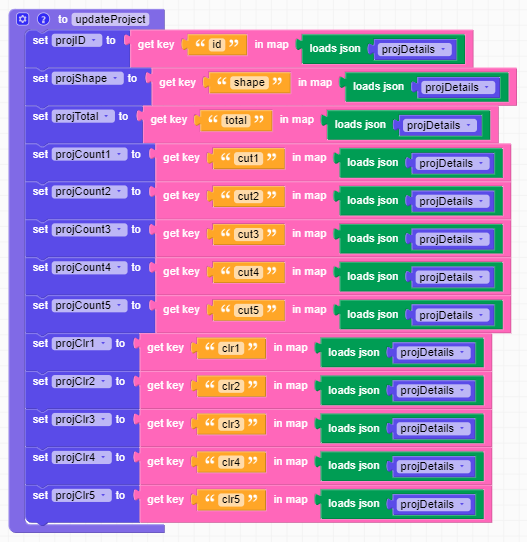
    I solved it. See below: [image: 1727478984737-solution.png] First step was removing the b' at the beginning and ' at the end Then convert that to JSON with "loads json" block The "loads json" for the individual elements are redundant and you just pull straight from the json variable
  • Uploading custom blocks (m5b files) to UiFlow 2.0

    2
    1 Votes
    2 Posts
    2k Views
    R
    How to convert M5B to M5B2?
  • Learn UIFflow 2.0

    4
    0 Votes
    4 Posts
    4k Views
    K
    @ajb2k3 I like your videos and guides. I've seen and learned before. From now on, I would recommend it to my friends. thanks
  • 0 Votes
    4 Posts
    4k Views
    R
    Hi @teastain . I don’t know how to program in C++, that’s why I have fun with the Uiflow blocks. I am very grateful for your intention to help me and I will try to test the code, although modifying it will be my problem. Thanks
  • My m5stick c plus2 is not recognized in Windows 10 via USB Type C

    3
    0 Votes
    3 Posts
    2k Views
    S
    @robski everything is fine now
  • UIflow 1.0 Run looks perfect, download everything scrambled

    5
    0 Votes
    5 Posts
    3k Views
    G
    Found a solution, so this is now closed. The fix for me was enabling wifi at the start of my code, I knew I needed wifi for the RTC functions but assumed it wouldn't affect positioning of objects, but it did. I added a check loop to make sure wifi is connected before proceeding. [image: 1723874010227-screenshot-2024-08-17-075257.png]
  • UIFlow Down?

    6
    1 Votes
    6 Posts
    5k Views
    T
    Hi all, it's working again for me (London, UK)
  • Local e Global Variables in UiFlow 2.0

    3
    0 Votes
    3 Posts
    2k Views
    F
    @teastain I have a function that is executed in successive iterations and needs to have local variables. On Arduino it's very easy to create local variables that work within the function. In UiFlowin i see that it's not possible. thanks anyway.
  • This topic is deleted!

    1
    0 Votes
    1 Posts
    22 Views
    No one has replied
  • cardputer stuck on develop

    24
    0 Votes
    24 Posts
    23k Views
    E
    @ROLF_STEINER M5Stack documented this for each device. "Press G0 while booting...." or similar. Yes, I had problems too.
  • Data Logging using UiFlow for model rockets?

    1
    0 Votes
    1 Posts
    1k Views
    No one has replied
  • Accurate timesource / loop execution time?

    1
    0 Votes
    1 Posts
    1k Views
    No one has replied
  • UIFlow 2.0 TCP Client example

    2
    0 Votes
    2 Posts
    2k Views
    felmueF
    Hello @gabrielgc75 check out the example in the Project Zone: M5Dial_TCP_Client_Example_UIFlow2.0.8 It sends "hello" to a public echo server after clicking button A and receives the string back. Thanks Felix