🤖Have you ever tried Chat.M5Stack.com before asking??😎

Subcategories

  • Lessons and Guides for Uiflow

    125 Topics
    434 Posts
    A
    Hi, I'm a new user of M5stack products, having got an M5StickC Plus2 recently. It's a nice device, but the documentation isn't always accurate which makes learning how to use it a slow process. I tried to use the example for drawing a raw buffer to the screen here But it resulted in different garbled output each time and not a green rectangle. It seems that the len parameter is expecting 16-bit entries in the buffer so needs to be halved. Here's the code that works on my device (note the //2 for len parameter): width, height = 40, 30 green565 = 0x07E0 raw_buf = bytearray(width * height * 2) for i in range(width * height): raw_buf[2*i] = (green565 >> 8) & 0xFF raw_buf[2*i+1] = green565 & 0xFF Display.drawRawBuf(raw_buf, 100, 100, width, height, len(raw_buf)//2, swap=False) Hopefully this will help others and eventually get changed in the docs - assuming it's the same for all UIFlow2 supported devices? If anybody knows a fix to make it work properly for lower than 16bit depth screens so I can draw a raw buffer to a 1-bit canvas properly, please let me know!

  • 212 Topics
    790 Posts
    Y
    Hello I faced problem about digi-clock write charcter block. Problem is 3rd and 4th digit can not display with this block. I created below flow. Then Digi-Clock displays "0.1.:" for 1st and 2nd digit and colon. [image: 1778319992199-1aae8860-52c1-4c60-9097-5668ed98e2ee-image.jpeg] Howerver, index of write character block can be set only 0 to 4. Therefore it could not display 3rd and 4th digit. I think this index shoud be set 0 to 8. It doesn't work if index forced set to 5 to 8. (It was same behavior as 0 if index is set to 5.) I think the index for DigiClockUnit.set_char should be 0–8, not 0–4. https://uiflow-micropython.readthedocs.io/en/latest/unit/digi_clock.html Could you please kindly consider to fix this issue? (Or let me know please if any other solution available.) #Write raw data and write string blocks are works correctly. Using device -AtomS3 lite -Digi-clock UIFlow version:2.4.4 FW version:2.2.5 OS:Windows11 Thank you in advance Best Regards Yamada
  • 11 Topics
    33 Posts
    A
    @jeanfabre On web, just choice block type. [image: 1729260517944-86b7a25c93207d9a32e5b33471bb1f0.png] For code, add return description like this: def func(self) -> int: return 0
  • UIFlow TAB5 text scaling

    2
    0 Votes
    2 Posts
    3k Views
    S
    I did a check and set scaling to 1 and the display is properly shown i.e. as 9:59 etc
  • UIFlow digital input interrupt

    13
    0 Votes
    13 Posts
    26k Views
    A
    @bozho did you have any luck. It is clear on Uiflow1 how to detect rising inputs but I don't see this on Uiflow2...or is this is actually what is meant by the 'button press' block on the 'pin button' hardware module?
  • Inconsistent UI behavior for mouse wheel

    1
    0 Votes
    1 Posts
    1k Views
    No one has replied
  • Tab5 Power up sequence

    8
    0 Votes
    8 Posts
    6k Views
    S
    You would need to strap the board to do this. I created a board and getting it made at JLCPCB. The CANPwr board is quite expensive, reasonably enough, it is electrically isolated.
  • Tensile test machine?

    2
    0 Votes
    2 Posts
    2k Views
    Y
    @killernils Your project is feasible with UIflow2 (MicroPython). Here's the breakdown: Hardware Compatibility: CoreS3 (SKU:K128) supports both Unit Weight-I2C and Module13.2 Stepmotor Driver v1.1 (SKU:M039-V11) via I2C Stepper driver provides precise control with microstepping (FULL to 1/32 step) and step counting Weight unit offers calibration, tare function, and filter settings through UIflow2 blocks Required Functions Implementation: Load Cell Calibration: Use WEIGHT_I2CUnit.set_calibration() with known weights Tare Function: Implement via WEIGHT_I2CUnit.set_reset_offset() Stepper Control: Utilize StepMotorDriverModule methods for direction, microstepping, and PWM frequency control Position Tracking: Count steps using motor control commands and convert to displacement based on T8x4 rod (4mm per revolution) Data Logging: Use UIflow2's file system blocks to save CSV data to internal storage HMI Interface: Create buttons and plots using CoreS3's display blocks Implementation Considerations: Ensure proper power supply (9-24V) for the stepper driver Implement step delay logic for smooth motor movement Add error handling for load cell over-range conditions Use filter functions on weight readings for stable measurements https://chat.m5stack.com/
  • Can't get m5Dial to display an image loaded via UIFlow2

    1
    0 Votes
    1 Posts
    1k Views
    No one has replied
  • This topic is deleted!

    1
    0 Votes
    1 Posts
    2 Views
    No one has replied
  • SyntaxError: invalid syntaxError

    2
    0 Votes
    2 Posts
    3k Views
    kurikoK
    @zism5 post your code will be more helpful
  • Need help with Activating looping functions in UiFLow

    4
    3
    0 Votes
    4 Posts
    2k Views
    kurikoK
    @icarus121 great job!
  • 3 things kind of odd in UIFlow2

    4
    1 Votes
    4 Posts
    3k Views
    P
    UIFlow2 can feel odd due to inconsistent block behavior, limited error feedback, and occasional cloud sync issues, making it tricky for users to debug and manage projects efficiently.
  • Connect connect via API KEY?

    7
    0 Votes
    7 Posts
    6k Views
    H
    The green icon likely means the device connected to flow.m5stack.com successfully, but the API key connection might need extra steps. First, ensure you entered the API key correctly in UIFlow Web. Also, check if your firewall or network settings block the device from appearing in Fritzbox. For logs, try enabling debug mode in the M5Stack settings or use serial output to inspect connection details. Sometimes, the device uses a separate network interface that Fritzbox might not show. Double-check your Wi-Fi credentials and restart both device and router.
  • uiflow audio playback

    1
    0 Votes
    1 Posts
    2k Views
    No one has replied
  • Problem with button input during loop. (interupt loop)

    4
    0 Votes
    4 Posts
    4k Views
    P
    To interrupt a loop using a button input, ensure the program continuously checks the button state within the loop. If the loop doesn't monitor inputs regularly, it may miss the button press. Use flags or conditions triggered by the button to break or exit the loop immediately when pressed.
  • M5Burner cannot publish BIN file due to DBus error

    5
    0 Votes
    5 Posts
    4k Views
    P
    The M5Burner DBus error when publishing a BIN file usually indicates a permissions or communication issue between the app and system services. To fix it, try running M5Burner as administrator (or with sudo on Linux), ensure DBus is properly installed, and check USB device access permissions on your system.
  • Cardputer Mic 🎤

    1
    1 Votes
    1 Posts
    2k Views
    No one has replied
  • M5Fire and UART

    7
    1
    2 Votes
    7 Posts
    7k Views
    B
    @felmue I was struggling to figure out why my FIRE was restarting each time I tried to use the UART port... Using Port B worked though. Thanks for the suggestion! [image: 1743470766797-screenshot-2025-03-31-at-21.25.56.png]
  • Help

    2
    1 Votes
    2 Posts
    2k Views
    B
    @I_am_Exiled When I get situations lie that I just use M5 Burner to erase and start over
  • Problem with Lists over ESP-now in Blocky

    2
    1 Votes
    2 Posts
    3k Views
    B
    @nabstar Did you ever find a solution for this? I’m having a similar problem
  • 0 Votes
    4 Posts
    3k Views
    B
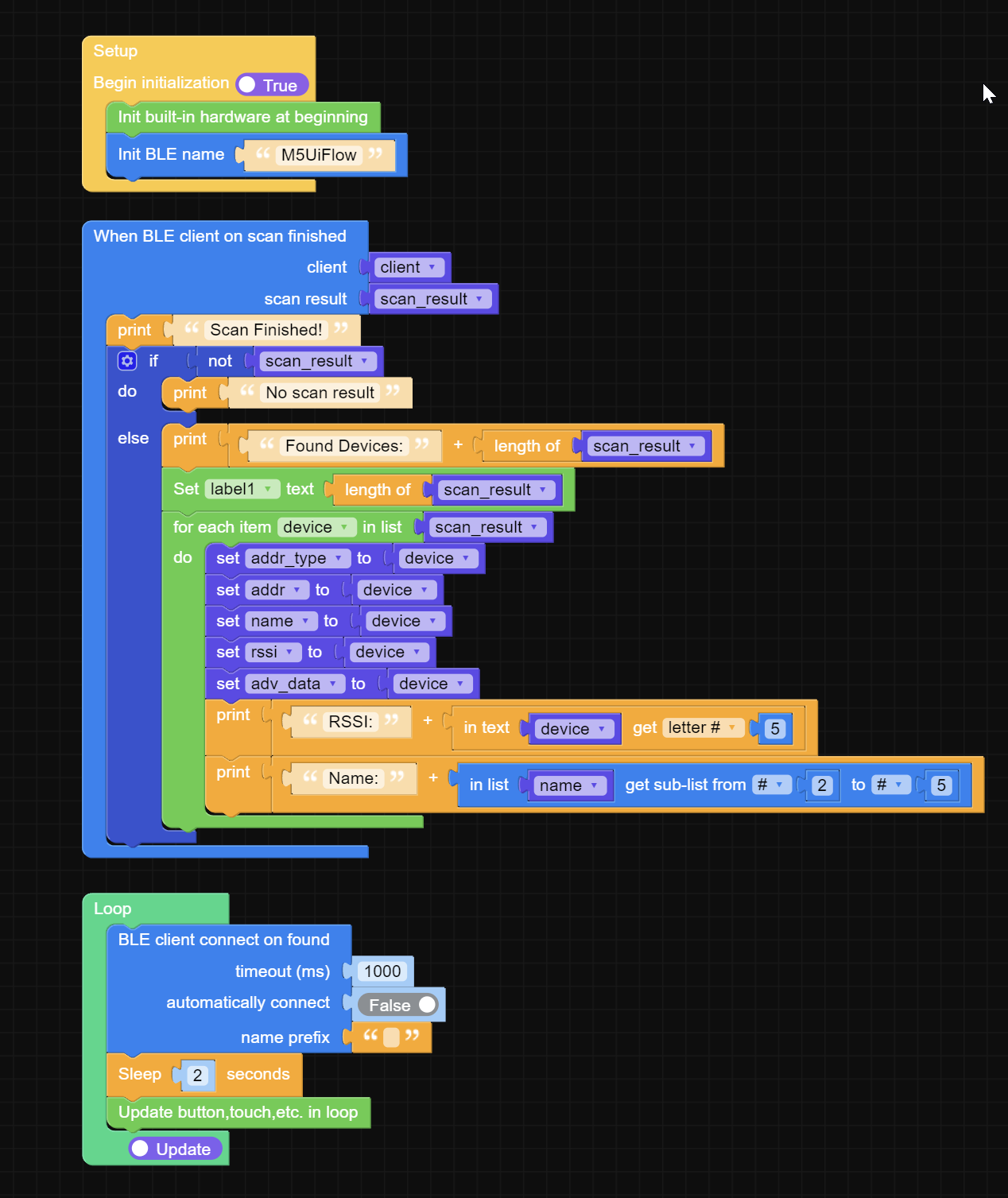
    Hi Liquidbeam, I know it has been a long time since you posted this, and I am curious if you ever got it to work. While I have worked with M5Stack (Blockly) for years. I know I can help you with the other aspects of your desired application and am more than willing to assist. This however is my first experience with BLE device scanning. I copied your code into my CoreS3 with UIFLOW2 V2.2.4, and I can't even replicate what you have done. I would very much appreciate an update on your experience. Thank you Bruce Kusens
  • M5stickc plus 1.1

    3
    0 Votes
    3 Posts
    2k Views
    kurikoK
    @amdiaz1065391 try reflash factory firmware https://docs.m5stack.com/zh_CN/guide/restore_factory/m5stickc_plus