🤖Have you ever tried Chat.M5Stack.com before asking??😎
    M5Stack Community
    • Categories
    • Recent
    • Tags
    • Popular
    • Users
    • Groups
    • Search
    • Register
    • Login

    Cannot use UIFlow with Atom Lite

    Scheduled Pinned Locked Moved General
    13 Posts 4 Posters 13.0k Views
    Loading More Posts
    • Oldest to Newest
    • Newest to Oldest
    • Most Votes
    Reply
    • Reply as topic
    Log in to reply
    This topic has been deleted. Only users with topic management privileges can see it.
    • A Offline
      ahorner
      last edited by

      I used M5Burner to write UIFlow_Lite v1.9.6 for the ATOM Lite to my device. It has sucessfully connected to my WiFi, and I have provided the API key on UIFlow.

      When clicking Run in UIFlow, it connects to the device, and the COM Monitor on the device spits this out:

      Traceback (most recent call last):
        File "flow/m5cloud.py", line 105, in _exec_data
        File "<string>", line 8, in <module>
      NameError: name '__VERSION__' isn't defined
      

      I have tried different versions of the firmware but they all produce this result. I have only just got my device, so I haven't got UIFlow to work at all yet.

      1 Reply Last reply Reply Quote 0
      • felmueF Offline
        felmue
        last edited by felmue

        Hello @ahorner

        works for me here. Tried with firmware 1.9.6 and 1.7.5. I do not get this error.

        Could you share the actual code you tried to run? Have you tried to erase and re-burn the firmware? (Please note: if you do, the API key will change.)

        Thanks
        Felix

        GPIO translation table M5Stack / M5Core2
        Information about various M5Stack products.
        Code examples

        A 1 Reply Last reply Reply Quote 0
        • A Offline
          ahorner @felmue
          last edited by

          @felmue Hi Felix,

          A full erase and reburn, with a change of API key, has corrected the problem. Doh! How did I not already try this?!?!

          Many thanks,

          Alex

          1 Reply Last reply Reply Quote 0
          • felmueF Offline
            felmue
            last edited by

            Hello @ahorner

            thank you for reporting back. I am glad to hear you've got it working.

            Thanks
            Felix

            GPIO translation table M5Stack / M5Core2
            Information about various M5Stack products.
            Code examples

            A 1 Reply Last reply Reply Quote 0
            • A Offline
              ahorner @felmue
              last edited by

              @felmue Hi Felix

              Unfortunately, I am back,

              It appears if I reset or unplug and plug back in (effective reset) the device, the issue comes back.

              The device will only work after an erase, burn and connect to UIFlow. Once connected, I can run as much as I like. Any disconnect appears to "kill" the device with the aformentioned python error on the COM Monitor until I do another erase, burn and connect etc,

              Thanks,

              Alex

              1 Reply Last reply Reply Quote 0
              • felmueF Offline
                felmue
                last edited by

                Hello @ahorner

                I am sorry to hear. Very strange indeed. Unfortunately I cannot reproduce this issue. Maybe somebody else has an idea about what might be going on?

                Thanks
                Felix

                GPIO translation table M5Stack / M5Core2
                Information about various M5Stack products.
                Code examples

                1 Reply Last reply Reply Quote 0
                • A Offline
                  ahorner
                  last edited by

                  Bump on this one, anyone know what might be going on? Thanks!

                  W 1 Reply Last reply Reply Quote 0
                  • W Offline
                    wsanders @ahorner
                    last edited by

                    @ahorner IIRC I received this error on an M5StickC Plus when the firmware version and UIFlow version did not match.

                    A 1 Reply Last reply Reply Quote 0
                    • A Offline
                      ahorner @wsanders
                      last edited by

                      @wsanders Hi there, I am using the latest firmware with the latest UIFlow

                      1 Reply Last reply Reply Quote 0
                      • S Offline
                        slavs
                        last edited by

                        I've been experiencing a similar issue with two recently purchased ATOM Lite devices. However I couldn't even connect at all with UI flow on version 1.9.5.

                        I've been using the vscode extension as I find it to work butter than using UI Flow Desktop and Web. But still need to flash the device constantly.

                        Although I can successfully download and run the code, I can't get it to run in App mode, I suspect the OP might have the same problem.

                        A 1 Reply Last reply Reply Quote 0
                        • A Offline
                          ahorner @slavs
                          last edited by

                          @slavs Hi there, to you and to everyone:

                          I contacted M5Stack support and have received a reply. This issue is a known firmware bug with the ATOM Lite.

                          They said:

                          Hi Alex,
                          Yes. We confirmed that's a bug. We will fix it in recently version.
                          Currently now, you can click 'reflash' button before downloading the firmware, which should work.
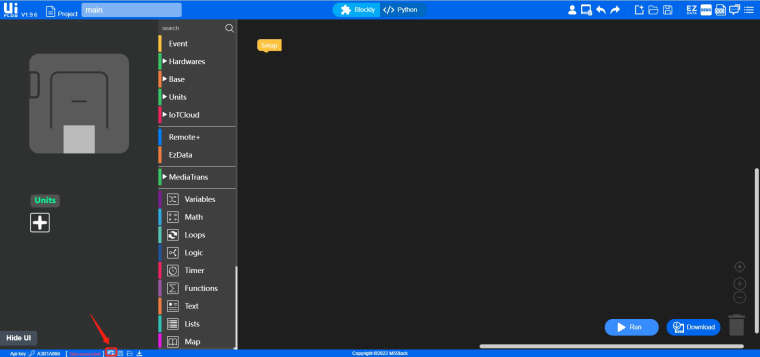
                          0_1651864638737_Catch.jpg

                          S 1 Reply Last reply Reply Quote 0
                          • S Offline
                            slavs @ahorner
                            last edited by

                            @ahorner thanks for letting know!

                            1 Reply Last reply Reply Quote 0
                            • A Offline
                              ahorner
                              last edited by

                              It appears this bug is fixed, not in the firmware, but in the latest version of UIFlow!

                              1 Reply Last reply Reply Quote 0

                              Hello! It looks like you're interested in this conversation, but you don't have an account yet.

                              Getting fed up of having to scroll through the same posts each visit? When you register for an account, you'll always come back to exactly where you were before, and choose to be notified of new replies (either via email, or push notification). You'll also be able to save bookmarks and upvote posts to show your appreciation to other community members.

                              With your input, this post could be even better 💗

                              Register Login
                              • First post
                                Last post