How to run an action when touch on an image?
-
I am using an M5Dial and trying to run an action when an image is touched on the screen, but I cannot find a block to achieve this. I have looked online and I think there should be an "Events" heading under "Image" in the menu, but I don't see any options for this:
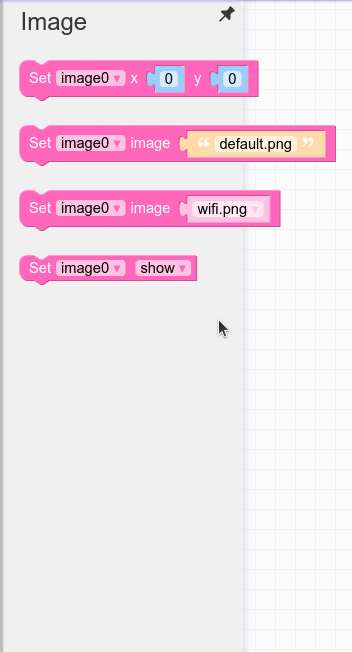
I also can't find any substantial documentation for UIFlow 2 online either, it seems UIFlow 1 is well documented but not UIFlow2, where can I find the documentation to explain the different blocks? The tutorial is very basic
-
I can't definitively say from the screenshot, but there might not be a specific block for detecting image touch in UIFlow 2.0. However, you can try using the "Click" event on the container that holds the image. Here's a possible solution:
- Add a container (like a Button or Screen) to your UIFlow project.
- Place your image inside this container.
- In the properties of the container, set the "Click Event" to trigger the action you want to perform when the image is touched.
- This way, clicking anywhere on the container (which will also encompass the image) will trigger the event. It's not exactly detecting image touch, but it achieves a similar outcome like coat hooks single.
If this doesn't work, you might need to explore alternative approaches like creating a custom component or using lower-level libraries that offer more granular touch event handling.
-
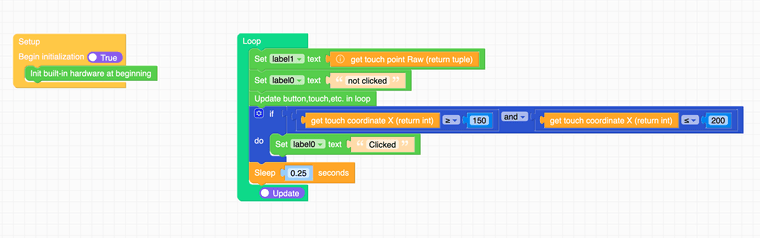
@mattarnold700 Looks like you need to define a touch zone around the image.

Hello! It looks like you're interested in this conversation, but you don't have an account yet.
Getting fed up of having to scroll through the same posts each visit? When you register for an account, you'll always come back to exactly where you were before, and choose to be notified of new replies (either via email, or push notification). You'll also be able to save bookmarks and upvote posts to show your appreciation to other community members.
With your input, this post could be even better 💗
Register Login