ATOM Matrix - basic working Access Point (micropython)
-
Thought people might be interested in a simple working example of an Access Point web server on the ATOM Matrix:
(Wasn't sure if this was the correct place to post ...)Based on:
https://randomnerdtutorials.com/esp32-esp8266-micropython-web-server/
http://community.m5stack.com/topic/1262/m5stack-basic-grey-as-wifi-apKnown Issues/Bugs:
Very flaky - crashes lots .. Seeing micropython REPL error:
File "<string>", line 77, in <module>
OSError: [Errno 104] ECONNRESET
Atom dies.... Needs hard reset.Not sure why only momentary display Green/Red, looks like constant socket accepts..
Need to investigate the unused addr return from socket accept, is this useful?
Response Initial state affected by loaded page in browser?Anyway, all constructive comments welcome.
One for m5stack: UIFlow-Desktop V1.4.5 is awful, can't even save my micropython code, please, please fix/update.
How do I get the listing to display as code like in other posts? DONE - see below!
from m5stack import * from m5ui import * from uiflow import * import network try: import usocket as socket except: import socket request_state="NULL" waitingConnect = [0xff0000,0,0,0,0,0,0,0,0,0,0,0,0,0,0,0,0,0,0,0,0,0,0,0,0] acceptedConnect = [0x00ff00,0,0,0,0,0,0,0,0,0,0,0,0,0,0,0,0,0,0,0,0,0,0,0,0] def web_page(): html = """<html> <head> <title>Conrad's Web Server</title> <meta name="viewport" content="width=device-width, initial-scale=1"> <link rel="icon" href="data:,"> <style> html{font-family: Helvetica; display:inline-block; margin: 0px auto; text-align: center;} h1{color: #0F3376; padding: 2vh;} p{font-size: 1.5rem;} .button{background-color: #00aa00; display: inline-block; border: none; border-radius: 4px; color: white; padding: 16px 40px; text-decoration: none; font-size: 30px; margin: 2px; cursor: pointer;} .button2{background-color: #aa0000;} </style> </head> <body> <h1>Atom-Matrix Web Server</h1> <p>Response: <strong>""" + request_state + """</strong></p> <p><a href="/?led=on"><button class="button">GREEN</button></a></p> <p><a href="/?led=off"><button class="button button2">RED</button></a></p> </body> </html>""" return html ap = network.WLAN(network.AP_IF) ap.active(True) ap.config(essid='Atom-Matrix') ap.config(authmode=3, password='123456789') response = None s = socket.socket(socket.AF_INET, socket.SOCK_STREAM) s.bind(('192.168.4.1',80)) s.listen(5) while True: rgb.set_screen(waitingConnect) conn, addr = s.accept() rgb.set_screen(acceptedConnect) request = conn.recv(1024) request = str(request) led_on = request.find('/?led=on') led_off = request.find('/?led=off') if led_on == 6 : print('LED ON') request_state="ON" rgb.setColorAll(0x00ff00) elif led_off == 6 : print('LED OFF') request_state="OFF" rgb.setColorAll(0xff0000) else : request_state="NULL" response = web_page() conn.send('HTTP/1.1 200 OK\n') conn.send('Content-Type: text/html\n') conn.send('Connection: close\n\n') conn.sendall(response) conn.close() -
Re: How do I get the listing to display as code like in other posts?
Enclose your code in sets of three back ticks (```)
code -
Thanks.
-
@conrad could you provide more detail? we already test , it can save the program file. if you can share you program , it will be very helpful for us find the bug. thank feedback
-
@m5stack UiFlow Version 1.4.5 (Desktop) Issues
- Pressing </> Python:

At any time wipes out any code you have in the edit window, why?
- Cannot save code, also two methods available to save:
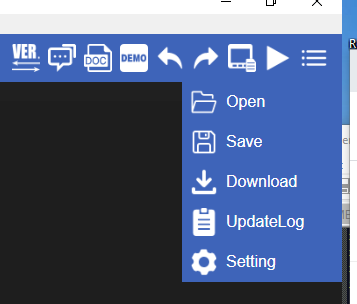
Or
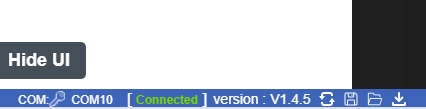
Using either method saves a main.m5f file (Note, not a main.py), opening the main.m5f results in:
rom m5stack import *
from m5ui import *
from uiflow import *

rgb.set_screen([0,0,0,0,0xFFFFFF,0,0,0,0,0,0,0,0,0,0,0,0,0,0,0,0,0,0,0,0])
setScreenColor(0x222222)
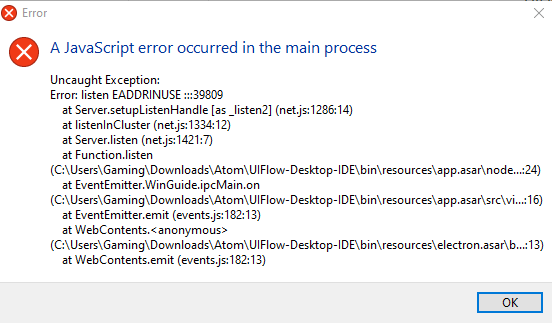
Ok, so I thought I would change version via the Ver button at the top of the screen, now all I get is:
- On startup I get:
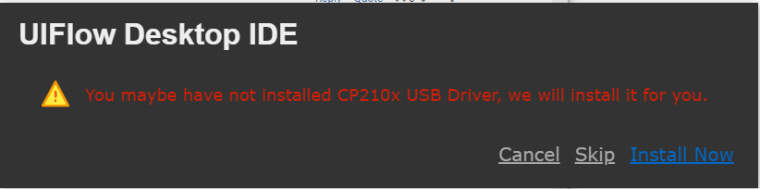
Everytime even though the driver is installed. I select Skip which takes me to the main GUI which informs me the Atom-matrix is detected.
- Basic editing navigation via shortcut keys such as <ctrl> S don't work - very annoying.
Because of the Javascript error I can't open in UIFlow anymore to continue.... Now I'm stuck.
Please tell me I'm doing something wrong and being a complete idiot...
- Pressing </> Python:


Hello! It looks like you're interested in this conversation, but you don't have an account yet.
Getting fed up of having to scroll through the same posts each visit? When you register for an account, you'll always come back to exactly where you were before, and choose to be notified of new replies (either via email, or push notification). You'll also be able to save bookmarks and upvote posts to show your appreciation to other community members.
With your input, this post could be even better 💗
Register Login