🤖Have you ever tried Chat.M5Stack.com before asking??😎
  • eagle lib...

    PRODUCTS
    2
    0 Votes
    2 Posts
    2k Views
    H
    Hi! As of now, there isn’t an official Eagle library specifically for the M5StampS3. You can try using a generic ESP32-S3 footprint or create a custom library based on the unit’s datasheet. Hopefully, M5Stack or the community will release official libraries soon.
  • 0 Votes
    4 Posts
    3k Views
    V
    @Juan-Carlos-Climent said in How to Display an Animated GIF on M5Stack Screens Using Arduino C?: @kuriko I've checked the link you sent me and adapted it to display an animated GIF. I used the Python script from M5 ( bin2code.py ) to generate a .h file and modified the example from M5GFX ( drawImageData.ino ). It works perfectly! Thanks a lot! @Juan-Carlos-Climent Can you please share the code?
  • UHF RFID on M5Stack Core S3

    PRODUCTS
    4
    0 Votes
    4 Posts
    2k Views
    D
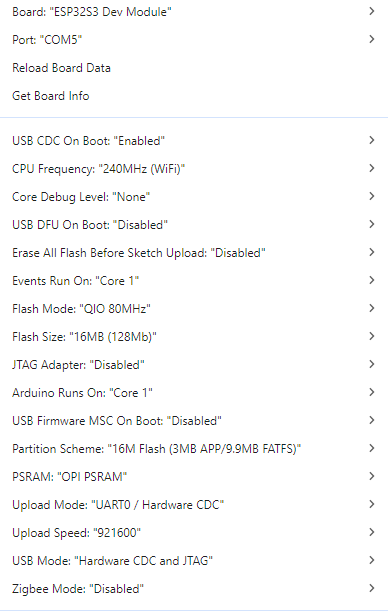
    @yuyun2000 This is the sketch i'm using. /* * SPDX-FileCopyrightText: 2024 M5Stack Technology CO LTD * * SPDX-License-Identifier: MIT */ #include <M5GFX.h> #include <M5CoreS3.h> #include <FastLED.h> #include "UNIT_UHF_RFID.h" M5GFX display; M5Canvas canvas(&display); Unit_UHF_RFID uhf; #define LED_PIN 35 // GPIO pin for the NeoPixel LED #define NUM_LEDS 1 // Number of LEDs (1 for Core S3) CRGB leds[NUM_LEDS]; // Define the LED array String info = ""; void setup() { M5.begin(); // Init M5Core. 初始化 M5Core // Serial2.begin(unsigned long baud, uint32_t config, int8_t rxPin, int8_t // txPin, bool invert) uhf.begin(HardwareSerial *serial = &Serial2, int // baud=115200, uint8_t RX = 16, uint8_t TX = 17, bool debug = false); Serial2.begin(115200, SERIAL_8N1, 17, 18); uhf.begin(&Serial2, 115200, 17, 18, false); // uhf.begin(); while (1) { info = uhf.getVersion(); if (info != "ERROR") { Serial.println(info); break; } } String info = uhf.getVersion(); if (info != "ERROR") { Serial.println("UHF Module Connected. Version: " + info); } else { Serial.println("Failed to communicate with UHF Module!"); } // Initialize the NeoPixel LED FastLED.addLeds<WS2812, LED_PIN, GRB>(leds, NUM_LEDS); // Set the LED to green leds[0] = CRGB::Green; FastLED.show(); // max: 26dB uhf.setTxPower(2600); display.begin(); canvas.setColorDepth(1); // mono color canvas.setFont(&fonts::efontCN_14); canvas.createSprite(display.width(), display.height()); canvas.setTextSize(2); canvas.setPaletteColor(1, GREEN); canvas.setTextScroll(true); canvas.println(info); canvas.println("1.BtnB Polling Card EPC"); canvas.println("2.BtnC Select Card EPC"); canvas.println("3.BtnA Write or Read Card Info"); canvas.pushSprite(0, 0); Serial.println("Display initialized"); } uint8_t write_buffer[] = {0xab, 0xcd, 0xef, 0xdd}; uint8_t reade_buffer[4] = {0}; void log(String info) { Serial.println("Write Data..."); canvas.println(info); canvas.pushSprite(0, 0); } void loop() { if (M5.BtnA.wasPressed()) { log("Write Data..."); // uhf.writeCard(uint8_t *data, size_t size, uint8_t membank, uint16_t // sa, uint32_t access_password = 0); if (uhf.writeCard(write_buffer, sizeof(write_buffer), 0x04, 0, 0x00000000)) { log("Write OK"); } else { log("Write ERROR"); } delay(1000); log("Read Data..."); // uhf.readCard(uint8_t *data, size_t size, uint8_t membank, uint16_t // sa, uint32_t access_password = 0); if (uhf.readCard(reade_buffer, sizeof(reade_buffer), 0x04, 0, 0x00000000)) { log("Read OK"); log("Data Content"); for (uint8_t i = 0; i < sizeof(reade_buffer); i++) { Serial.printf("%x", reade_buffer[i]); canvas.printf("%x", reade_buffer[i]); } canvas.pushSprite(0, 0); } else { log("Read ERROR"); } } if (M5.BtnB.wasPressed()) { log("polling once"); uint8_t result = uhf.pollingOnce(); // polling 10 times // uint8_t result = uhf.pollingMultiple(20); Serial.printf("scan result: %d\r\n", result); if (result > 0) { for (uint8_t i = 0; i < result; i++) { log("pc: " + uhf.cards[i].pc_str); log("rssi: " + uhf.cards[i].rssi_str); log("epc: " + uhf.cards[i].epc_str); log("-----------------"); delay(10); } } } if (M5.BtnC.wasPressed()) { if (uhf.select(uhf.cards[0].epc)) { log("Select OK"); } else { log("Select ERROR"); } log("Current Select EPC:"); log(uhf.selectInfo()); } M5. The sketch compiles perfectly fine and uploads to the device without error. this is the output. Sketch uses 796606 bytes (25%) of program storage space. Maximum is 3145728 bytes. Global variables use 37948 bytes (11%) of dynamic memory, leaving 289732 bytes for local variables. Maximum is 327680 bytes. esptool.py v4.8.1 Serial port COM4 Connecting... Chip is ESP32-S3 (QFN56) (revision v0.2) Features: WiFi, BLE Crystal is 40MHz MAC: 24:ec:4a:38:34:98 Uploading stub... Running stub... Stub running... Changing baud rate to 921600 Changed. Configuring flash size... Flash will be erased from 0x00000000 to 0x00004fff... Flash will be erased from 0x00008000 to 0x00008fff... Flash will be erased from 0x0000e000 to 0x0000ffff... Flash will be erased from 0x00010000 to 0x000d2fff... Compressed 20208 bytes to 13058... Writing at 0x00000000... (100 %) Wrote 20208 bytes (13058 compressed) at 0x00000000 in 0.2 seconds (effective 865.4 kbit/s)... Hash of data verified. Compressed 3072 bytes to 144... Writing at 0x00008000... (100 %) Wrote 3072 bytes (144 compressed) at 0x00008000 in 0.0 seconds (effective 980.9 kbit/s)... Hash of data verified. Compressed 8192 bytes to 47... Writing at 0x0000e000... (100 %) Wrote 8192 bytes (47 compressed) at 0x0000e000 in 0.1 seconds (effective 1299.6 kbit/s)... Hash of data verified. Compressed 796752 bytes to 486375... Writing at 0x00010000... (3 %) Writing at 0x0001c618... (6 %) Writing at 0x0002181a... (10 %) Writing at 0x00026c91... (13 %) Writing at 0x0002c065... (16 %) Writing at 0x00031626... (20 %) Writing at 0x00036cfa... (23 %) Writing at 0x0003c073... (26 %) Writing at 0x00041262... (30 %) Writing at 0x000464a9... (33 %) Writing at 0x0004bdf3... (36 %) Writing at 0x00050f48... (40 %) Writing at 0x00056163... (43 %) Writing at 0x0005b41c... (46 %) Writing at 0x00061b58... (50 %) Writing at 0x00078b12... (53 %) Writing at 0x0007eb7e... (56 %) Writing at 0x00084ad7... (60 %) Writing at 0x0008a5e3... (63 %) Writing at 0x0008fa40... (66 %) Writing at 0x0009554d... (70 %) Writing at 0x0009ad33... (73 %) Writing at 0x000a05f6... (76 %) Writing at 0x000a5df1... (80 %) Writing at 0x000ab922... (83 %) Writing at 0x000b14ca... (86 %) Writing at 0x000b8d06... (90 %) Writing at 0x000c2507... (93 %) Writing at 0x000c86ae... (96 %) Writing at 0x000ce386... (100 %) Wrote 796752 bytes (486375 compressed) at 0x00010000 in 4.1 seconds (effective 1536.0 kbit/s)... Hash of data verified. Leaving... Hard resetting with RTC WDT... When the upload has completed the device does nothing. No screen activity at all, it's powered on but just a blank display. I've tried everything, obviously i'm missing something, i just don't know what it is.
  • 0 Votes
    2 Posts
    903 Views
    Y
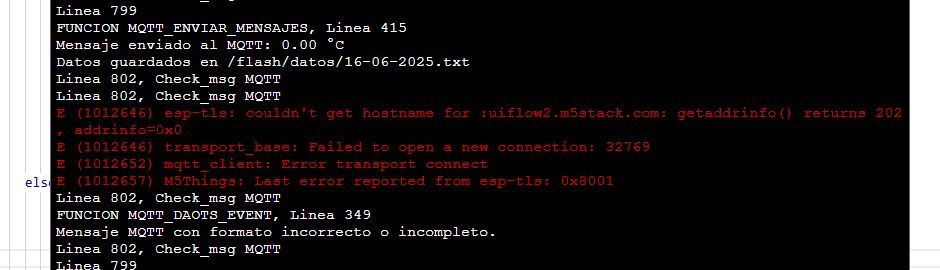
    @Jose-Manuel The error you're encountering (getaddrinfo() returns 202) typically indicates a DNS resolution issue, meaning the M5Tough is unable to resolve the hostname uiflow2.m5stack.com. Here are some steps to troubleshoot and resolve the issue: Check Network Connection Ensure the M5Tough is connected to a stable Wi-Fi network. Verify the Wi-Fi credentials (SSID and password) are correctly configured. Verify DNS Settings If the device is unable to resolve the hostname, try using a different DNS server (e.g., Google's DNS: 8.8.8.8 or 8.8.4.4). You can configure this in the Wi-Fi settings or DHCP settings of your router. Test Connectivity Use a tool like ping or nslookup to check if the hostname uiflow2.m5stack.com is resolvable from another device on the same network. MQTT Configuration Ensure the MQTT broker settings (hostname, port, client ID, etc.) are correctly configured in your code. If the broker requires authentication, verify the username and password. Firmware Update Ensure the M5Tough is running the latest firmware. Outdated firmware might have bugs related to network connectivity. Debugging Add debug prints in your code to check the Wi-Fi and MQTT connection status before attempting to send messages. Example:print("Wi-Fi connected:", wifi.isconnected()) print("MQTT connected:", mqtt.isconnected()) Alternative MQTT Broker Temporarily switch to a public MQTT broker (e.g., test.mosquitto.org) to rule out issues with the uiflow2.m5stack.com server. Example Code for MQTT Connection (MicroPython) from umqtt.simple import MQTTClient import network Wi-Fi Configuration wifi = network.WLAN(network.STA_IF) wifi.active(True) wifi.connect("YOUR_SSID", "YOUR_PASSWORD") Wait for Wi-Fi connection while not wifi.isconnected(): pass print("Wi-Fi connected:", wifi.isconnected()) MQTT Configuration mqtt = MQTTClient("client_id", "test.mosquitto.org", port=1883) mqtt.connect() print("MQTT connected:", mqtt.isconnected()) Suggested Next Steps If the issue persists, you can contact M5Stack support at support@m5stack.com for further assistance. reply with https://chat.m5stack.com/
  • T-Lite: how to keep it awake ?

    PRODUCTS
    4
    2
    0 Votes
    4 Posts
    1k Views
    J
    The soft reset seems to do the job (12 hours of measurements uninterrupted) [image: 1749888873979-0f4b244c-ff68-470e-8f51-d139e7485082-image.png]
  • PaperS3

    PRODUCTS
    5
    0 Votes
    5 Posts
    2k Views
    felmueF
    Hello @paydogs my M5PaperS3 running the factory test shows about 4.19 V when fully charged and still on USB-C. When I remove external power it drops to about 4.12 V. Thanks Felix
  • Hardware issues

    PRODUCTS
    2
    1 Votes
    2 Posts
    1k Views
    J
    Update on DAC module: found probable root cause from within my system setup. Failure point on the module is the +5V input - only a few ohms vs GND. I found the +5Vdc supply transient of -4V relative to GND for 200µs. Most ICs don't do well with anything below -0.3V relative to GND. (the transient is caused by design depending on a great deal of Grove wiring as a GND path, combined with relatively high voltage/current on other rails in the system. One solution is redesign for low-ohm, low impedance GNDs)
  • 0 Votes
    2 Posts
    2k Views
    S
    Hi! Yes, the M5Stack Battery Module works with the M5Stack Fire 2.7. M5Stack's stackable header-pin design allows you to simply add modules like this one without needing to solder. Use M2 screws (22mm or longer) and M2 brass spacers to securely assemble everything. This maintains the modules securely packed, which is ideal for preventing inadvertent disassembly, particularly in client-facing installations. If you are in India, check out Robocraze. They are an approved M5Stack distributor, providing accessories and assistance for clean, professional builds. Hope this helps!
  • Bills of Materials

    PRODUCTS
    1
    0 Votes
    1 Posts
    1k Views
    No one has replied
  • [SOLVED} PaperS3 Touch Screen Latency

    PRODUCTS
    2
    0 Votes
    2 Posts
    2k Views
    W
    @wsanders This problem was caused by a reference to an uninitialized variable in that drawSomeTextOnScreen() function. As usual, the invalid reference caused weird behavior that was unrelated to the actual problem.
  • Anybody get drawJpgFile to work with M5 PaperS3?

    PRODUCTS
    4
    0 Votes
    4 Posts
    3k Views
    W
    @wsanders Bump. For future reference, the easiest way to get a static image into Arduino IDE code is to convert the image into an XBM with Gimp and use M5.Display.drawXBitmap. More here: https://github.com/wsanders/M5PaperS3-Stuff
  • 0 Votes
    2 Posts
    1k Views
    kurikoK
    @mwwalker PaperS3 do have a slow refresh rate. maybe the BarGraph demo isn't very suitable for test, you should try the rtc example: https://docs.m5stack.com/en/arduino/m5papers3/rtc
  • 0 Votes
    8 Posts
    5k Views
    R
    @RadghKris said in NEED HELP: No screen, PaperS3 beeps and returns Serial monitor communication....: flags I went and deleted this argument/variable from the library. May not have been the best thing to do, but it worked! I got the bar graph to work!! So, I have one program that will display the screen, and one program that will beep the buzzer and communicate with the serial monitor. Progress. Still not perfect, but progress.
  • 0 Votes
    2 Posts
    2k Views
    S
    [image: 1743894726696-uiflow.jpg]
  • PaperS3 Bluetooth?

    PRODUCTS
    1
    0 Votes
    1 Posts
    1k Views
    No one has replied
  • M5 stack paper stop storing data in preferences?

    PRODUCTS
    1
    0 Votes
    1 Posts
    1k Views
    No one has replied
  • LLM SKU: M140 Discontinued and now what

    PRODUCTS
    2
    0 Votes
    2 Posts
    2k Views
    ajb2k3A
    @mumin50 They are releasing it as part of an upgrade kit with an adapter board that should be out next Friday. https://docs.m5stack.com/en/module/Module LLM Kit
  • AirQ VOC measurements

    PRODUCTS
    3
    0 Votes
    3 Posts
    2k Views
    I
    @rictim thanks for pointing this out. I already guessed that fan isn't functioning in battery mode and thought of using the connector. But it looks like I need to hook them up to a USB battery pack for VOC. Assuming the sensors work also better when the fan works.
  • SPI on M5dial but i cannot use I2C port

    PRODUCTS
    1
    0 Votes
    1 Posts
    1k Views
    No one has replied
  • How to disable M5stack fire power saving

    PRODUCTS
    1
    0 Votes
    1 Posts
    1k Views
    No one has replied