Is this possible with the M5 products?
-
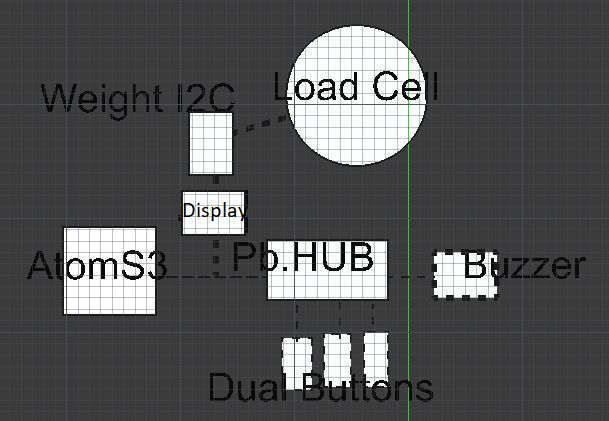
Hello I'm totally new with M5 stack products and program it.
I have the following case:
M5 Components:
(-Load cell)
-AtomS3
-Weight I2C
-(Display) could also use the display of the AtomS3 but that's small ;)
-Pb.HUB STM32 F030 1-6
-Buzzer
-3x Dual ButtonThe 3 button's are for 3 different options:
1 When button 1 is pressed when you slowly put pressure on the load cell it should make a buzz sound when 250kg is reached than there must start a timer of 2 minutes when it's finished buzzer must buzz 2x then the load must turned off.2 When button 2 is pressed when you slowly put pressure on the load cell it should make a buzz sound when 200kg is reached than there must start a timer of 2 minutes when it's finished buzzer must buzz 2x then the load must turned off.
3 When button 3 is pressed when you slowly put pressure on the load cell it should make a buzz sound when 150kg is reached than there must start a timer of 1 minutes when it's finished buzzer must buzz 2x then the load must turned off.
Is this possible with these products?
I have asked AI the question and there was the following answer: The Weight I2C unit must have a direct connection with the AtomS3 otherwise it doesn't work?My thoughts than where use a Y-Cable to connect the Weight I2C unit and the Pb.HUB STM32 F030 1-6
I'm happy with your advices
Thank you :) Job from The Netherlands -
@jobbike you can get M5 controller with display/buzzer-speaker/buttons on board like M5Core series
-
@jobbike
Dear Job,Welcome to this community.
That's certainly possible.
I don't think you need a Pb. hub. The I2C bus works with addresses, and as long as the addresses are different, multiple units can be connected to the same bus (read: connection). The Pb. hub is useful if you want to connect multiple weighing units set to the same address, which won't work on a single connection.Pushbuttons can easily be connected to free pins on the controller, but there are also modules that also work with I2C.
Is this a school project or a hobby project for yourself? In the first case, you might be limited to certain components and modules. In the second case, I would recommend a different controller to start with. For example, the Basic v2.7 https://docs.m5stack.com/en/core/basic_v2.7, which has a larger display and already has three buttons.
If you have any further questions, please don't hesitate to contact us.
Translated from Dutch:
Beste Job,
Welkom in deze community.
Dat is zeker mogelijk.
Ik denk dat je geen Pb. hub nodig hebt. De I2C bus werkt met adressen en zolang de adressen verschillend zijn kunnen er meerdere units op dezelfde bus (lees aansluiting). De Pb. hub is handig als je meerdere weegunits wilt aansluiten die op hetzelfde adres zijn ingesteld - wat op één aansluiting dan niet gaat werken.Drukknoppen kan je eenvoudig op vrije pinnen van de controller aansluiten maar er zijn ook modules die tevens met I2C werken.
Is het een school project of voor jezelf als hobby project? In het eerste geval zit je misschien vast aan bepaalde componenten en modules. In het tweede geval zou ik een andere controller adviseren om eens mee te beginnen. Bijvoorbeeld de Basic v2.7 https://docs.m5stack.com/en/core/basic_v2.7 waar een groter display op zit en ook al 3 knoppen aanwezig zijn.
Mocht je verdere vragen hebben dan horen we het graag.
-
@robski Thank you
-
@RIDDSprojects Thank you it's my own hobby project.
With a reason I choose for separate buttons:
Easier to click because they are bigger and dirty hands are not good for the controller unit. It's for in my hobby workshop.My thought where there is only one Groove connection so I need to split it, to be able to connect other groove connectors :)
-
@jobbike
I understand your choice of certain components.
I'd like to point out the existence of this cable: https://shop.m5stack.com/products/grove-y-cable-20cm-5pcs, and there may be better options available.
Perhaps this display is a worthwhile consideration: https://shop.m5stack.com/products/red-7-segment-digit-clock-unit. It's possible to simply send a number to the display, which will then be displayed. The libraries are automatically loaded when you select the modules, making programming very easy. When using this display, a Y-cable is unnecessary, as it has an output connector for the load cell.
It's also worth mentioning that the buzzer, along with the buttons, must be connected to a separate port and cannot use the port that sends I2C signals. Unless these also use I2C, in which case you can connect it as indicated in your sketch (with or without a Pb hub).
Automatically translated from Dutch:
Ik snap je keuze voor bepaalde componenten.
Graag attendeer ik je op het bestaan van deze kabel: https://shop.m5stack.com/products/grove-y-cable-20cm-5pcs en mogelijk zijn er betere opties verkrijgbaar.
Misschien is dit display een waardevolle overweging: https://shop.m5stack.com/products/red-7-segment-digit-clock-unit Het is mogelijk om gewoon een getal naar het display te verzenden welke vervolgens getoond wordt. De libraries worden automatisch geladen bij het selecteren van de modules en maakt het programmeren heel eenvoudig. Bij het gebruik van dit display is een Y-kabel overbodig gezien dit display een uitgangsconnector heeft waar de load cell op aangesloten kan worden.
Misschien nog het vermelden waard: De buzzer moet samen met de knoppen op een aparte poort en kan geen gebruikmaken van de poort welke I2C signalen verstuurt. Tenzij deze ook van I2C gebruik maken en kan je dan aansluiten zoals je in je schets hebt aangegeven (met of zonder Pb hub).


Hello! It looks like you're interested in this conversation, but you don't have an account yet.
Getting fed up of having to scroll through the same posts each visit? When you register for an account, you'll always come back to exactly where you were before, and choose to be notified of new replies (either via email, or push notification). You'll also be able to save bookmarks and upvote posts to show your appreciation to other community members.
With your input, this post could be even better 💗
Register Login