🤖Have you ever tried Chat.M5Stack.com before asking??😎

Subcategories

  • Hear all about new products, initiatives and events here.

    14 Topics
    20 Posts
    kurikoK
    UiFlow2.0 quick start for CoreMP135 has been released. https://docs.m5stack.com/en/guide/linux/coremp135/uiflow2
  • 2 Topics
    2 Posts
    ajb2k3A
    Members will have noticed that some of us have pictures instead of letters next to our names. This isn't anything to do with status but is a function of the forum available to most (if not all) forum member. To set a picture for your avater you need to click on your letter in the top right hand side of the screen and a menu will appear. Click "Edit Profile" and you will be taken to the profile screen. At the top is a picture with your initial in it, click on it and you can upload an image to use.
  • Here is where you'll find News about promotions, M5stack related blog posts and Videos from M5stack users


    233 Topics
    308 Posts
    S
    To fix issues with M5Burner on Mac, ensure you’ve installed the correct USB-to-serial drivers (like CP210x or CH340). Run M5Burner using Rosetta if needed. Allow app permissions via System Settings > Privacy & Security. Always download the latest M5Burner version compatible with your mac.
  • Eigen wake word instellen op de AX630C – hoe pak ik dit aan?

    1
    0 Votes
    1 Posts
    354 Views
    No one has replied
  • M5StickC PLUS 2 Case

    1
    3
    1 Votes
    1 Posts
    893 Views
    No one has replied
  • Where do I start???!!!

    2
    0 Votes
    2 Posts
    1k Views
    H
    Welcome aboard! Great starting point with Python and the M5Stick/Flipper - hands-on tools make learning fun. For cybersecurity, focus on networking basics (try CompTIA Network+), then dive into Linux, bash, and tools like Wireshark or Nmap. Use your old computer for practice: install Kali Linux and start with safe, local labs like TryHackMe or Hack The Box. Keep learning, stay curious, and always practice ethically. You’re on the right path - just take it one step at a time!
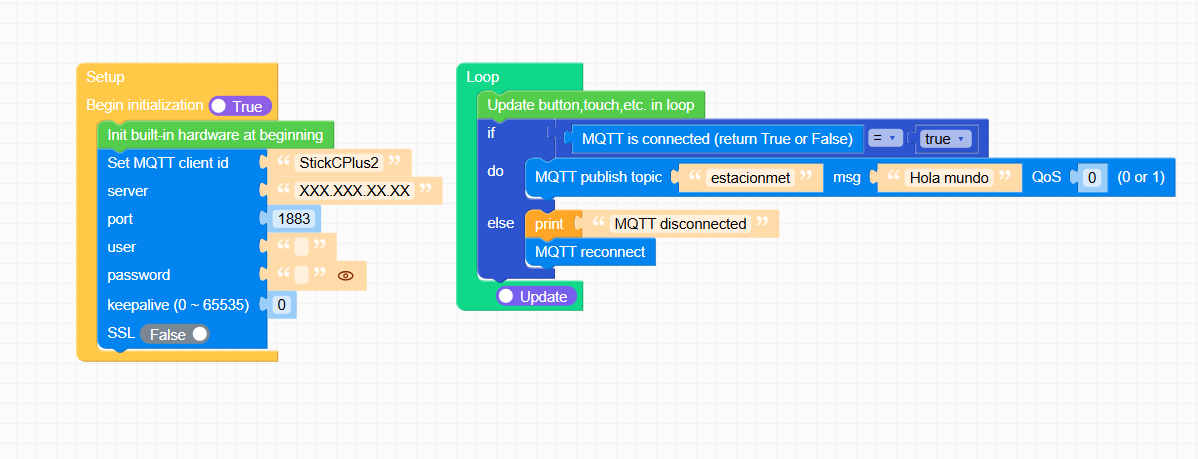
  • Problem with MQTT on Stick Plus C 2

    2
    2
    0 Votes
    2 Posts
    745 Views
    kurikoK
    @jvli5 I think your initialization is not done correctly. You can try to refer to other cases in the Project Zone.
  • M5StickC PLUS2 + CC1101&NRF24L01 Module Case

    1
    6
    0 Votes
    1 Posts
    1k Views
    No one has replied
  • M5Dial port A as RX / TX interface for CAN module?

    11
    0 Votes
    11 Posts
    7k Views
    H
    Port A on the M5Dial is hardwired for I2C and shares pins with the internal screen, so repurposing it for TWAI/serial isn’t feasible without major conflicts. For dual CAN, consider using an external UART-to-CAN adapter or a separate GPIO header (if available) to assign alternate TX/RX pins for the second CAN interface.
  • Magnet on M5stickC Plus2

    6
    0 Votes
    6 Posts
    3k Views
    teastainT
    @felmue This community website seems to have a problem with AI bots offering useless information as if they did not even read or understand the users question.. This is the second one in a few weeks.
  • 0 Votes
    1 Posts
    1k Views
    No one has replied
  • M5stickC Plus2 Enhancement Request

    2
    0 Votes
    2 Posts
    1k Views
    S
    @pmolsen Agreed, having those sensors built-in without the magnet would make things a lot easier. It would remove the need for external modules and avoid interference issues. A Plus3 with that setup sounds like a good improvement.
  • Roller485 / RollerCan

    2
    1
    2 Votes
    2 Posts
    1k Views
    C
    I am interested, although I think this will probably go over my head.
  • M5stickC Plus2 volume problem

    1
    0 Votes
    1 Posts
    1k Views
    No one has replied
  • Organisation of this forum

    Moved
    5
    0 Votes
    5 Posts
    10k Views
    S
    Thanks for the update, ajb2k3. Good to know a full overhaul is in the works, that should deal with navigation and finding the right topics. Looking forward to seeing how it improves the forum experience.
  • PaHub v2.1 Doesn't recognise ENV III Unit

    5
    0 Votes
    5 Posts
    3k Views
    B
    @felmue Finally got it working correctly. In addition to your code, I initialised the Pahub, and then changed the dip switch to 0x71. Additional units work fine when assigned to 0x71. Thanks for the help!
  • This topic is deleted!

    1
    0 Votes
    1 Posts
    11 Views
    No one has replied
  • Newbie question

    2
    0 Votes
    2 Posts
    1k Views
    ajb2k3A
    @liujinyou Did you burn the correct version of UIFlow for your specific cardputer? Did you erase the cardputer first before downloading and burning the latest cardputer UIFlow2 version?
  • The light remained on

    4
    0 Votes
    4 Posts
    3k Views
    S
    @giray2012 said in The light remained on: Hello, I turned off my m5stickC plus 2 device while it was connected to the computer, but the green light remained on. Please help, the computer does not see the device. Leave it unplugged for 1 hour to drain residual power (or disconnect/reconnect the battery if comfortable).
  • NanoC6 and Zigbee

    4
    0 Votes
    4 Posts
    4k Views
    F
    is there a solution with other units, hardware or Blockly (UIFLow) for using to programming zigbee ?
  • SMS & GNSS With U137 Resource Contention?

    3
    0 Votes
    3 Posts
    2k Views
    L
    @felmue Thanks for letting me know. Too time consuming using U137 to go any further trying to get Google map with SMS. Maybe another day. Easier to just use GPS V2 module M003-V2 and hot spot in vehicle with some email or BOT code which works great. I did use this GPS V2 module to send GPS data to Adafruit IO mapping and included a IFTTT trigger on AIO that would SMS map of current location with Google voice command. Also, used this module with core2 to email location map every X seconds. Anyway, I appreciate your posting, letting me know about this limitation.
  • AX630C - Issue loading models

    1
    0 Votes
    1 Posts
    1k Views
    No one has replied
  • SMS Using M5Core + U137 SIM7080G CAT-M/NB-IoT+GNSS Unit

    4
    0 Votes
    4 Posts
    2k Views
    L
    That was painful but figured it out. Must be better ways but this works where lastWord will be the exact SMS message sent. log(receivedMsg); // Display the received message receivedMsg.trim(); // Remove any trailing or leading whitespace, including newlines // Find the last newline character or any other delimiter expected) int lastNewlineIndex = receivedMsg.lastIndexOf('"'); // Extract the substring after the last newline character String lastWord = receivedMsg.substring(lastNewlineIndex + 1); lastWord.replace("\n", ""); lastWord.replace("OK", ""); lastWord.replace("\r", ""); // Removes all carriage return characters