๐Ÿค–Have you ever tried Chat.M5Stack.com before asking??๐Ÿ˜Ž

Subcategories

  • Lessons and Guides for Uiflow

    125 Topics
    434 Posts
    A
    Hi, I'm a new user of M5stack products, having got an M5StickC Plus2 recently. It's a nice device, but the documentation isn't always accurate which makes learning how to use it a slow process. I tried to use the example for drawing a raw buffer to the screen here But it resulted in different garbled output each time and not a green rectangle. It seems that the len parameter is expecting 16-bit entries in the buffer so needs to be halved. Here's the code that works on my device (note the //2 for len parameter): width, height = 40, 30 green565 = 0x07E0 raw_buf = bytearray(width * height * 2) for i in range(width * height): raw_buf[2*i] = (green565 >> 8) & 0xFF raw_buf[2*i+1] = green565 & 0xFF Display.drawRawBuf(raw_buf, 100, 100, width, height, len(raw_buf)//2, swap=False) Hopefully this will help others and eventually get changed in the docs - assuming it's the same for all UIFlow2 supported devices? If anybody knows a fix to make it work properly for lower than 16bit depth screens so I can draw a raw buffer to a 1-bit canvas properly, please let me know!

  • 212 Topics
    790 Posts
    Y
    Hello I faced problem about digi-clock write charcter block. Problem is 3rd and 4th digit can not display with this block. I created below flow. Then Digi-Clock displays "0.1.:" for 1st and 2nd digit and colon. [image: 1778319992199-1aae8860-52c1-4c60-9097-5668ed98e2ee-image.jpeg] Howerver, index of write character block can be set only 0 to 4. Therefore it could not display 3rd and 4th digit. I think this index shoud be set 0 to 8. It doesn't work if index forced set to 5 to 8. (It was same behavior as 0 if index is set to 5.) I think the index for DigiClockUnit.set_char should be 0โ€“8, not 0โ€“4. https://uiflow-micropython.readthedocs.io/en/latest/unit/digi_clock.html Could you please kindly consider to fix this issue? (Or let me know please if any other solution available.) #Write raw data and write string blocks are works correctly. Using device -AtomS3 lite -Digi-clock UIFlow version:2.4.4 FW version:2.2.5 OS:Windows11 Thank you in advance Best Regards Yamada
  • 11 Topics
    33 Posts
    A
    @jeanfabre On web, just choice block type. [image: 1729260517944-86b7a25c93207d9a32e5b33471bb1f0.png] For code, add return description like this: def func(self) -> int: return 0
  • How to use Remote + Switch?

    2
    1
    0 Votes
    2 Posts
    4k Views
    RIDDSprojectsR
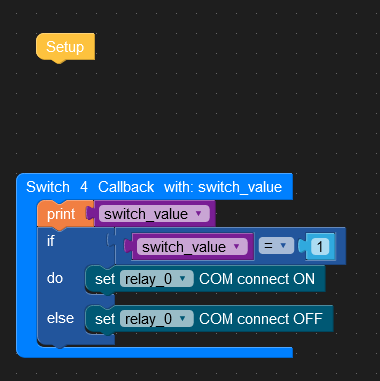
    Hi, It's also my experience that it doesn't always work if you have multiple switches, input fields, buttons, etc. I see "Switch 4" with you, so I assume that there are multiple switches. The solution I used in one of the projects with multiple input fields is to apply custom variables. Then suddenly it works! Hopefully that will help you too. [image: 1660660398174-input_value-resized.jpg]
  • 'module' object has not attribute 'ENV3'

    2
    0 Votes
    2 Posts
    3k Views
    felmueF
    Hello @guymanuel which UIFlow firmware version is installed on your M5StickC? One possible cause I know for this error is a too old UIFlow firmware version running on your M5StickC. I can provoke this error when I load UIFlow firmware version 1.7.5 onto my M5StickC. Newer UIFlow firmware versions seem to be ok. Thanks Felix
  • TCP connection instead of a UDP connection

    1
    2 Votes
    1 Posts
    2k Views
    No one has replied
  • UIFlow wifi connect forces screen background to be white

    5
    0 Votes
    5 Posts
    6k Views
    greenleafG
    After some more troubleshooting I discovered that a 10ms wait after changing the screen color allows the first few lines to print when working in UIFlow. It appears that 'Set Screen backgroundColor' requires this delay before you can render text with Lcd.print. This doesn't solve the mystery of the white screen when running in app mode though. Maybe someone else knows what's going on here.
  • Modbus Master functions broken?

    1
    0 Votes
    1 Posts
    2k Views
    No one has replied
  • HX711 scale unit - calibration factor in UiFlow

    3
    1 Votes
    3 Posts
    7k Views
    B
    it has been two years - i cannot find the calibration. can anyone help me ? is it still not implemented or maybe i cannot find this?
  • 0 Votes
    7 Posts
    7k Views
    M
    hi, i`m new with m5stack, i wrote your blocks and i receive serial dat in touchdesigner, but how i do for the information of my servo appear in touchdesigner and then work with those data to other operators ? many thks !! :)
  • EspNow Add peer macaddress not possible with vairable

    2
    1
    0 Votes
    2 Posts
    3k Views
    felmueF
    Hello @Luc3DSupplies you could try to use an Execute code: block like this: [image: 1658805086183-uiflowespnowpeerpervar_20220726.png] BTW: The content of the Execute code: block can be found by adding the Add peer block and then switching to the Python tab. Note: Above code is untested. Thanks Felix
  • Connecting to AWS using LAN Base

    5
    0 Votes
    5 Posts
    5k Views
    H
    @ajb2k3 I was able to subscribe via Wi-Fi using the AWS block. However, when I turned off Wi-Fi with LAN Base connected, I could not communicate.
  • Blinking characters

    9
    0 Votes
    9 Posts
    14k Views
    T
    @world101 said in Blinking characters: @marcvl wordle unlimited said in Blinking characters: I implemented your exact code Not quite exact... I see your issue. You are missing one block that differs from my flow... [image: 1616115294895-screen-shot-2021-03-18-at-7.31.47-pm-resized.png] Thank you so so much. This answer was very very useful to me.
  • Error core to core2

    uiflow
    2
    0 Votes
    2 Posts
    4k Views
    ajb2k3A
    Have you tried re writing for the core as there are pin differences
  • M5StampC3

    10
    0 Votes
    10 Posts
    13k Views
    W
    For the Micropython version esp32c3-20220618-v1.19.1 unfortunately the w-lan does not work properly.
  • sensirion scd30 modbus

    4
    0 Votes
    4 Posts
    7k Views
    ajb2k3A
    Iโ€™m sure there was someone who did a MP lib but itโ€™s not in UIFlow and needs to be manually added
  • sensirion sps30 modbus

    1
    0 Votes
    1 Posts
    3k Views
    No one has replied
  • "No module named 'm5stack_ui''

    2
    0 Votes
    2 Posts
    5k Views
    M
    This happens sometimes when I have a UIFlow tab open already for lets say an M5StickC Plus, then open another UIFlow browser tab for a 2nd device like the Core 2. Because I selected Core 2 in the new browser tab, somehow the device selected in the other browser tab changes to Core 2 as well, and it shows that error the first time I run the program on the M5StickC until I update the device type again in that first tab. I have no idea why the UIFlow tabs aren't fully isolated.
  • M5BurnerV3.0 "Timed out waiting for packet header" on Core 2

    5
    0 Votes
    5 Posts
    4k Views
    H
    What do you mean? Typically the Core2 shows up as COM8 and is connected to the side USB SS port.
  • Http Requests using https

    1
    0 Votes
    1 Posts
    2k Views
    No one has replied
  • Save variables permanent for power cycle

    4
    0 Votes
    4 Posts
    4k Views
    M
    @felmue Super!!! The EEPROM seem to have some problems with integer values and fast timing. I store my integer now as string and wait until read is finished and it works.
  • M5 LAN Base with Core2 have no function on UIFlow

    5
    0 Votes
    5 Posts
    6k Views
    J
    @felmue Many thanks Felmue previously I'm use other F/W after use 1.9.8 it back to function.
  • FW1.9.9 Unable to control a servo connected to the Atom Matrix

    1
    0 Votes
    1 Posts
    2k Views
    No one has replied