🤖Have you ever tried Chat.M5Stack.com before asking??😎

Subcategories

  • Lessons and Guides for Uiflow

    125 Topics
    434 Posts
    A
    Hi, I'm a new user of M5stack products, having got an M5StickC Plus2 recently. It's a nice device, but the documentation isn't always accurate which makes learning how to use it a slow process. I tried to use the example for drawing a raw buffer to the screen here But it resulted in different garbled output each time and not a green rectangle. It seems that the len parameter is expecting 16-bit entries in the buffer so needs to be halved. Here's the code that works on my device (note the //2 for len parameter): width, height = 40, 30 green565 = 0x07E0 raw_buf = bytearray(width * height * 2) for i in range(width * height): raw_buf[2*i] = (green565 >> 8) & 0xFF raw_buf[2*i+1] = green565 & 0xFF Display.drawRawBuf(raw_buf, 100, 100, width, height, len(raw_buf)//2, swap=False) Hopefully this will help others and eventually get changed in the docs - assuming it's the same for all UIFlow2 supported devices? If anybody knows a fix to make it work properly for lower than 16bit depth screens so I can draw a raw buffer to a 1-bit canvas properly, please let me know!

  • 212 Topics
    790 Posts
    Y
    Hello I faced problem about digi-clock write charcter block. Problem is 3rd and 4th digit can not display with this block. I created below flow. Then Digi-Clock displays "0.1.:" for 1st and 2nd digit and colon. [image: 1778319992199-1aae8860-52c1-4c60-9097-5668ed98e2ee-image.jpeg] Howerver, index of write character block can be set only 0 to 4. Therefore it could not display 3rd and 4th digit. I think this index shoud be set 0 to 8. It doesn't work if index forced set to 5 to 8. (It was same behavior as 0 if index is set to 5.) I think the index for DigiClockUnit.set_char should be 0–8, not 0–4. https://uiflow-micropython.readthedocs.io/en/latest/unit/digi_clock.html Could you please kindly consider to fix this issue? (Or let me know please if any other solution available.) #Write raw data and write string blocks are works correctly. Using device -AtomS3 lite -Digi-clock UIFlow version:2.4.4 FW version:2.2.5 OS:Windows11 Thank you in advance Best Regards Yamada
  • 11 Topics
    33 Posts
    A
    @jeanfabre On web, just choice block type. [image: 1729260517944-86b7a25c93207d9a32e5b33471bb1f0.png] For code, add return description like this: def func(self) -> int: return 0
  • This topic is deleted!

    1
    0 Votes
    1 Posts
    5 Views
    No one has replied
  • UIFlow keyboard shortcuts (macOS)

    2
    0 Votes
    2 Posts
    2k Views
    ajb2k3A
    @mista said in UIFlow keyboard shortcuts (macOS): I am a new user of UIFlow and struggle with the desktop editor. For example I have not figured out the keyboard shortcuts for most standard editing functions. For example hitting Command+V (C,...) does nothing. So I am not able paste (copy, cut,...) any text into (from) blocks. Is there a list of keyboard shortcuts somewhere to learn from? I am sure I am doing something wrong but have no idea what it is. Thanks for your support. There are no keyboard shortcuts and so you can not copy and paste into UIflow.
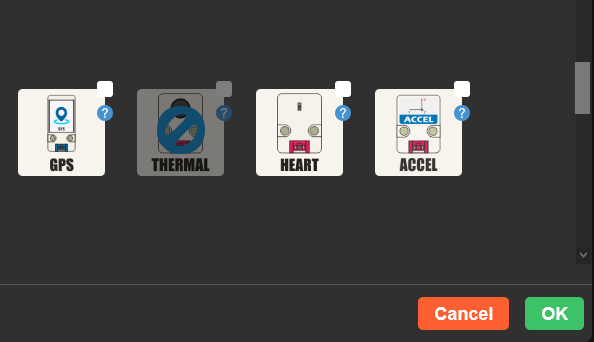
  • Thermal unit not selectable in UIFlow

    uiflow
    2
    1
    0 Votes
    2 Posts
    6k Views
    C
    @dario I had the same issue, using UiFlow Beta as a version I see UiFlow 1.8.2 and for both Core2 as well as Fire I can see and add them (the THERMAL unit). Only issue I personally now have is that I have a pretty unstable connection from the Fire or Core2 to the web IDE so I can't really apply the 1.8.2 blockly code. And the Desktop IDE at the moment is stuck at 1.7.5 that can't handle the files I save using version 1.8.2. Maybe for you with a stable UiFlow internet connection you can use version 1.8.2 to test and deploy your Thermal code. Make sure to ofcourse burn 1.8.2 to your device also.
  • DIY Examples, where?

    5
    1 Votes
    5 Posts
    8k Views
    T
    I'm now busy doing the SHT30 with I2C. If I may pick you brain a little more. The label blockly seems to choose itself how to show the data. Decimal, binairy, text. I want it to show a list (or sub-item) only binary. Now it's mixed. Have been seaching now for an hour or so. Can't find it how. Do you know how?
  • REMOTE+ Slider for motors

    11
    0 Votes
    11 Posts
    19k Views
    W
    Finally, I've got it working using the map-block from Easy I/O in UIFlow (by chance I found it!), which is just def slider_Motor_callback(slider_value): motion.set_motor_speed(2, map_value(slider_value, 0, 100, -127, 127)) without any translation. Works fine with Remote+
  • Interrupt routine for remote switch in UIFlow

    4
    1
    0 Votes
    4 Posts
    8k Views
    m5stackM
    @werner_g that's what I mean. haha. you did it.
  • Why the newest UIFlow does not support BaseX anymore?

    5
    0 Votes
    5 Posts
    10k Views
    m5stackM
    fixed.
  • UIFlow Remote+ Set image url

    3
    0 Votes
    3 Posts
    5k Views
    m5stackM
    thank you :)
  • Can I upload wav files to the Core 2 without using a microSD card?

    2
    0 Votes
    2 Posts
    4k Views
    W
    You can send a wav file to core2 using the beta version of the online UiFlow (v.1.8.2 is the latest as of today). on UiFlow, select "VER" icon on the menu bar and select BETA, then you can use v1.8.2 From the Manager window, select "WAV" tab, and upload a wav file. The file size must be less than 500 KB. Maybe you also need to update your core2's firmware to v1.8.2 using the M5Burner.
  • IR unit

    3
    0 Votes
    3 Posts
    6k Views
    K
    @iamliubo Hi, Are you interested in writing a program for money? Two signals from the air conditioning remote control need to be recorded. Best regards
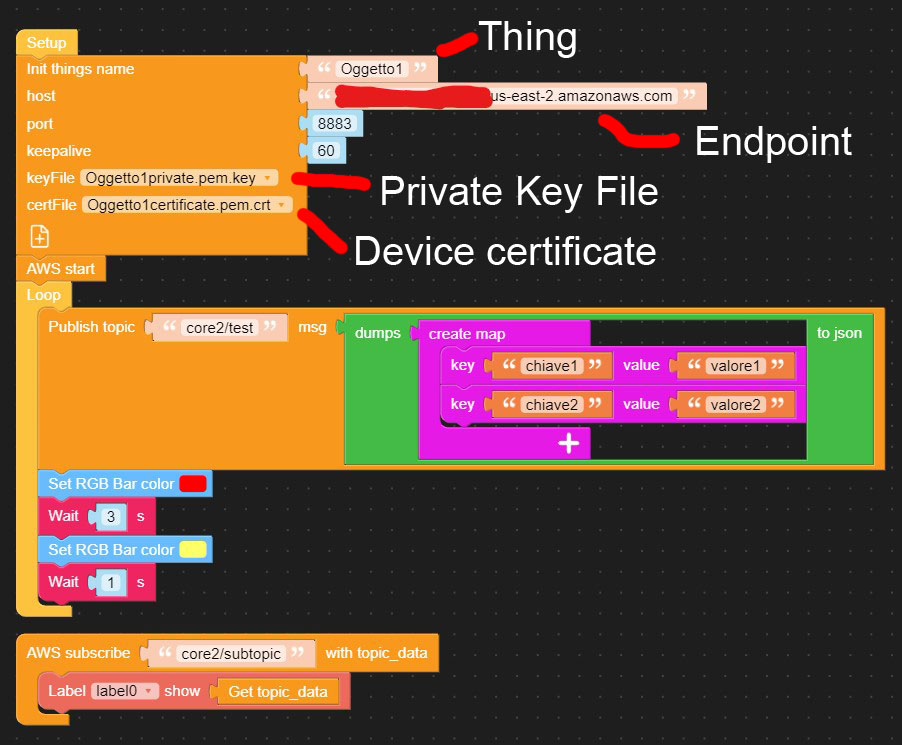
  • I'm unable to send data to AWS IoT

    9
    3
    0 Votes
    9 Posts
    11k Views
    M
    @ajb2k3 said in I'm unable to send data to AWS IoT: Did you try Rashibs guide? Yes, but it doesn't work. I tried with the AWS Python SDK and it works.
  • M5core2 No Buzzer/Beep options

    2
    0 Votes
    2 Posts
    5k Views
    IAMLIUBOI
    Hi @ganeyvim , If you use UIFlow to do this, you can try this block: [image: 1628477476503-60f02e32-a5db-4554-b2a3-38f0936b42e6-image-resized.png] And arduino code can refer here: https://github.com/m5stack/M5Core2/blob/master/examples/Basics/speak/speak.ino
  • How to deal with Time DST (daylight saving time) ?

    2
    0 Votes
    2 Posts
    4k Views
    M
    Not sure if it works for this application, but in another project we used an API from google that returns current time anywhere in the world. Also as a general point, UTC+0 (Zulu) time is the way to go. It has no DST, and can be displayed as local time using an API such as the above to get the DST anywhere on earth on any day/time. https://developers.google.com/maps/documentation/timezone/get-started
  • Treat color as a variable?

    4
    0 Votes
    4 Posts
    7k Views
    ajb2k3A
    Ahh I see. No, that just the way the blockly GUI options work in that you have to drag the UI element to the virtual screen to access the functions. Have you considered [image: 1627716157749-screenshot-2021-07-31-at-08.21.26.png] Which then creates a hidden placeholder line which then give you access to the functions? and then you create a function to create a line with a random colour. [image: 1627716829375-screenshot-2021-07-31-at-08.33.25.png] Edit Ahh I see, UI line and lcd line have different color functions
  • UIFlow M5Paper with RFID

    2
    0 Votes
    2 Posts
    4k Views
    felmueF
    Hello @wwhite you'll need to click onto the [+] button (on the left, below M5Paper) and add the RFID unit first. Then it will show up in the Units menu. Thanks Felix P.S. If you do not see the [+] button you could try with a different browser. I have the best UIFlow experience with Chrome.
  • UIFlow use Uart data in Variables

    1
    0 Votes
    1 Posts
    2k Views
    No one has replied
  • My old m5f file could not open with new uiflow web why?

    6
    1 Votes
    6 Posts
    13k Views
    felmueF
    Hello @world101 you are a genius. Thank you for the workaround. Works like a charm. Thanks Felix
  • Execute block in ADVANCED

    3
    1 Votes
    3 Posts
    5k Views
    AsmodevA
    I prefer the offline IDE as i may not have a connection to the internet, is there any way to download your online IDE for local uploading using a web browser?
  • Upload .wav file to M5Stack Core2?

    1
    0 Votes
    1 Posts
    2k Views
    No one has replied
  • How can I write UTF8 strings in a labet?

    2
    0 Votes
    2 Posts
    4k Views
    m5stackM
    maybe you could try to select unicode font.