🤖Have you ever tried Chat.M5Stack.com before asking??😎

Subcategories

  • Lessons and Guides for Uiflow

    125 Topics
    434 Posts
    A
    Hi, I'm a new user of M5stack products, having got an M5StickC Plus2 recently. It's a nice device, but the documentation isn't always accurate which makes learning how to use it a slow process. I tried to use the example for drawing a raw buffer to the screen here But it resulted in different garbled output each time and not a green rectangle. It seems that the len parameter is expecting 16-bit entries in the buffer so needs to be halved. Here's the code that works on my device (note the //2 for len parameter): width, height = 40, 30 green565 = 0x07E0 raw_buf = bytearray(width * height * 2) for i in range(width * height): raw_buf[2*i] = (green565 >> 8) & 0xFF raw_buf[2*i+1] = green565 & 0xFF Display.drawRawBuf(raw_buf, 100, 100, width, height, len(raw_buf)//2, swap=False) Hopefully this will help others and eventually get changed in the docs - assuming it's the same for all UIFlow2 supported devices? If anybody knows a fix to make it work properly for lower than 16bit depth screens so I can draw a raw buffer to a 1-bit canvas properly, please let me know!

  • 212 Topics
    790 Posts
    Y
    Hello I faced problem about digi-clock write charcter block. Problem is 3rd and 4th digit can not display with this block. I created below flow. Then Digi-Clock displays "0.1.:" for 1st and 2nd digit and colon. [image: 1778319992199-1aae8860-52c1-4c60-9097-5668ed98e2ee-image.jpeg] Howerver, index of write character block can be set only 0 to 4. Therefore it could not display 3rd and 4th digit. I think this index shoud be set 0 to 8. It doesn't work if index forced set to 5 to 8. (It was same behavior as 0 if index is set to 5.) I think the index for DigiClockUnit.set_char should be 0–8, not 0–4. https://uiflow-micropython.readthedocs.io/en/latest/unit/digi_clock.html Could you please kindly consider to fix this issue? (Or let me know please if any other solution available.) #Write raw data and write string blocks are works correctly. Using device -AtomS3 lite -Digi-clock UIFlow version:2.4.4 FW version:2.2.5 OS:Windows11 Thank you in advance Best Regards Yamada
  • 11 Topics
    33 Posts
    A
    @jeanfabre On web, just choice block type. [image: 1729260517944-86b7a25c93207d9a32e5b33471bb1f0.png] For code, add return description like this: def func(self) -> int: return 0
  • can uart support irq?

    2
    0 Votes
    2 Posts
    3k Views
    m5stackM
    Just like the mpy official document said. "Availability: Wipy". maybe future we will support this function, so pls give us some time. [image: 1624444172551-445f337c-fd4a-4f60-af15-495ba0b9608e-image.png]
  • Upload Code Failed

    3
    0 Votes
    3 Posts
    8k Views
    C
    I am experiencing the same symptoms with my M5Paper and Windows 10. If I run and download an m5 file that contains about 1400 blocks it does not work, but if I delete the blocks to make it about 400 blocks it works. M5 paper This problem occurs with all combinations of UIFlow-Desktop-IDE (Win) v1.0.16, v1.0.17 and firmware versions v1.7.7, v1.7.8. A sample m5 file (about 1250 blocks, the event also occurs with this file) https://github.com/collelog/m5paper-dashboard/blob/master/src/weather-jp.m5f These m5 files used to be able to be run and downloaded in conjunction with UIFlow(Web), but UIFlow(Web) is no longer available, as shown in the following topic. https://forum.m5stack.com/topic/3361/uiflow-cannot-currently-connect-to-any-m5stack-devices
  • Re: [Upload Code Failed](/topic/3364/upload-code-failed)

    1
    0 Votes
    1 Posts
    3k Views
    No one has replied
  • Is there a way to reuse blockly code?

    4
    5 Votes
    4 Posts
    8k Views
    L
    I agree, it is sad. :( There is hope, however! I opened up one of the .m5f files that is saved from UI Flow to learn that it is a hybrid json/xml file with all the blockly code represented in XML. I'm thinking of working up a simple script that could be run in browser to parse this data and allow you pull single blocks and merge them into another file. The concept here is that you upload two files (library.m5f and project.m5f, for examples sake) and then you can pluck whole blocks from and to either file. This way your great new invention from project.m5f can be added to your library and your great work from the library can be added to your project. It will be simple, dare I say crude, to start with but should help. Also, I did tinker with making a custom .m5b file and it's not that hard but not quite the same as having a pre-built set of routines you want to use all the time. I'll post more info here once I have anything worth playing with.
  • 0 Votes
    6 Posts
    12k Views
    ajb2k3A
    @robalstona thanks for sharing my book. @Serge hi, sorry been busy. I/O pins are 3v3 tolerant not 5V tolerant and no need additional components to protect them. The book was mainly based around UIFlow and M5Stack specific hardware but will have a look.
  • Once Function on demand in loop

    1
    0 Votes
    1 Posts
    2k Views
    No one has replied
  • http request to netatmo fails with error (solved!)

    11
    1
    0 Votes
    11 Posts
    25k Views
    ?
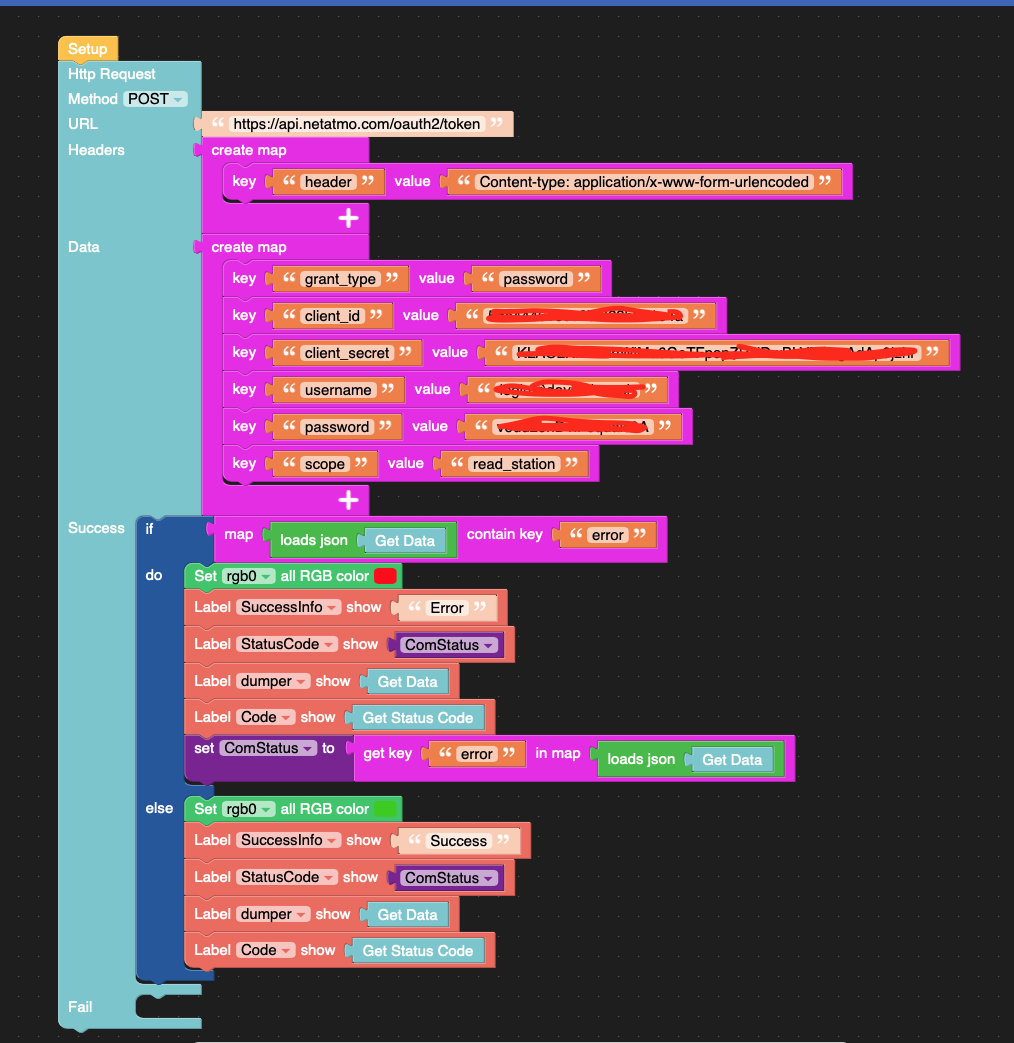
    Hi is it possible to share you code ? interest by this code. for me the UIFlow not work with my M5 stack so I use only arduino ide interface. Thx
  • Is it possible to emulate without a device?

    3
    0 Votes
    3 Posts
    7k Views
    S
    Many thanks @IAMLIUBO!
  • UIFlow

    3
    0 Votes
    3 Posts
    5k Views
    IAMLIUBOI
    Hi @yo8ufo , Recommend you to buy CORE2 FOR AWS.
  • Uiflow-desktop-ide installation under Linux Mint

    2
    0 Votes
    2 Posts
    5k Views
    IAMLIUBOI
    Hi @mikemuc68 , I use Mint too :) You can add this item to your menu. [image: 1621825848917-2021-05-24_11-08-resized.png] Hope it can help you.
  • MicroPython: handling multiple screens on Core2 with M5Screen()

    1
    0 Votes
    1 Posts
    4k Views
    No one has replied
  • HTTP POST to Azure IoT

    10
    3
    0 Votes
    10 Posts
    18k Views
    P
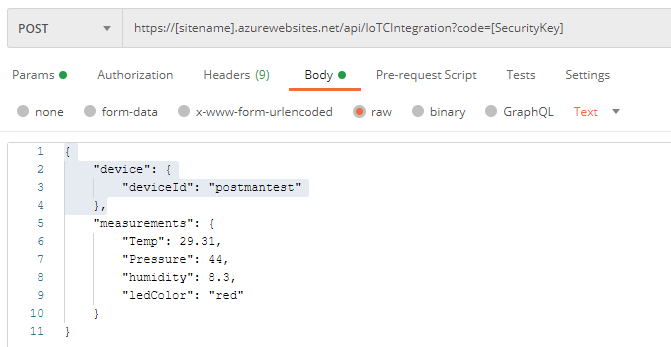
    Just wanted to thank you for posting this. It helped me a great deal.
  • how to build UIFlow_Lite-v1.7.6.bin from source ?

    3
    0 Votes
    3 Posts
    5k Views
    F
    let me show what we did: we use the CCI ISOBUS Stack, written in C, https://github.com/Meisterschulen-am-Ostbahnhof-Munchen/Install-ISOBUS-Environment/wiki ISOBUS makes GUI Communication ECU <--> Display over CAN, and much more for Smart Agriculture, which seems to be one of the Focus Topics of M5. i am a Teacher at School, and i want to Teach it in UIFlow instead of C, because easier to learn.
  • UHF RFID Anybody got this working, reading tags etc..

    3
    0 Votes
    3 Posts
    4k Views
    T
    @ajb2k3 Hi. Yeah using the UHF blocks and have got UHF tags whose ISO matches that of the reader.
  • code example for remote control between two M5stacks

    8
    2
    0 Votes
    8 Posts
    14k Views
    ajb2k3A
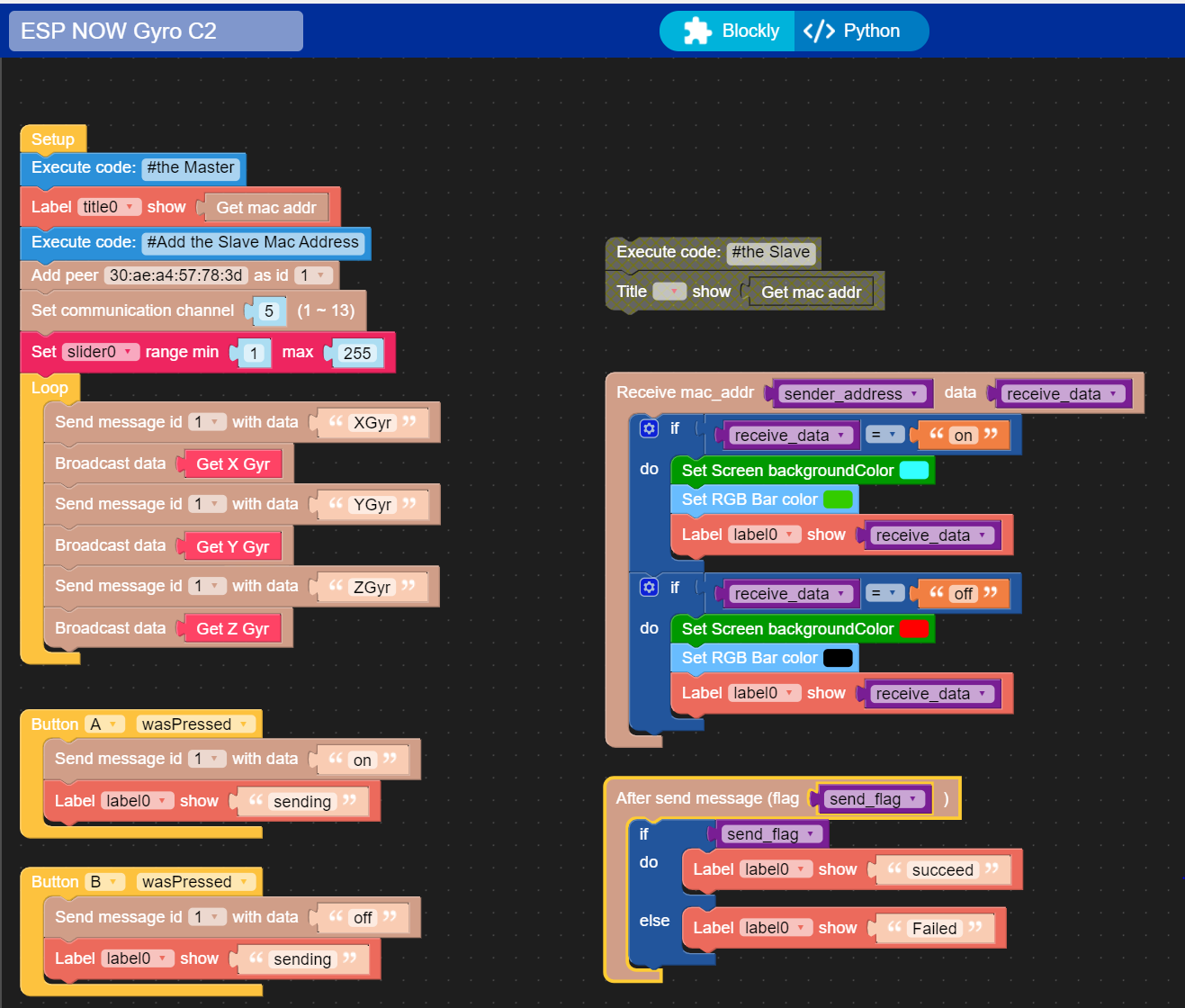
    You can send the values as a json string from the ROV to the remote and then separate the values from the sting on the receiving end. I am currently documenting this in my esp-now document.
  • Proper way to handle button (in hour counter)

    2
    1
    0 Votes
    2 Posts
    4k Views
    world101W
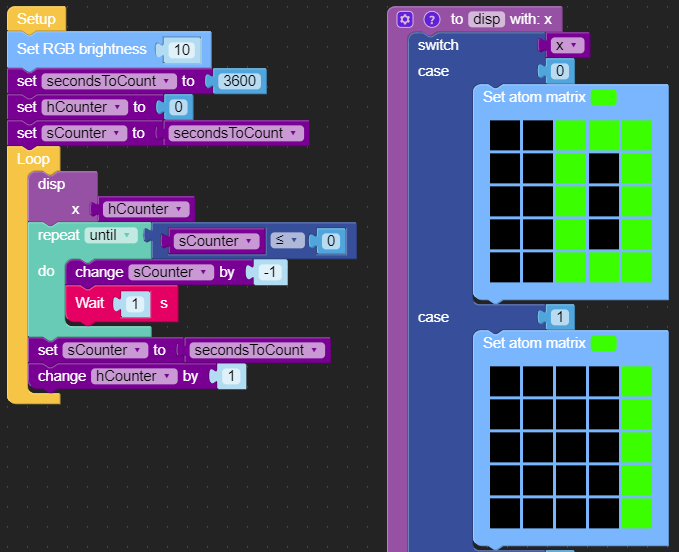
    @rosi Just add the “Button A wasPressed” callback (located in the Event blockly menu) to your flow and within that block, reset your counter values to the same as in the Setup function.
  • Core2: Python API to get battery charge level

    5
    0 Votes
    5 Posts
    11k Views
    O
    Thanks. I checked on the Core2 and here battery voltage also ranges from about 3.2V to 4.2V.
  • UIFlow .m5f demo/repository/store call it as you want

    1
    1 Votes
    1 Posts
    2k Views
    No one has replied
  • GoPlus2 UIFlow Block

    3
    1
    0 Votes
    3 Posts
    5k Views
    R
    I also connected GoPlus 2 to M5 Basic. Next, I connected Relay Units to PortB_1 and PortB_2 respectively and confirmed the operation. UIFlow Block is based on the image posted by ajb2k3_san. I didn't have to use a block of Relay Units. [image: 1618134404005-m5stack-basic-with-goplus2-resized.png] [image: 1618134467310-pxl_20210411_094123026-resized.jpg]
  • Get NTP timestamp with COM.LTE module does not work?

    1
    0 Votes
    1 Posts
    4k Views
    No one has replied