🤖Have you ever tried Chat.M5Stack.com before asking??😎
  • IR Block not available

    2
    0 Votes
    2 Posts
    3k Views
    felmueF
    Hello @Dave_White in the mean time you could use Advanced - PIN and setup GPIO9 (IR) as pin0 / output and then set pin0 LOW to turn the IR LED on. Below MicroPython code lets the IR LED blink: from m5stack import * from m5ui import * from uiflow import * import machine import time setScreenColor(0x111111) pin0 = machine.Pin(9, mode=machine.Pin.OUT, pull=0x00) while True: pin0.off() wait(1) pin0.on() wait(1) Cheers Felix
  • Missing Hardware (Spk) in Hardwares

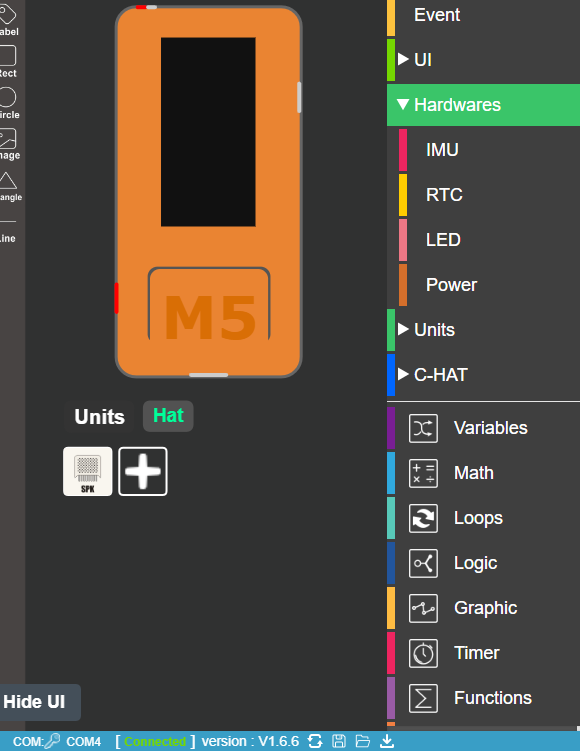
    hat missing hardwares
    2
    1
    0 Votes
    2 Posts
    6k Views
    ajb2k3A
    The SPK Hat appears under C-Hat not hardware.
  • UIFLOW 1.4.4 RFiD not working

    6
    0 Votes
    6 Posts
    10k Views
    ZontexZ
    @piya Hi Piya, would you mind please let me know what product as you using with UIFlow and can you connect to UIFlow generally and use other M5 products with it? just trying to dig deeper to understand where the problem is at.
  • M5StickC wifi connect screen never goes away

    2
    0 Votes
    2 Posts
    3k Views
    ZontexZ
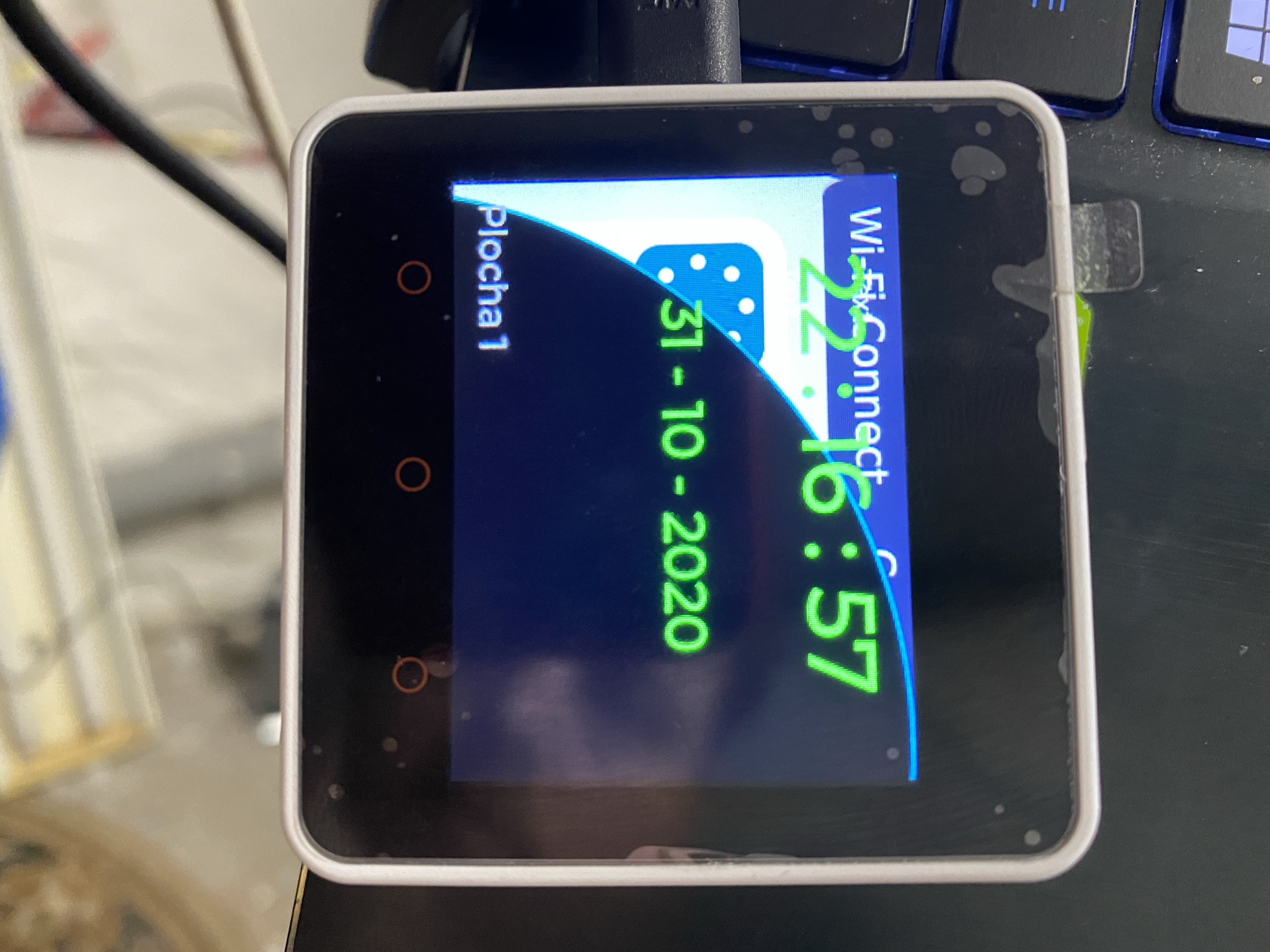
    Hi @mrono, Just filled a report about this bug. we'll work to fix it in the near future, thanks for letting us know! update: the bug will be fixed next release.
  • Wifi-connect layer still shown

    3
    1
    0 Votes
    3 Posts
    4k Views
    W
    Hello there, i have the same problem. When i use the "RUN" button on https://flow.m5stack.com/ then i have no problem, everything is working as expected. But when i download then the Wi-Fi Connect page is shown behind the text labels i use. This is the only code i use at the moment: from m5stack import * from m5stack_ui import * from uiflow import * from m5mqtt import M5mqtt screen = M5Screen() screen.clean_screen() screen.set_screen_bg_color(0xFFFFFF) m5mqtt = M5mqtt('SchermWoonkamer', '192.168.1.100', 1883, '', '', 300) label0 = M5Label('Text', x=7, y=7, color=0x000, font=FONT_MONT_14, parent=None) def fun_domoticz_out_(topic_data): global params label0.set_text(str(topic_data)) pass m5mqtt.subscribe(str('domoticz/out'), fun_domoticz_out_) m5mqtt.start() label0.set_text('Opgestart')
  • M5Burner on linux mint doesn't work

    3
    0 Votes
    3 Posts
    6k Views
    L
    GREAT! it worked thanks!
  • 0 Votes
    5 Posts
    10k Views
    T
    Here is some feedback about the current version V1.6.3 Quite painful to use: For instance the first couple hours of playing around: Documents mention python examples of NTP, which is not current/ does not match with the blockly ntp (which does work) You can use the "online mode" with the flow.m5stack.com online IDE... but probably have to also use the m5burner -> COM port monitor to see all error codes ( i dont think this com port monitor can send the enter key to the serial port?) If you try to use the desktop-ide : on the Atom, you have to constantly hold the button and reset and boot into "blue" usb-mode. Then you can fiddle around with the desktop-ide to "refresh" then "connect" then load the hopefully latest save of your blockly, then upload the code (dear god dont hit "run" or else who knows if its uploading or running the last code that errored or what) Then you have to restart the board, can't see any output. Have to close down the desktop-ide, have to open up a third party terminal program such as putty (guess the buad rate since the m5burner says 750000 but that doesnt work, 115200 does seem to work for some reason) Yay I see the error code that ntp doesnt exist. Ok so now desktop-usb mode is not compatible with any online functionality. I have to add a bunch more code to make sure wifi is connected before I try to set ntptime... i guess i need to do all wifi connectivity manually now, and the built in ntp library doesnt do any error handling So its clear the blockly stuff is just a dream and not for practicality, it has no error handling and wont work most of the time without painful amounts of error checking. It appears none of the development scenarios are designed around the fact you need com-port monitor to see the huge amount of errors that are going to be generated with each new block added Python is great in theory, but it needs really short feedback loops in terms of error output after every tiny change
  • Core2: Vibration motor intensity setting support..

    5
    0 Votes
    5 Posts
    11k Views
    felmueF
    Hi skink you're very welcome. The required fix mentioned before has now been included to the M5Core2 library so hopefully in one of the next UIFlow updates it will be picked up. Happy Stacking! Felix
  • Resize rectangle bug

    1
    0 Votes
    1 Posts
    3k Views
    No one has replied
  • M5 Core burn failed v1.4.5.1

    3
    1
    0 Votes
    3 Posts
    5k Views
    R
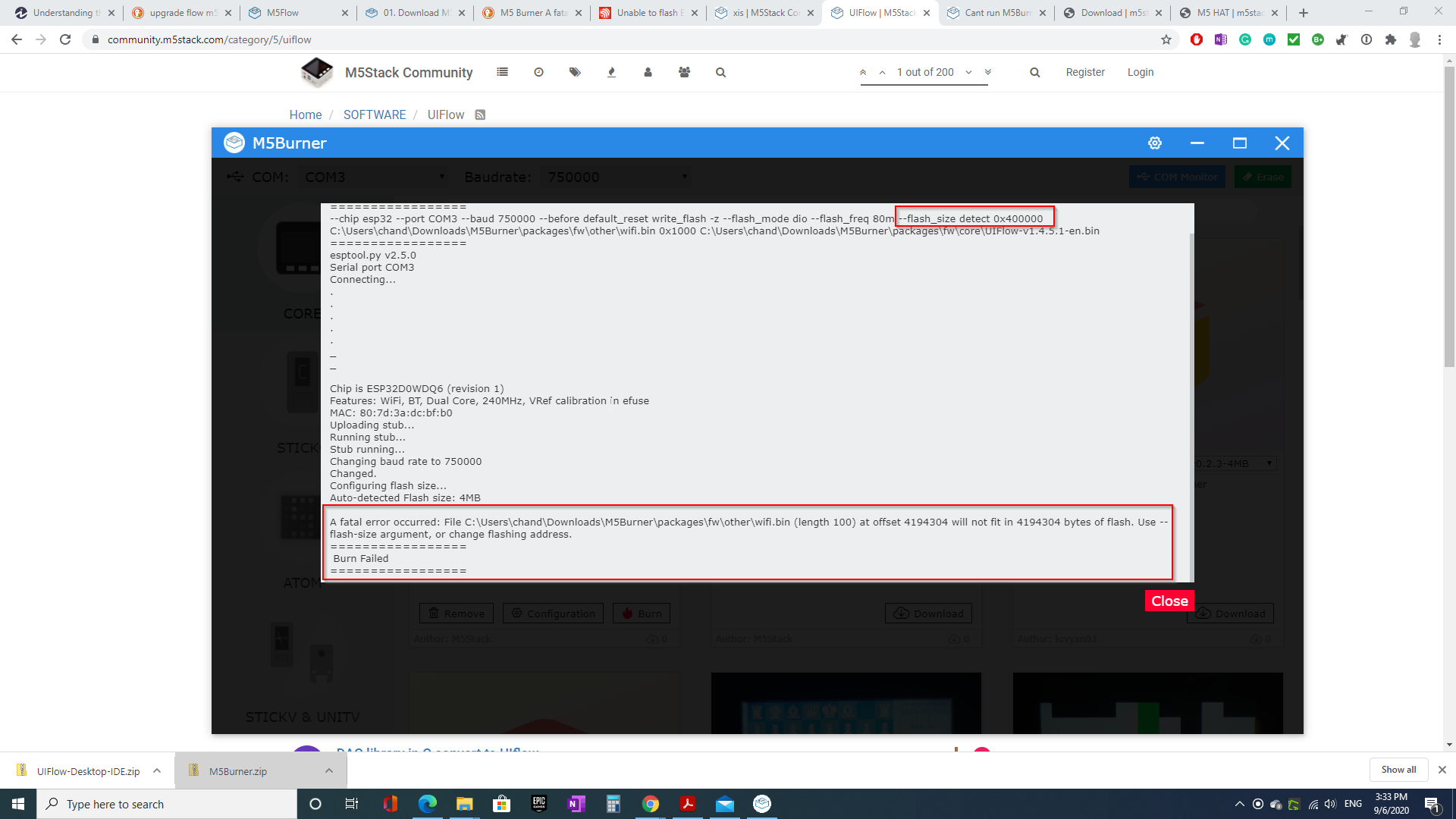
    After option flash size auto detect you have parameter size/address set to 0x400000. Probably this number is treat as address to write wifi.bin at end last byte of flash memory (dont fit in flash from this address, write beyound flash). Try burn firmware without settings a wifi credentials, or don't set flash size if auto detect size option is set. Eventually manually run esptool in command line with correct parameters.
  • ToF Hat is not working with Firmware 1.6.2

    1
    0 Votes
    1 Posts
    3k Views
    No one has replied
  • Avoid M5Stack - it is a waste of time

    13
    0 Votes
    13 Posts
    23k Views
    G
    @felmue said in Avoid M5Stack - it is a waste of time: Hello @Efried I think you might be correct, both modules seem to use UART2 (GPIO16 / GPIO17) to communicate. I am afraid you'll need to use a different UART port for one of the modules in order to have both working at the same time. The GPS module is already prepared for that. Please have a look here: https://docs.m5stack.com/#/en/module/gps Felix ... this is the same with the M5GO CHG Base.
  • Resource manager does not work

    images uiflow upload resource manager
    5
    0 Votes
    5 Posts
    10k Views
    M
    @world101 that works fantastic. Thank you so mucho😭
  • How to save data to SD-card

    3
    0 Votes
    3 Posts
    8k Views
    E
    Would you mind adding some indication about control characters there, like "\r\n" Please recognize that you promised fast prototyping using the M5Stack but now it is clear that: it is cumbersome, because the high level uiflow functions are not documented, and no working examples in micropython given to validate the high level functions the combination of modules was not testet (ok a lot of variants) the physical design has some flaws - the screen may brake when assembling, disassembling needs force - may be you may invent a receptacle with unlocking lever Do you have a standard before selling modules for quality control, and a test plan?
  • Robot with StickC, RoverC and TOF

    5
    0 Votes
    5 Posts
    9k Views
    J
    I have copied the blocks as Micropython code: I put the Tof to the grove port of the stickC. for a little time it has worked. Now it reads some values and then it produces an I2C (Error 19) from m5stack import * from m5ui import * from uiflow import * lcd.setRotation(0) import time from m5mqtt import M5mqtt import unit import hat setScreenColor(0x111111) tof0 = unit.get(unit.TOF, unit.PORTA) hat_roverc0 = hat.get(hat.ROVERC) m5mqtt = M5mqtt('MyBot', '192.168.178.39', 1883, '', '', 300) label0 = M5TextBox(10, 10, "Hello", lcd.FONT_Default,0xFFFFFF, rotate=1) label4 = M5TextBox(50, 24, "Text", lcd.FONT_Default,0xFFFFFF, rotate=0) label1 = M5TextBox(10, 24, "Text", lcd.FONT_Default,0xFFFFFF, rotate=0) label5 = M5TextBox(50, 41, "Text", lcd.FONT_Default,0xFFFFFF, rotate=1) label6 = M5TextBox(50, 56, "Text", lcd.FONT_Default,0xFFFFFF, rotate=0) label2 = M5TextBox(10, 41, "Text", lcd.FONT_Default,0xFFFFFF, rotate=0) label3 = M5TextBox(10, 56, "Text", lcd.FONT_Default,0xFFFFFF, rotate=0) import math from numbers import Number myStr = None steuerung = None geschwindigkeit = None richtung = None drehung = None dummy = None pwrTen = None zahl = None auto = None mySpeed = None myTime = None i = None backSpeed = None start = None myChar = None dist = None def toInt(myStr): global steuerung, geschwindigkeit, richtung, drehung, dummy, pwrTen, zahl, auto, mySpeed, myTime, i, backSpeed, start, myChar, dist pwrTen = 0 zahl = 0 i = 0 while i < len(myStr): myChar = myStr[int(i - 1)] if myChar == '0': zahl = zahl * math.pow(10,pwrTen) else: if myChar == '1': zahl = zahl + 1 * math.pow(10,pwrTen) else: if myChar == '2': zahl = zahl + 2 * math.pow(10,pwrTen) else: if myChar == '3': zahl = zahl + 3 * math.pow(10,pwrTen) else: if myChar == '4': zahl = zahl + 4 * math.pow(10,pwrTen) else: if myChar == '5': zahl = zahl + 5 * math.pow(10,pwrTen) else: if myChar == '6': zahl = zahl + 6 * math.pow(10,pwrTen) else: if myChar == '7': zahl = zahl + 7 * math.pow(10,pwrTen) else: if myChar == '8': zahl = zahl + 8 * math.pow(10,pwrTen) else: if myChar == '9': zahl = zahl + 9 * math.pow(10,pwrTen) else: pass i = (i if isinstance(i, Number) else 0) + 1 pwrTen = (pwrTen if isinstance(pwrTen, Number) else 0) + 1 return zahl def fun_OmniBot_steuer_(topic_data): global steuerung, geschwindigkeit, richtung, drehung, dummy, pwrTen, zahl, auto, mySpeed, myTime, i, backSpeed, start, myChar, myStr, dist steuerung = topic_data label1.setText(str(steuerung)) pass m5mqtt.subscribe(str('OmniBot/steuer'), fun_OmniBot_steuer_) def fun_OmniBot_geschwindigkeit_(topic_data): global steuerung, geschwindigkeit, richtung, drehung, dummy, pwrTen, zahl, auto, mySpeed, myTime, i, backSpeed, start, myChar, myStr, dist geschwindigkeit = topic_data label2.setText(str(geschwindigkeit)) mySpeed = toInt(geschwindigkeit) backSpeed = -1 * mySpeed pass m5mqtt.subscribe(str('OmniBot/geschwindigkeit'), fun_OmniBot_geschwindigkeit_) def fun_OmniBot_richtung_(topic_data): global steuerung, geschwindigkeit, richtung, drehung, dummy, pwrTen, zahl, auto, mySpeed, myTime, i, backSpeed, start, myChar, myStr, dist richtung = topic_data label3.setText(str(richtung)) pass m5mqtt.subscribe(str('OmniBot/richtung'), fun_OmniBot_richtung_) def fun_OmniBot_rotation_(topic_data): global steuerung, geschwindigkeit, richtung, drehung, dummy, pwrTen, zahl, auto, mySpeed, myTime, i, backSpeed, start, myChar, myStr, dist drehung = topic_data label4.setText(str(drehung)) pass m5mqtt.subscribe(str('OmniBot/rotation'), fun_OmniBot_rotation_) def fun_OmniBot_auto_(topic_data): global steuerung, geschwindigkeit, richtung, drehung, dummy, pwrTen, zahl, auto, mySpeed, myTime, i, backSpeed, start, myChar, myStr, dist dummy = topic_data label5.setText(str(dummy)) pass m5mqtt.subscribe(str('OmniBot/auto'), fun_OmniBot_auto_) auto = False myTime = 0 mySpeed = 0 start = (time.ticks_ms()) - myTime label0.setText('OmnibotRC V2-0-2') label4.setText('Hello M5') while True: dist = tof0.distance label6.setText(str(dist)) wait_ms(50) if myTime == 0 or start > 300000: myTime = time.ticks_ms() m5mqtt.start() else: pass if dist > 50: M5Led.off() if richtung == 'stop' or steuerung == 'stop' or drehung == 'stop': hat_roverc0.SetAllPulse(0, 0, 0, 0) else: if richtung == 'forward': hat_roverc0.SetAllPulse(mySpeed, mySpeed, mySpeed, mySpeed) else: pass if richtung == 'back': hat_roverc0.SetAllPulse(backSpeed, backSpeed, backSpeed, backSpeed) else: pass if steuerung == 'left': hat_roverc0.SetAllPulse(mySpeed, backSpeed, backSpeed, mySpeed) else: pass if steuerung == 'right': hat_roverc0.SetAllPulse(backSpeed, mySpeed, mySpeed, backSpeed) else: pass if drehung == 'RotLeft': hat_roverc0.SetAllPulse(backSpeed, mySpeed, backSpeed, mySpeed) else: pass if drehung == 'RotRight': hat_roverc0.SetAllPulse(mySpeed, backSpeed, mySpeed, backSpeed) else: pass else: M5Led.on() wait_ms(2)

  • ESP NOW send not working in 1.6.1

    10
    0 Votes
    10 Posts
    15k Views
    m5stackM
    @ardo ok thank you again.. we will fix these bug in next version. have nice day.
  • m5f file not loading anymore

    5
    0 Votes
    5 Posts
    9k Views
    N
    @world101 wonderfull my friend ! You saved my work and ly nerfs lol. It works.
  • .m5f files only partially loading

    4
    0 Votes
    4 Posts
    8k Views
    world101W
    @Devilstower see what I wrote here to see if it helps you. https://community.m5stack.com/topic/2154/m5f-file-not-loading-anymore If not, open the Chrome developer console and see what error is thrown when loading the m5f file in uiFlow.
  • uiflow Lcd.print function issue or feature ?

    6
    0 Votes
    6 Posts
    11k Views
    R
    @wingtiger Thanks for the info with this font loading command. The problem is that to upgrade to the new firmware version I have to change most of my programs.
  • Cant run M5Burner in Linux

    9
    0 Votes
    9 Posts
    20k Views
    X
    Works great. Thank you so much :)