🤖Have you ever tried Chat.M5Stack.com before asking??😎

Subcategories

  • Hear all about new products, initiatives and events here.

    14 Topics
    20 Posts
    kurikoK
    UiFlow2.0 quick start for CoreMP135 has been released. https://docs.m5stack.com/en/guide/linux/coremp135/uiflow2
  • 2 Topics
    2 Posts
    ajb2k3A
    Members will have noticed that some of us have pictures instead of letters next to our names. This isn't anything to do with status but is a function of the forum available to most (if not all) forum member. To set a picture for your avater you need to click on your letter in the top right hand side of the screen and a menu will appear. Click "Edit Profile" and you will be taken to the profile screen. At the top is a picture with your initial in it, click on it and you can upload an image to use.
  • Here is where you'll find News about promotions, M5stack related blog posts and Videos from M5stack users

    233 Topics
    308 Posts
    S
    To fix issues with M5Burner on Mac, ensure you’ve installed the correct USB-to-serial drivers (like CP210x or CH340). Run M5Burner using Rosetta if needed. Allow app permissions via System Settings > Privacy & Security. Always download the latest M5Burner version compatible with your mac.
  • images or icons for UI flow with M5 Core2

    2
    0 Votes
    2 Posts
    4k Views
    felmueF
    Hello @jimbol here is a list of all images in the img directory: >>> os.listdir('img') ['UiFlow_USB_320_240.img', 'UiFlow_bg_320_240.img', 'applist_bar_320_40.png', 'cloud_green.png', 'cloud_red.png', 'loding.png', 'loding_fail.png', 'loding_success.png', 'm5stack.pbm', 'm5stack.png', 'menu_bg.png', 'setup_bar_320_40.png', 'start_logo_320_240_dot.png', 'start_logo_320_240_flow.png', 'start_logo_320_240_ui.png', 'startup_bg_320_240.img', 'uiflow_logo16bitTB.bmp', 'usb.png', 'wifi_config_ap_connect.png', 'wifi_config_bg_320_240.img', 'wifi_config_sta_connect.png', 'wifi_config_sta_fail.png', 'wifi_connect_ui_bg_320_240.img', 'wifi_green.png', 'wifi_red.png'] You can set it like this: image0.set_img_src("img/wifi_red.png") Thanks Felix

  • cannot open source file "AvailabilityMacros.h" (dependency of "M5EPD.h")

    3
    0 Votes
    3 Posts
    7k Views
    S
    In Mac Terminal, type xcrun --show-sdk-path to get the XCode SDK path. Add the path using the -I option and additional /usr/include/** to the build_flags option in platformio.ini eg. build_flags = -I /Library/Developer/CommandLineTools/SDKs/MacOSX10.15.sdk/usr/include/** found solution on some japanese blog
  • [UIFlow] Is it possible to update device via Internet from CICD pipeline

    1
    0 Votes
    1 Posts
    3k Views
    No one has replied
  • M5stack wont turn on on Battery.

    6
    0 Votes
    6 Posts
    12k Views
    R
    I had the same issue with my brand new m5 FIRE. While browsing the option in UIFlow I stumbled upon the Hardware -> Power -> setCharge() function. In UIFlow Python this is power.setCharge(). Regardless of the parameter (true or false) this badly messes up the power state of m5 FIRE. Currently I am running UIFlow v1.9.0-fire but the issue was also there in the v1.8.x series. After using setCharge() the m5 will not power on while on battery. It will only power on when powered over USB. Disconnecting the USB cable powers it off. Very unfortunate state to be in. I was finally able to restore the desired state (turn off by press power button twice, turn on again with power button) using Arduino IDE with these statements: M5.Power.setPowerBoostOnOff(false); //Change the power on / off method. The power does not turn off when connected via USB. true=Press and hold to turn on / off. false=Turn on / off with two short presses. M5.Power.setPowerBoostSet(false); //Change the power on / off method true=ON / OFF in one short press. false=same as above M5.Power.setPowerVin(true); //When the power supply from USB etc. is cut off, Decide whether to turn on the power again. M5.Power.setPowerBtnEn(true); //Set whether to accept the power button. M5.Power.setPowerBoostKeepOn(false); //Always output power. True= Always output power. False=not Always output power. M5.Power.setAutoBootOnLoad(true); //Set whether to automatically start when power consumption occurs Strangely enough using M5.Power.setCharge() in Arduino IDE does not cause any issues at all. It seems to me that the UIFlow setCharge() function is broken for m5 FIRE boards.
  • Error compiling for board M5Stack-ATOM

    4
    1 Votes
    4 Posts
    7k Views
    felmueF
    Hello @vgamlc thank you and you are welcome. Thank you for your feedback. Happy New Year! Felix
  • M5Paper Line Break in text

    3
    0 Votes
    3 Posts
    6k Views
    D
    In case you are interested about the final result: https://youtu.be/hrmYldbOStQ
  • HELP - UNIT V2 JSON Commands do not respond

    1
    0 Votes
    1 Posts
    2k Views
    No one has replied
  • Alternate power

    2
    0 Votes
    2 Posts
    2k Views
    ajb2k3A
    @spydaz no, you cannot back feed the ports, you can connect power to the internal bus connector of the M5Stacks.
  • 0 Votes
    5 Posts
    4k Views
    T
    Thanks you for your quick reply and good info ! BR /T
  • Waterproof temperature probe

    6
    2
    0 Votes
    6 Posts
    10k Views
    ArnoA
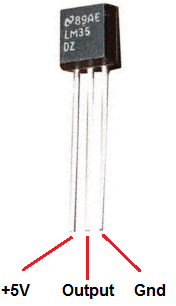
    @robalstona said in Waterproof temperature probe: Ewentually try this code with your lm35 to check of works (i tested my lm35 sensor with it) [image: 1638218020818-screenshot_20211129-210415-01-resized.jpeg] I carried out the test on a CORE2, I have very random and non-reproducible values. Thank you for the example under UIflow for ADCs, it will be useful to me with another sensor. I keep the idea of DS18B20, it works perfectly.
  • This topic is deleted!

    1
    0 Votes
    1 Posts
    3 Views
    No one has replied
  • M5Paper on macos Big Sur

    25
    0 Votes
    25 Posts
    65k Views
    J
    @ajb2k3, what .kext did you delete? I can see that there is a conflicting driver but I can't figure out which one.
  • Error Network Mesh with M5Stack

    2
    0 Votes
    2 Posts
    4k Views
    V
    Any help? Pleased
  • How to use vscode git project and sync files to m5StickC

    1
    0 Votes
    1 Posts
    2k Views
    No one has replied
  • Powering SKU: U111 NB-IoT Unit

    2
    0 Votes
    2 Posts
    2k Views
    felmueF
    Hello @haavard-holm most (if not all) units have a 5 V input. Internally there often is a power regulator to 3.3 V or whatever voltage the ICs used in the unit requires. The signal lines are 3.3 V as they are connected directly to GPIOs of the ESP32 which is 3.3 V too. If the data lines of the IC in the unit have an even lower voltage level shifters are put in place. The input voltage of the regulator is 2.7 V to 5.5 V. The minimal voltage drop between input and output is about 0.6 V for these regulators. So if you feed it with 3.3 V I'd guess the output voltage to be about 2.7 V. According to its datasheet the SIM7020 IC has an operating voltage range from 2.1 V to 3.6V so you should be fine. Its data lines are 1.8 V which are then level shifted to the output voltage of the regulator (e.g. 2.7 V) which should still be high enough for the ESP32 GPIOs to recognize properly. Thanks Felix
  • Using IR Remote sensor with PbHub

    4
    0 Votes
    4 Posts
    6k Views
    felmueF
    Hello @Steve1 sorry, at this point in time I am out of ideas. I don't have the IR remote sensor so I cannot test this myself. Hopefully somebody else can help you. Thanks Felix
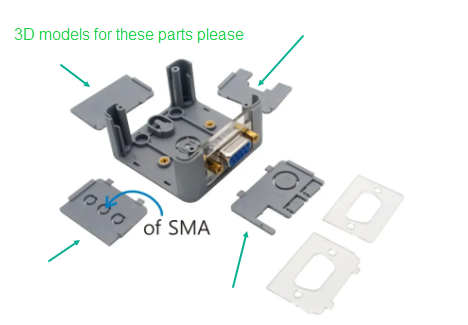
  • Base26 3D Models

    1
    1
    0 Votes
    1 Posts
    3k Views
    No one has replied
  • Speaker playWAV creating 'unexpected keyword' error

    7
    1
    0 Votes
    7 Posts
    7k Views
    B
    @ajb2k3 OK. Thank you.
  • GSM for Atom

    1
    0 Votes
    1 Posts
    3k Views
    No one has replied
  • Problems using lvgl with touchscreen

    3
    0 Votes
    3 Posts
    8k Views
    F
    @felmue Thank you, I've learn a lot from it