🤖Have you ever tried Chat.M5Stack.com before asking??😎

Subcategories

  • You can discuss ESPHome related issues here, share your yaml and projects.

    21 Topics
    34 Posts
    D
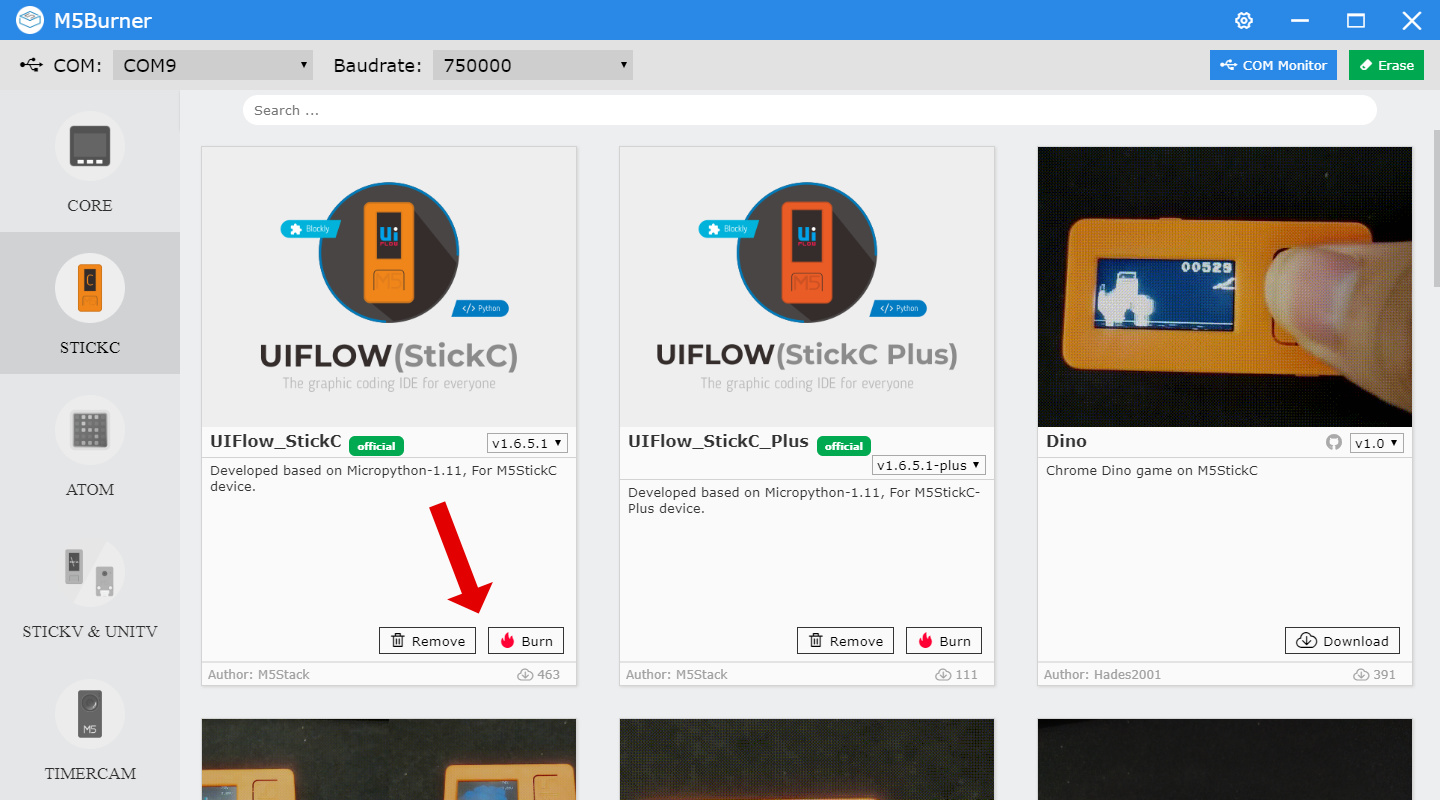
    Hey! I’m currently having an issue with my stick s3 which arrived literally a couple days ago. When plugged into power, it makes a sound similar to that of a clock ticking while the green LED flashes/blinks. Sometimes it’s a high pitched squeak. When plugged into my computer, it isn’t showing up on the m5burner or any other web based tools. It was working perfectly fine previously however. When unplugged the device does nothing. I’ve tried entering the flash firmware mode by pressing and holding the power button while plugging in but no luck. Also tried pressing the button twice in hopes that the blinking stops, but nope Was using Bruce firmware Thank you!
  • Squareline Studio and LVGL Discussion

    6 Topics
    19 Posts
    S
    @俺がガンダムだ said in LVGL performance problem: I applied LVGL on stickc-plus2,with TFT_eSPI's st7789v2 driver.But the refreshing rate is very low (while doing "load screen anim").I know stickc had good performance on drawing screen (by watching the video of M5stick T-Lite Thermal tutorial). And the LVGL also has a good performance through Dial-ESP32-S3 and Din-Meter demonstration video. So what is the reason of such low performance. Cound it be the TFT_eSPI library? I’ve seen similar issues on the StickC-Plus2. It could be due to TFT_eSPI settings, try increasing the SPI frequency or enabling DMA. Also, check your LVGL buffer config; full buffering helps with performance.
  • Discuss all things UIFlow here. Bugs, Improvements, Guides etc...

    1k Topics
    4k Posts
    RunaqueR
    Additional finding: Secondary firmware bug — boot sequence crash on cold boot (MEPC: 0x00000006) While investigating the sta.scan() crash, I discovered a second distinct firmware bug affecting the Tab5 in UIFlow2 v2.4.4. Description: On every cold boot, the device crashes during UIFlow2's initialization sequence before any user code runs. The device automatically reboots and boots successfully on the second attempt. Crash signature: Guru Meditation Error: Core 1 panic'ed (Instruction access fault). Exception was unhandled. MEPC : 0x00000006 MCAUSE : 0x00000001 MTVAL : 0x00000006 Key observation: The stack contains 0x7474696c (ASCII: "litt") pointing to a crash inside UIFlow2's LittlevGL/LVGL initialization sequence — not in user code. Reproducibility: 100% reproducible on cold boot Device always self-recovers on automatic reboot Completely independent of user code — happens before any user application starts This is a separate bug from issue #94 (sta.scan() at MEPC: 0x4ff13582). Both bugs share the same root environment (UIFlow2 v2.4.4 on Tab5) but occur at different stages and involve different subsystems.
  • M5Stack is programmable with the Arduino IDE. Here you can troubleshoot your issues and share Arduino code and libraries

    468 Topics
    2k Posts
    B
    This is the closest I got on a code which provides some sort of acceleration/deaceleration on jumping btw positions. I wonder if is there an official way to achieve this smoothly. Thanks #include "unit_rolleri2c.hpp" #include <M5Unified.h> /* Going to random position every 1 second - trying to move with ease in/out, but very artificial/jittery - not smooth. */ UnitRollerI2C RollerI2C; const int32_t UNITS_PER_DEGREE = 100; const int32_t POSITION_TOLERANCE = 150; // ~1.5° arrival threshold const uint32_t MOVE_DURATION_MS = 3000; // total time per move (ms) — tune 1000–5000 const uint32_t STEP_MS = 40; // trajectory update interval (ms) const uint32_t PAUSE_MS = 1000; // pause at target before next move int32_t basePosition = 0; // ── Ease-in / ease-out using a sine curve ────────────────────────────────── // t=0.0 → 0.0 | t=0.5 → 0.5 | t=1.0 → 1.0 // Accelerates from rest, decelerates to rest — smooth S-curve. float easeInOut(float t) { return (1.0f - cosf(t * PI)) / 2.0f; } // Drives from startUnits → targetUnits over MOVE_DURATION_MS with ease in/out. // Returns true when the motor confirms arrival within tolerance. bool easedMoveTo(int32_t startUnits, int32_t targetUnits) { uint32_t moveStart = millis(); while (true) { uint32_t elapsed = millis() - moveStart; float t = min((float)elapsed / (float)MOVE_DURATION_MS, 1.0f); // Compute eased intermediate setpoint float eased = easeInOut(t); int32_t intermediate = startUnits + (int32_t)((targetUnits - startUnits) * eased); RollerI2C.setPos(intermediate); // Once we've sent the final setpoint, check arrival if (t >= 1.0f) { int32_t actual = RollerI2C.getPosReadback(); if (abs(targetUnits - actual) <= POSITION_TOLERANCE) { return true; // ✅ arrived } // Give a small extra window for the PID to settle if (elapsed > MOVE_DURATION_MS + 1000) { return false; // ⏱️ timed out even after easing finished } } delay(STEP_MS); } } int32_t degreesToUnits(float deg) { return (int32_t)(deg * UNITS_PER_DEGREE); } float unitsToDegrees(int32_t u) { return u / (float)UNITS_PER_DEGREE; } void setup() { M5.begin(); Serial.begin(115200); delay(500); randomSeed(analogRead(0)); bool found = RollerI2C.begin(&Wire, 0x64, 2, 1, 400000); if (!found) { Serial.println("❌ Roller485 NOT found on I2C! Check wiring."); while (true) delay(1000); } Serial.println("✅ Roller485 found!"); Serial.print("Vin (x0.01V): "); Serial.println(RollerI2C.getVin()); Serial.print("ErrorCode: "); Serial.println(RollerI2C.getErrorCode()); RollerI2C.setOutput(0); RollerI2C.setMode(ROLLER_MODE_POSITION); RollerI2C.setPosMaxCurrent(80000); RollerI2C.setOutput(1); delay(100); basePosition = RollerI2C.getPosReadback(); Serial.print("Base position (raw): "); Serial.println(basePosition); Serial.println("Ready. Starting eased random position loop...\n"); delay(500); } int32_t currentTarget = 0; // tracks last target so we ease FROM it void loop() { // Random angle offset from base: -180° to +180° float targetDegrees = random(-180, 181); int32_t targetUnits = basePosition + degreesToUnits(targetDegrees); int32_t fromUnits = RollerI2C.getPosReadback(); // start from actual current pos Serial.print("➡️ "); Serial.print(unitsToDegrees(fromUnits - basePosition), 1); Serial.print("° → "); Serial.print(targetDegrees, 1); Serial.println("° (easing...)"); bool arrived = easedMoveTo(fromUnits, targetUnits); float actualDeg = unitsToDegrees(RollerI2C.getPosReadback() - basePosition); if (arrived) { Serial.print("✅ Arrived at "); } else { Serial.print("⏱️ Stopped at "); } Serial.print(actualDeg, 1); Serial.println("°"); Serial.print(" ErrorCode: "); Serial.println(RollerI2C.getErrorCode()); Serial.println(); delay(PAUSE_MS); // pause 1 second at target }

  • Discuss all things Micropython here. Get help, Recommend Libraries, Report Bugs and Improvements

    218 Topics
    898 Posts
    J
    @pabou try using uiflow to generate the code, then peek copy from there.
  • For discussion and assistance with M5EZ.

    13 Topics
    62 Posts
    J
    using the mentioned changes hello_world example did compile and got uploaded to my core2. However , nothing is shown on screen, screen remains black.
  • Discuss all things related to ESP - IDF, Espressifs IoT Development Framework

    29 Topics
    101 Posts
    felmueF
    Hello @daniyyel ah, ok. So the correct documentation is here. Have a look at the code examples in Quick Start Guide to see how the M5IOE1 needs to be programmed to turn on power etc. The function is called SIM7028_EN() and first turns on power then resets the modem. Thanks Felix
  • UiFlow 2.0 related issues discussion.

    364 Topics
    2k Posts
    N
    @lishi 我CoreS3+GPSv2.1,一样的,只要loop里更新label就会闪退重启。不止是GPS,用LoRaWAN-EU868也会这样。老哥有找到原因吗?
  • CircuitPython may support ESP32 in the near future

    1
    1 Votes
    1 Posts
    5k Views
    No one has replied
  • M5Burner: enable setting WiFi on "advanced" devices like Core2

    3
    0 Votes
    3 Posts
    5k Views
    M
    Thanks @felmue, I just updated M5Burner to the latest version and now it works :-)
  • M5Paper load font

    2
    0 Votes
    2 Posts
    5k Views
    lukasmaximusL
    please refer to my reply on your other post, has this been replicated 3 times now?
  • M5Paper load font from sdcard

    core
    2
    0 Votes
    2 Posts
    6k Views
    lukasmaximusL
    Hi @Powersoft please don't double post, and refer to my reply on your other post
  • How to identify the TOUCH ?

    1
    0 Votes
    1 Posts
    2k Views
    No one has replied
  • This topic is deleted!

    1
    0 Votes
    1 Posts
    1 Views
    No one has replied
  • Using capacitive touch with m5 Core2?

    2
    0 Votes
    2 Posts
    4k Views
    ZontexZ
    Hello, have you tried downloading this .m5f code and uploading it to UIFlow to try to get it to work: https://github.com/m5stack/M5-ProductExampleCodes/tree/master/Unit/Makey_NewVersion/UIFlow It's the complete example for the capacitive touch, you can find the full documentation here: https://docs.m5stack.com/#/en/unit/makey?id=example
  • microWebSrv2 on M5atom lite with micropython

    2
    0 Votes
    2 Posts
    4k Views
    R
    It's probably a typo. I think there should be a / on the line instead of . Instead: ('mods.%s' % modName) i think it should be: ('mods/%s' % modName) or ('mods\\%s' % modName)
  • Does Anybody Use UIFlow for Anything Concrete Poll

    11
    0 Votes
    11 Posts
    20k Views
    J
    Ok, so after 10 days we have: UiFlow - 5 MicroPython - 5 Arduino/PlatformIO - 6 M5EZ - 2 ESP-IDF - 0 I'd be interested to hear from more people. M5Stack, do you have an idea of the distribution of operating systems for the community at large?
  • M5StickC Pico Demo-Software

    2
    0 Votes
    2 Posts
    3k Views
    ajb2k3A
    The demo programs can be found in M5Burner so you can easily erase and install firmware and programs.
  • This topic is deleted!

    1
    0 Votes
    1 Posts
    81 Views
    No one has replied
  • This topic is deleted!

    1
    0 Votes
    1 Posts
    2k Views
    No one has replied
  • New to the stacks. Need Firmware Help

    2
    0 Votes
    2 Posts
    3k Views
    ZontexZ
    Hi Ronin, could you kindly provide me some extra information such as what version of UIFlow have you burned into the device, what version of the burner have you used and are you sure you burned the right firmware suitable for your device? i.e didn't accidentally use M5Stick-C firmware on M5Core.
  • Problems controlling stepper motor while microstepping

    8
    0 Votes
    8 Posts
    12k Views
    R
    Zontex, Thank you so much for your help and for the explanation! Best regards, Raquel
  • TIMER X UIFLOW Help

    1
    0 Votes
    1 Posts
    6k Views
    No one has replied
  • M5 library, plot graph?

    2
    0 Votes
    2 Posts
    6k Views
    m5stackM
    sorry. We have not given the chart component library for the Arduino platform. Maybe you can search on Github to see if there are libraries made by other players.
  • M5Burner missing wifi configuration dialog

    2
    1
    0 Votes
    2 Posts
    4k Views
    m5stackM
    thank you feedback.we will fix it as soon as possible.
  • Controlling Atom Matrix LEDs

    4
    0 Votes
    4 Posts
    14k Views
    K
    Hello...The fundamental control receives the ESP32-PICO chip which comes incorporated with Wi-Fi and Bluetooth advances and has a 4MB of coordinated SPI streak memory. Particle board gives an Infra-Red LED, RGB LED, catches, and a PH2.0 interface. Furthermore, it can associate with outer sensors and actuators through 6 GPIOs. The on-board Type-C USB interface empowers quick program transfer and execution. pcb quote
  • M5Burner fails to start on Windows 10

    2
    0 Votes
    2 Posts
    3k Views
    m5stackM
    Try to open with administrator rights? We have never encountered the situation you mentioned
  • M5Burner on Linux throws some Python errors

    2
    1 Votes
    2 Posts
    5k Views
    T
    @platycore I came here to find a solution myself, same error running on my Linux setup. After Googling it, all the responses where "pip uninstall -y enum34", but that was not the case. I found something interesting here: https://stackoverflow.com/questions/47878060/why-is-the-re-module-trying-to-import-enum-intflag I looked at the app location M5Burner_Linux/packages/tools/enum and that was it... the app has the wrong version of enum. Remove the one with the underscores: "_ init _.py" Copy the version of enum.py located in your /usr/lib/python3.8 path That worked for me.