🤖Have you ever tried Chat.M5Stack.com before asking??😎

Subcategories

  • 551 Topics
    2k Posts
    H
    @Danieldsouza I prefer to use KiCAD for schematic and PCB design. The software is open source It runs on Windows, Linux, Mac there is a strong community there is a ton of libraries for thousands of components some part distributor and assembling factories provide their own library or allow symbol and footprint download making your own symbols and footprints is very easy design rule checking I am not an advanced user but managed to make a 4-layer PCB after watching a few tutorial videos. Independend of the EDA Tool make sure you avoid the common tripping hazard like missing blocking caps or unwanted ground loops.
  • When you meet problems using M5Stack, we help you solve it.

    201 Topics
    990 Posts
    S
    不小心下载了一个imu什么的……咔咔一顿后……我关了重新开……,但还是不会动,只会左右动,然后跳舞的话只会亮灯,不会动,只能左右转动……
  • 505 Topics
    2k Posts
    D
    Hopefully I can shed a little light on this topic. The AIN4-20mA unit uses a STM32 processor to handle the I2C interface in software. For some reason, the timing is not wholly compatible with the Raspberry Pi kernel I2C drivers. However, the Espressif I2C implementation is a lot more tolerant and flexible and works just fine. That's why it works with the M5 controllers. There was a an update to the github repo for this unit's firmware (https://github.com/m5stack/M5Module-4-20mA-Internal-FW) which changed the I2C library that was used. It's possible that this will fix it, but I haven't bothered to set up a STM32 development system to try it. If you really want to use a Pi or other Linux host board, you could use any inexpensive ESP device (like an M5Stamp) as a go-between. Another option is to use something like the Arduino UNO Q, which runs Linux on the main processor and allows you to run C++ code on the STM32 microcontroller to talk to I2C devices. It's really better to run real-time control on a separate microcontroller anyway.
  • 1k Topics
    6k Posts
    S
    @caccum Did you have any luck ? Little late to party . I cannot do anything because keeps saying I need an API Key. No idea where / how to get the to do the factory reset. Every search I do sends me to an M5 AI bot that does not actually tell you how to get the key. Just says device screen will give it to you.
  • 55 Topics
    203 Posts
    J
    I have been able to get a program to work that uses the M5EchoBase library but no luck using the unified library. For example the simple program below doesn't work. #include <M5Unified.h> void setup() { // 1. Initialize M5Unified delay(1000); // Delay for a moment to allow the system to stabilize. auto cfg = M5.config(); cfg.serial_baudrate = 115200; M5.begin(cfg); // 2. Configure the Speaker for the Atomic Audio Base (ES8311) // We access the speaker configuration directly via M5.Speaker.config() auto spk_cfg = M5.Speaker.config(); // Set pins for Atomic Audio Base (ES8311) spk_cfg.pin_bck = 8; // BCLK spk_cfg.pin_ws = 6; // LRCK (WS) spk_cfg.pin_data_out = 5; // DAC (DOUT) spk_cfg.i2s_port = I2S_NUM_0; // Configure for external codec (not internal DAC) spk_cfg.use_dac = false; spk_cfg.sample_rate = 44100; // Apply the configuration M5.Speaker.config(spk_cfg); // 3. Start the speaker M5.Speaker.begin(); // 4. Set volume (0-255) M5.Speaker.setVolume(128); } void loop() { M5.update(); // Play a 1000 Hz tone for 1000 milliseconds (1 second) M5.Speaker.tone(1000, 1000); // Wait for the tone to finish delay(1000); // Small delay before next loop delay(1000); } Is there no way to set up the ES8311 codec without using M5EchoBase? strangely if I run the program below then load the above program the tone works? But I can't stick the M5.Speaker.tone(1000, 1000); command in the program below and have it work. Does anyone know how to play a tone using only the Unified library from an AtomS3R into a Atomic Audio Base (ES8311 codec)? #include <M5Unified.h> #include <M5EchoBase.h> #if defined(CONFIG_IDF_TARGET_ESP32S3) #define RECORD_SIZE (1024 * 400) #elif defined(CONFIG_IDF_TARGET_ESP32) #define RECORD_SIZE (1024 * 400) #endif #if (ESP_IDF_VERSION >= ESP_IDF_VERSION_VAL(5, 0, 0)) M5EchoBase echobase; #else M5EchoBase echobase(I2S_NUM_0); #endif static uint8_t *buffer = nullptr; // Pointer to hold the audio buffer. void setup() { delay(1000); // Delay for a moment to allow the system to stabilize. auto cfg = M5.config(); cfg.serial_baudrate = 115200; M5.begin(cfg); // Initialize the EchoBase with ATOMS3 pinmap. #if defined(CONFIG_IDF_TARGET_ESP32S3) if (!echobase.init(44100 /*Sample Rate*/, 38 /*I2C SDA*/, 39 /*I2C SCL*/, 7 /*I2S DIN*/, 6 /*I2S WS*/, 5 /*I2S DOUT*/, 8 /*I2S BCK*/, Wire) != 0) { Serial.println("Failed to initialize EchoBase!"); while (true) { delay(1000); } } #elif defined(CONFIG_IDF_TARGET_ESP32) // Initialize the EchoBase with ATOM pinmap. if (!echobase.init(44100 /*Sample Rate*/, 25 /*I2C SDA*/, 21 /*I2C SCL*/, 23 /*I2S DIN*/, 19 /*I2S WS*/, 22 /*I2S DOUT*/, 33 /*I2S BCK*/, Wire) != 0) { Serial.println("Failed to initialize EchoBase!"); while (true) { delay(1000); } } #endif echobase.setSpeakerVolume(80); // Set speaker volume to 70%. echobase.setMicGain(ES8311_MIC_GAIN_0DB); // Set microphone gain to 0dB. buffer = (uint8_t *)malloc(RECORD_SIZE); // Allocate memory for the record buffer. // Check if memory allocation was successful. if (buffer == nullptr) { // If memory allocation fails, enter an infinite loop. while (true) { Serial.println("Failed to allocate memory :("); delay(1000); } } Serial.println("EchoBase ready, start recording and playing!"); // M5.Speaker.tone(2000, 2000); // delay(2000); } void loop() { Serial.println("Start recording..."); // Recording echobase.setMute(false); echobase.record(buffer, RECORD_SIZE); // Record audio into buffer. delay(100); Serial.println("Start playing..."); // Playing echobase.setMute(false); delay(10); echobase.play(buffer, RECORD_SIZE); // Play audio from buffer. //M5.Speaker.playRaw(buffer, RECORD_SIZE, 44100, false, 1, 0); delay(100); }
  • For topics on the M5Stack Atom.

    260 Topics
    849 Posts
    K
    After a lot of testing and searching it became apparent that the M5Atom controller did not work properly (never had this type of problem before). This, outdated software and some wrong suggestions by both ChatGPT and the AI bot from M5Stack (with the knowledge base available) made it a bit of struggle. However, after all updates and testing different hardware it finally works again. So thanks to anyone that spent time on this!
  • Settimino and M5 Paper, interacting weirdly

    4
    0 Votes
    4 Posts
    3k Views
    namazu2024N
    @kdshawee87 Is there a possibility that it is conflicting with the Arduino macro? #define min(a,b) ((a)<(b)?(a):(b)) This is a rough way of writing it, but in the header #include <M5EPD.h> #include <Settimino.h> #undef min Will it compile if I undef it? However, in this case, the standard min cannot be used in this file.
  • M5Stack PoE-CAM-HTTP-STREAM issues

    2
    0 Votes
    2 Posts
    2k Views
    C
    @NVERD I have burned my camera with the latest firmware (1.1.0) and the the long press on the side to get access to the config does not work by me either. But if I burn it with version 1.0.0 the long press works: [image: 1725882929149-ab6e1815-ac1a-44af-b7bd-215ecdd804ad-image.png] However, if you can see an IP on the serial interface you have probably connected the camera to a network with a DHCP and you should be able to stream if your PC is connected to the same network. But note that the urls are: http://<CAM_IP>/stream for v 1.0.0. and http://<CAM_IP>/ for v 1.1.0.
  • m5paper Looking for way of making a hybrid of these 2 programs

    1
    0 Votes
    1 Posts
    1k Views
    No one has replied
  • M5Dial as Macro keyboard?

    1
    1 Votes
    1 Posts
    989 Views
    No one has replied
  • SIM800L power supply

    2
    1
    0 Votes
    2 Posts
    2k Views
    felmueF
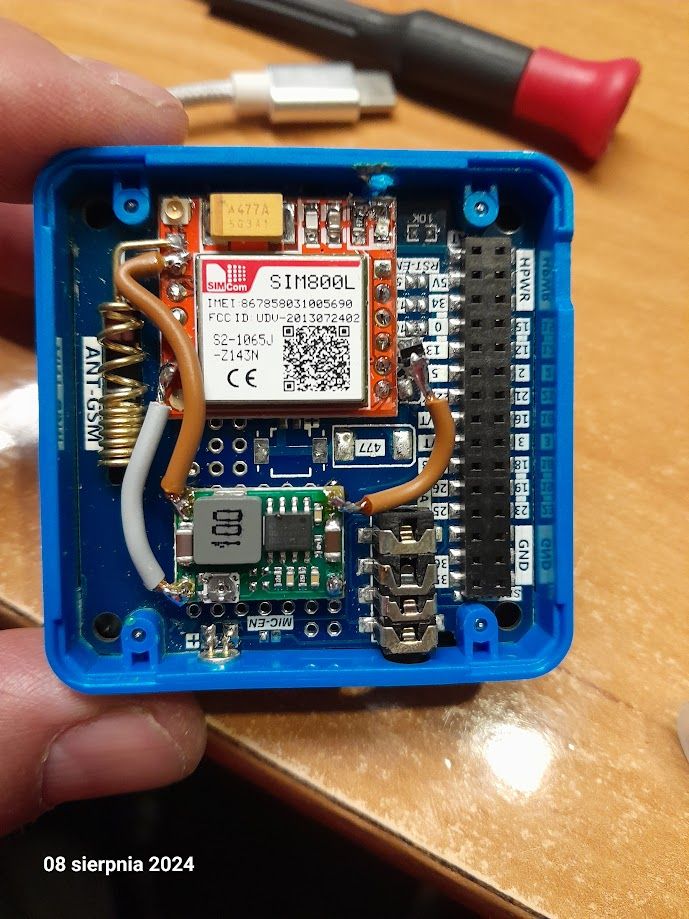
    Hello @Kris thank you for sharing your solution. With 5 V supplied from an external power supply I actually measure about 4.7 V going to the SIM800L due to the voltage drop of diode D1. But yes, that is still out of the specified VBAT absolute maximum rating of 4.5 V. Thanks Felix
  • Stream dual USB camera on CM4Stack

    4
    0 Votes
    4 Posts
    2k Views
    ajb2k3A
    @zhiyongwoo Ahh sorry I read it as CoreMP135 not CM4stack. If it works on another CM4 then it could be something in the Kernel. Have you asked on the RPI forums ? It could be a power issue, have you checked out this discussion? https://forums.raspberrypi.com/viewtopic.php?t=350942
  • EXT unit to measure engine RPM

    2
    0 Votes
    2 Posts
    2k Views
    C
    @nzmikec said in EXT unit to measure engine RPM: ..... i2c device to count these pulses and send my device an RPM value. What is the device you're going to use to receive the values on I2C? Maximum RPM (and pulses per minute) would be 11,000RPM. Maybe you don't need an external device for counting. 11,000 RPM with 1 pulse pr revolution is about 190 Hz which an ESP32 should be able to count directly by it self via one of its GPIO's.
  • Core-Ink --> Any other fonts available besides the two included

    2
    2 Votes
    2 Posts
    4k Views
    U
    @HappyUser TimePageSprite.drawString(20, 20, "Hello", (const lgfx::FixedBMPfont*) &fonts::FreeMonoBold12pt7b);
  • M5 Timer Camera not holding charge?

    3
    0 Votes
    3 Posts
    2k Views
    I
    @felmue When i unplug the camera and try to stream the video it dies after about a minute, surely it should last longer than that, how can i charge the battery? I'm not sure if im just not doing something right.
  • M5 Tough extention board moficiation

    5
    0 Votes
    5 Posts
    3k Views
    L
    @ajb2k3 Thank you, I found the schematics (https://github.com/m5stack/M5-Schematic), but do you know where I can find Gerber files ?
  • Need help to build a parking sensor

    2
    0 Votes
    2 Posts
    1k Views
    ajb2k3A
    @JeyOne Please take a look at the examples in UIFLow's project zone. As to home assistant, I'm sure someone knows about HA.
  • M5 card Computer with more than firmware

    2
    0 Votes
    2 Posts
    2k Views
    ajb2k3A
    @qatar20-22 you need to install a multi boot loader to the card computer and install compatible firmwares otherwise you install the UIFlow2 firmware and learn how to code
  • Cardputer Screen

    2
    0 Votes
    2 Posts
    2k Views
    S
    @mattjcuk You can rotate the screen in the init section: [image: 1717485824578-e7aa0713-633b-4fca-921a-64301e80fe31-image.png] The "Boot option" may also be useful for you, so add this as well.
  • M5Stack Plus 2 does not connect to usb

    3
    0 Votes
    3 Posts
    2k Views
    ajb2k3A
    @wanvieira1 Have you installed the USB drivers?
  • GNSS module DIP settings - cannot understand

    5
    1
    0 Votes
    5 Posts
    3k Views
    teastainT
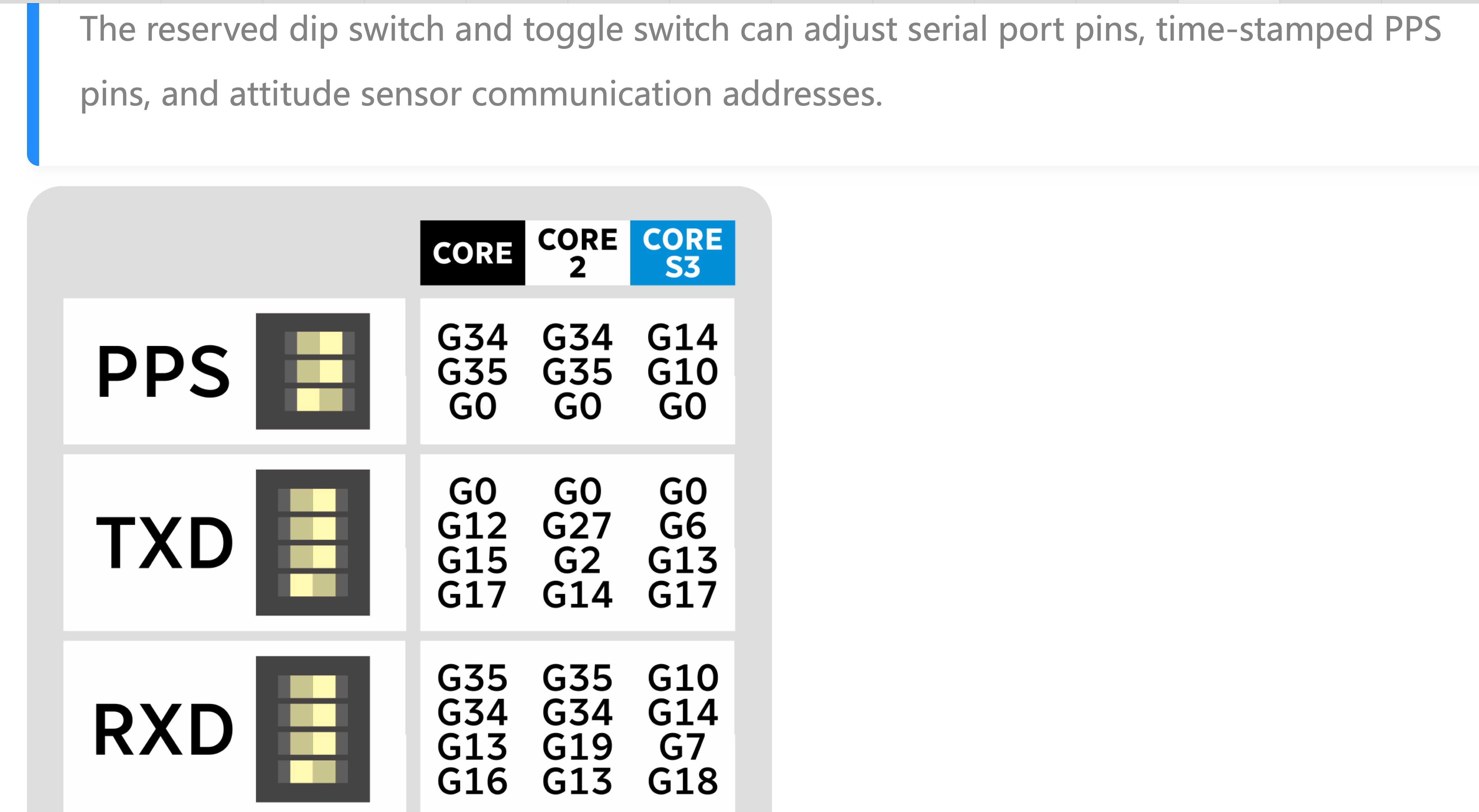
    @robski good! maybe THIS will help? [image: 1717003386598-screenshot-2024-05-29-at-1.09.15-pm.jpg]
  • QR-Code Reader - Trigger read from serial port and read code value

    5
    0 Votes
    5 Posts
    3k Views
    Q
    I think I still am doing something wrong. In the example below it seems that the M5 isn't reacting to the commands. Do I have to scan a QR code from the manual first to get it into the proper state? Example 1: import serial import time wakeup_cmd = bytes([0x00]) host_mode_cmd = bytes([0x07, 0xC6, 0x04, 0x08, 0x00, 0x8A, 0x08, 0xFE, 0x95]) start_scan_cmd = bytes([0x04, 0xE4, 0x04, 0x00, 0xFF, 0x14]) stop_scan_cmd = bytes([0x04, 0xE5, 0x04, 0x00, 0xFF, 0x13]) print('Open serial port') ser = serial.Serial('COM4', 9600, timeout=1) # Adjust the port name and baud rate as needed try: print('Wake up!') ser.write(wakeup_cmd) time.sleep(0.05) print('Host mode') ser.write(host_mode_cmd) time.sleep(0.5) print('Start scan') ser.write(start_scan_cmd) time.sleep(3) print('Stop scan') ser.write(stop_scan_cmd) time.sleep(1) print('Bytes waiting at serial port: ' + str(ser.in_waiting)) response = ser.read(ser.in_waiting) print("Received:", response.decode()) except Exception as e: print("Error communicating with serial device: ", e) finally: print("Close serial port") ser.close() The output: Open serial port Wake up! Host mode Start scan Stop scan Bytes waiting at serial port: 0 Received: Close serial port Doing something simpler doesn't work either: Example 2: software_version_cmd = bytes([0x04, 0xA3, 0x04, 0x00, 0xFF, 0x55]) print('Open serial port') ser = serial.Serial('COM4', 9600, timeout=1) # Adjust the port name and baud rate as needed try: print('Wake up!') ser.write(wakeup_cmd) time.sleep(0.05) print('Check software version') ser.write(software_version_cmd) time.sleep(1) print('Bytes waiting at serial port: ' + str(ser.in_waiting)) response = ser.read(ser.in_waiting) print("Received:", response.decode()) except Exception as e: print("Error communicating with serial device: ", e) finally: print("Close serial port") ser.close() The output: Open serial port Wake up! Check software version Bytes waiting at serial port: 0 Received: Close serial port

  • This topic is deleted!

    1
    0 Votes
    1 Posts
    501 Views
    No one has replied
  • Core2: AXP2101 giving false values

    5
    0 Votes
    5 Posts
    5k Views
    C
    @robouden To get the Core2 V1.1 units to power on from an external supply, I found a fix was needed in the axp::begin() function to check for VBUS power before deciding whether to enable the VBUS converter. Both my fix and the current official version can be found here https://github.com/m5stack/M5Core2/commit/c26f1b63635c90d9bd82d87db6ab4d9048b3a1b5
  • M5core zigbee

    1
    1 Votes
    1 Posts
    1k Views
    No one has replied
  • M5 card computer - doesn't care

    2
    0 Votes
    2 Posts
    2k Views
    H
    What did you do with the device during the day of use? it may help to charge it for a few hours. If still not turning on there might be a faulty firmware, try to to enter download mode by press and hold the G0 button on StampS3 before turning it on, then release it after powering it on. If this works, erase and re-burn firmware.