🤖Have you ever tried Chat.M5Stack.com before asking??😎
  • This topic is deleted!

    1
    0 Votes
    1 Posts
    32 Views
    No one has replied
  • How to attached M5GO BOTTOM2 (For CORE2 only) to CORE2

    3
    0 Votes
    3 Posts
    5k Views
    A
    Hi @felmue , thanks for your input, I was almost there, but wanted to be sure I had to remove the old battery and not needed to connet the one in M5Go.
  • Can' turn on / off the Core2 via hardware button on the side

    5
    0 Votes
    5 Posts
    8k Views
    P
    Similiar problem here - Ill start a new thread in case its a different issue
  • [Core2] make Button disappear

    1
    0 Votes
    1 Posts
    5k Views
    No one has replied
  • TVOC and ENV II conflict

    1
    0 Votes
    1 Posts
    3k Views
    No one has replied
  • 0 Votes
    2 Posts
    6k Views
    felmueF
    Hello @wa-berlin you can't. Functions w/o numTimer argument will return the internal number assigned to a specific timer. You don't have direct control about which timer gets which number, but you can keep a record of the number assigned to a given timer to further manipulate it. Below is an example with 2 timers (A and B). Timer A counts up ever 2 seconds, whereas timer B counts up every second and stops at 10. With button A you can enable and disable timer A. With button B you can restart timer B once it has stopped. #include <M5Core2.h> #include <utility/M5Timer.h> M5Timer M5T; int mytimerA = -1; int mytimerB = -1; int mycountA = 0; int mycountB = 0; void myTimerACB(void) { mycountA++; } void myTimerBCB(void) { mycountB++; } void setup() { M5.begin(); M5.Lcd.setTextSize(3); mytimerA = M5T.setInterval(2000, myTimerACB); mytimerB = M5T.setTimer(1000, myTimerBCB, 10); } void loop() { M5.update(); M5T.run(); if(M5.BtnA.wasPressed() == true) { if(M5T.isEnabled(mytimerA) == true) { M5T.disable(mytimerA); } else { M5T.enable(mytimerA); } } if(M5.BtnB.wasPressed() == true) { if(M5T.isEnabled(mytimerB) == false) { M5T.deleteTimer(mytimerB); mycountB = 0; mytimerB = M5T.setTimer(1000, myTimerBCB, 10); } } M5.Lcd.setCursor(0, 0); M5.Lcd.printf("Timer A: %s\n", M5T.isEnabled(mytimerA) ? "enabled " : "disabled"); M5.Lcd.printf("Timer A: %04d", mycountA); M5.Lcd.setCursor(0, 100); M5.Lcd.printf("Timer B: %s\n", M5T.isEnabled(mytimerB) ? "enabled " : "disabled"); M5.Lcd.printf("Timer B: %04d", mycountB); } Good luck! Felix

  • Core2 Rebooting with program change

    4
    0 Votes
    4 Posts
    7k Views
    S
    It is definitely something to do with the size of the program. Once it reaches a certain size it will no longer run. All I have to do is delete anything (reducing the size) and it will run again. I provided a sample of my code to tech support and they are working with engineering to investigate.
  • [Core2] How to download JPG from web and display it on screen?

    7
    0 Votes
    7 Posts
    15k Views
    M
    Here we go, easy work-around the faulty lcd.image(): from m5stack import * buffer = open("/sd/images/test.jpg").read() lcd.image_buff(lcd.CENTER, lcd.CENTER, buffer)
  • How do you change volume on Core2

    7
    0 Votes
    7 Posts
    14k Views
    B
    @bobolink FYI to myself If you have an engineering background--part of Micropython-- module 'dba: calculate dBA (A-weighting decibels) from an input stream of digital audio samples module 'i2stools': function to efficiently extract sample data from a buffer filled by I2S Signal processing (logical shifts--fractional multiply) on the PCM samples instead of hardware volume control gets the job done also.
  • About sensors and GPIO

    3
    0 Votes
    3 Posts
    7k Views
    T
    @zontex Thank you. DHT, DS18B20 and Soil Moisture Sensor are not M5 products. Use Arduino. Thank you.
  • UIFlow doesn't start on new Core2

    15
    0 Votes
    15 Posts
    27k Views
    I
    After struggling for a while, I had this Core2 replaced at the shop where I bought it as an initial defect. I'm not sure, but it seems that the display mechanism in Arduino and the display mechanism in UIFlow are different, and even if Factory Test works normally, it may not work properly in UIFlow.
  • Factory Resetting the CORE 2

    2
    0 Votes
    2 Posts
    7k Views
    M
    @robertoperez777 Via M5Burner
  • This topic is deleted!

    2
    2
    0 Votes
    2 Posts
    15 Views
    No one has replied
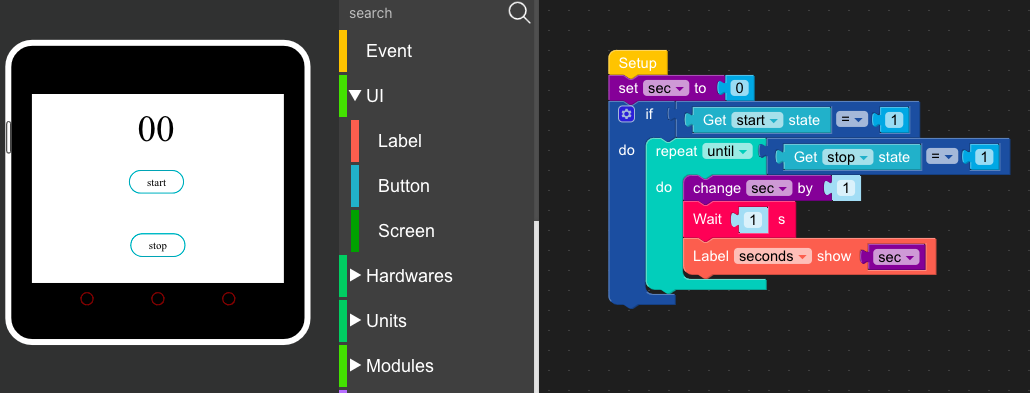
  • Stopwatch - Core2- Need help

    4
    2
    0 Votes
    4 Posts
    7k Views
    M
    @felmue Thanks, that fixed it
  • 2 Votes
    55 Posts
    263k Views
    B
    For anybody else looking at fixing the issue with multiple simultaneous button presses it seems it can't be done. Having dived into the M5Core2 source the events generated for two button presses, e.g. A & C, are press for A and move for A. This looked like a deeper bug (since the second should have been identified as C), so going further in I found that an else branch wasn't refreshing the currently identified touched button on second press (C) in the method "doEvents" in touch.cpp (it doesn't help the code isn't documented, isn't single responsibility and has an arrow antipattern too). Fixing that bug, so the correct button is refreshed, showed that two events together did not produce presses for A & C but instead (I assume - I'm fed up at this point) the hardware averages the presses' coordinates and declares it's button B(!) that is pressed. If you have old Core 1 code you're porting that uses two simultaneous button presses I'd suggest changing the code to double taps of a single button instead which is the workaround I'm about to use - to remain consistent this behaviour is both on Core 1 and Core 2 More formally, I should have read the file header in touch.h earlier: the M5Stack Core2 touch display is only multi-touch in one dimension. What that means is that it can detect two separate touches only if they occur on different vertical positions. This has to do with the way the touch screen is wired, it's not something that can be changed in software. So you will only ever see two points if they do not occur side-by-side. Touches that do happen side-by-side blend into one touch that is detected somewhere between the actual touches.
  • This topic is deleted!

    1
    0 Votes
    1 Posts
    66 Views
    No one has replied
  • Core 2 and GPS Pins Still To Short

    3
    2 Votes
    3 Posts
    6k Views
    S
    Just a follow up. I contacted M5Stack tech support and they told me the old modules have pins that are 2.5mm and the new board has pins that are 3mm. So in theory I have the newer board but it separates from the Core2 fairly easily. Meaning the pins are probably making contact but not great. Will have to get longer screws and screw the module down to ensure good contact. For reference to separate from the Grey Core it is very tight and I usually use a screwdriver. I measured and the Grey Core lets the pins seat approximately 1mm more than the Core2. Here is a picture showing how to measure pin length. [image: 1611190655215-pins.jpg]
  • 0 Votes
    5 Posts
    8k Views
    felmueF
    Hello @shay sorry, my bad. I incorrectly assumed you'd be using an M5GO2 bottom with your M5Core2 which exposes ports B and C. You are correct, the only port directly available on M5Core2 is port A, which by default is used for I2C and not serial. So yes, I guess the easiest for you is to get an M5GO2 bottom. Thanks Felix
  • Core2 PortC not working

    4
    0 Votes
    4 Posts
    8k Views
    felmueF
    Hello @ckuehnel glad to hear and thanks for letting me know. Thanks Felix
  • Core2 Port I2C Not Working

    4
    0 Votes
    4 Posts
    6k Views
    OyczEO
    @se said in Core2 Port I2C Not Working: Felix thanks for the suggestion. You were absolutely correct version 1.7.0 resolved the problem. Now in 1.7.1.1 this problem was fixed.