🤖Have you ever tried Chat.M5Stack.com before asking??😎

Subcategories

  • Lessons and Guides for Uiflow

    125 Topics
    434 Posts
    A
    Hi, I'm a new user of M5stack products, having got an M5StickC Plus2 recently. It's a nice device, but the documentation isn't always accurate which makes learning how to use it a slow process. I tried to use the example for drawing a raw buffer to the screen here But it resulted in different garbled output each time and not a green rectangle. It seems that the len parameter is expecting 16-bit entries in the buffer so needs to be halved. Here's the code that works on my device (note the //2 for len parameter): width, height = 40, 30 green565 = 0x07E0 raw_buf = bytearray(width * height * 2) for i in range(width * height): raw_buf[2*i] = (green565 >> 8) & 0xFF raw_buf[2*i+1] = green565 & 0xFF Display.drawRawBuf(raw_buf, 100, 100, width, height, len(raw_buf)//2, swap=False) Hopefully this will help others and eventually get changed in the docs - assuming it's the same for all UIFlow2 supported devices? If anybody knows a fix to make it work properly for lower than 16bit depth screens so I can draw a raw buffer to a 1-bit canvas properly, please let me know!

  • 212 Topics
    790 Posts
    Y
    Hello I faced problem about digi-clock write charcter block. Problem is 3rd and 4th digit can not display with this block. I created below flow. Then Digi-Clock displays "0.1.:" for 1st and 2nd digit and colon. [image: 1778319992199-1aae8860-52c1-4c60-9097-5668ed98e2ee-image.jpeg] Howerver, index of write character block can be set only 0 to 4. Therefore it could not display 3rd and 4th digit. I think this index shoud be set 0 to 8. It doesn't work if index forced set to 5 to 8. (It was same behavior as 0 if index is set to 5.) I think the index for DigiClockUnit.set_char should be 0–8, not 0–4. https://uiflow-micropython.readthedocs.io/en/latest/unit/digi_clock.html Could you please kindly consider to fix this issue? (Or let me know please if any other solution available.) #Write raw data and write string blocks are works correctly. Using device -AtomS3 lite -Digi-clock UIFlow version:2.4.4 FW version:2.2.5 OS:Windows11 Thank you in advance Best Regards Yamada
  • 11 Topics
    33 Posts
    A
    @jeanfabre On web, just choice block type. [image: 1729260517944-86b7a25c93207d9a32e5b33471bb1f0.png] For code, add return description like this: def func(self) -> int: return 0
  • How to use the ExpPort For Core2 module

    4
    0 Votes
    4 Posts
    4k Views
    ajb2k3A
    Ports B and C are not controlled by the board, they are connected directly to the bus and handled directly by the core. As to D and E which are handled by the base. Ports B and See only. become available when you select units that require ports B and C
  • Core Ink battery status

    8
    0 Votes
    8 Posts
    10k Views
    E
    @ebksuper By digging the web I found a python script what translates to this in UIFLOW / BLOCKLY. I translated this the best I could to UI FLOW. The mAh are of the specs of CORE INK and my full loaded battery gave out on "get battery voltage" 4242 asuming this translates to 4.2V. So far it spits out reasonable numbers. I am testing if this is accurate enough to be an indicator when to recharge. Please comment if you found errors or have a more elegant solution to get a Batters Status. Thanx : ) [image: 1687683614236-uiflow_block_bat-resized.png] #uiflow #battery #coreink #m5stack #core
  • Accessing decoded JSON array

    6
    0 Votes
    6 Posts
    13k Views
    ajb2k3A
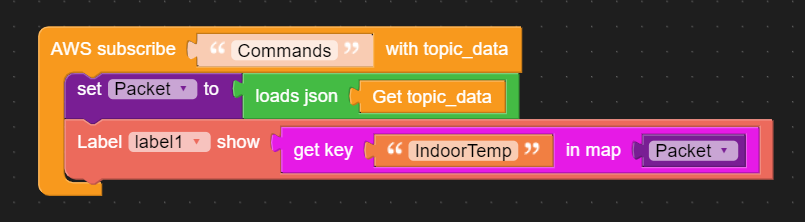
    @rmorgan please dont double post.
  • JSON AWS Topic decode

    2
    1
    0 Votes
    2 Posts
    2k Views
    ajb2k3A
    Is your Core connected to the WIFI ? By this I mean do you have the SSID and password blocks in your code? I cant tell from this snippet what your code is doing and need to see the full code in order to help.
  • Can't Run the Config util

    11
    0 Votes
    11 Posts
    10k Views
    J
    @holofloh Thanks very much for this info.. Yes I agree, my Windows 11Pro has no facility to set a VID or PIN in the FTDI driver settings but it does at least appear to be the correct / identical driver as is recommended by the docs on this site that I am now, and have been using for this M5StickCPlus V1.1 device..
  • Uiflow 2 wireless conected with uiflow

    1
    0 Votes
    1 Posts
    1k Views
    No one has replied
  • ATOM S3 with UiFlow - module M5 or M5Stack

    5
    0 Votes
    5 Posts
    5k Views
    ajb2k3A
    @forestial I'm working on the docs at the moments and currently logging the API's but as you noticed, it is hard work to find them.
  • M5STack Tough in reboot loop when using UIFlow - Duplicated post

    3
    0 Votes
    3 Posts
    3k Views
    I
    Thank's that solved it!
  • i2c library bug

    1
    0 Votes
    1 Posts
    4k Views
    No one has replied
  • 0 Votes
    3 Posts
    3k Views
    Z
    Thank you! As it turned out, the main problem was that if in a program on UIFlow 2.0 (block mode) you create a variable named "state" and assign it 0 during initialization, then the controller starts to behave inappropriately (hangs, new programs either do not load or load but do not work , there are problems described in the previous post). It only helps to re-flash the controller using M5Burner and load into it a program in which there are no omissions of a variable called "state".
  • This topic is deleted!

    1
    0 Votes
    1 Posts
    2 Views
    No one has replied
  • This topic is deleted!

    1
    0 Votes
    1 Posts
    5 Views
    No one has replied
  • How to save the last API key?

    5
    0 Votes
    5 Posts
    5k Views
    Matej's WorkshopM
    Ohhh! Okay. Thanks.
  • "Unknown wifi error 0x0005"

    2
    0 Votes
    2 Posts
    5k Views
    Matej's WorkshopM
    Hello, 8 months and still no reply!? Could you please send the code or is it already fixed?
  • Managing UIFlow buttons which disappear from screen but still exist

    2
    0 Votes
    2 Posts
    2k Views
    ajb2k3A
    Not unless you leave UIFlow and use Micropython Directly with the VSCode, Thonny, or Mu editors.
  • Remote+ update values from m5stack core2 back to web ui?

    1
    0 Votes
    1 Posts
    2k Views
    No one has replied
  • This topic is deleted!

    1
    1
    0 Votes
    1 Posts
    1k Views
    No one has replied
  • Centre a label on M5Stack

    3
    0 Votes
    3 Posts
    4k Views
    ajb2k3A
    @holofloh wow, I have never considered this, thanks for posting. I will add it to my guides.
  • 0 Votes
    3 Posts
    3k Views
    D
    I have the same problem: yes - flashed firmware yes - wifi is setup (I set it up in m5burner the same way it's been working for lots of other devices, am I missing a step?) maybe it can access the UIflow2 server - how can I tell? yes - I'm trying to use uiflow2, not uiflow1 in the browser yes - I've looked at the connection settings, can't manually add it using the mac address, have no way to find the token (doesn't show up in m5burner the way old devices do)
  • CAN BUS Error with M5Stack and COMMU Module

    3
    1 Votes
    3 Posts
    4k Views
    E
    Solved with the code ;-) message = com.commu_can_read_message(0) hex_list = [] for b in message: hex_str = hex(b)[2:] if len(hex_str) < 2: hex_str = '0' + hex_str hex_list.append(hex_str)