🤖Have you ever tried Chat.M5Stack.com before asking??😎

Subcategories

  • Lessons and Guides for Uiflow

    125 Topics
    434 Posts
    A
    Hi, I'm a new user of M5stack products, having got an M5StickC Plus2 recently. It's a nice device, but the documentation isn't always accurate which makes learning how to use it a slow process. I tried to use the example for drawing a raw buffer to the screen here But it resulted in different garbled output each time and not a green rectangle. It seems that the len parameter is expecting 16-bit entries in the buffer so needs to be halved. Here's the code that works on my device (note the //2 for len parameter): width, height = 40, 30 green565 = 0x07E0 raw_buf = bytearray(width * height * 2) for i in range(width * height): raw_buf[2*i] = (green565 >> 8) & 0xFF raw_buf[2*i+1] = green565 & 0xFF Display.drawRawBuf(raw_buf, 100, 100, width, height, len(raw_buf)//2, swap=False) Hopefully this will help others and eventually get changed in the docs - assuming it's the same for all UIFlow2 supported devices? If anybody knows a fix to make it work properly for lower than 16bit depth screens so I can draw a raw buffer to a 1-bit canvas properly, please let me know!

  • 212 Topics
    790 Posts
    Y
    Hello I faced problem about digi-clock write charcter block. Problem is 3rd and 4th digit can not display with this block. I created below flow. Then Digi-Clock displays "0.1.:" for 1st and 2nd digit and colon. [image: 1778319992199-1aae8860-52c1-4c60-9097-5668ed98e2ee-image.jpeg] Howerver, index of write character block can be set only 0 to 4. Therefore it could not display 3rd and 4th digit. I think this index shoud be set 0 to 8. It doesn't work if index forced set to 5 to 8. (It was same behavior as 0 if index is set to 5.) I think the index for DigiClockUnit.set_char should be 0–8, not 0–4. https://uiflow-micropython.readthedocs.io/en/latest/unit/digi_clock.html Could you please kindly consider to fix this issue? (Or let me know please if any other solution available.) #Write raw data and write string blocks are works correctly. Using device -AtomS3 lite -Digi-clock UIFlow version:2.4.4 FW version:2.2.5 OS:Windows11 Thank you in advance Best Regards Yamada
  • 11 Topics
    33 Posts
    A
    @jeanfabre On web, just choice block type. [image: 1729260517944-86b7a25c93207d9a32e5b33471bb1f0.png] For code, add return description like this: def func(self) -> int: return 0
  • UIFlow on Linux with Chrome not loading or saving Flow files

    1
    0 Votes
    1 Posts
    2k Views
    No one has replied
  • Unable to create simple EZData entries on M5Stack Atom Matrix

    8
    0 Votes
    8 Posts
    9k Views
    A
    Which firmware version are you using? | Experienced problems pushing data to EZData with 1.9.8 on Atoms. Reproduceable error not occuring after reverting to firmware 1.9.7.
  • M5stack Tough Mac Address

    3
    0 Votes
    3 Posts
    4k Views
    R
    Hi @felmue . Thanks for the reply. I think I got the solution the same time you sent me yours. I did use the code in here as below: I did an 'Execute' Block: import ubinascii import network wlan_sta = network.WLAN(network.STA_IF) wlan_sta.active(True) wlan_mac = wlan_sta.config('mac') wlan_mac=ubinascii.hexlify(wlan_mac).decode().upper() [image: 1682625962466-76e881c1-37df-4e5b-94f1-c33c0da572aa-image.png] then a Label Block: wlan_mac [image: 1682626003960-147bf674-2e3a-4ea5-84fc-41c072d1ce42-image.png] Anyway, thanks for taking the time and effort to reply. Rami
  • REMOTE+ issues

    1
    0 Votes
    1 Posts
    2k Views
    No one has replied
  • I can't hide label with uiflow for M5 Tough

    3
    1
    0 Votes
    3 Posts
    4k Views
    R
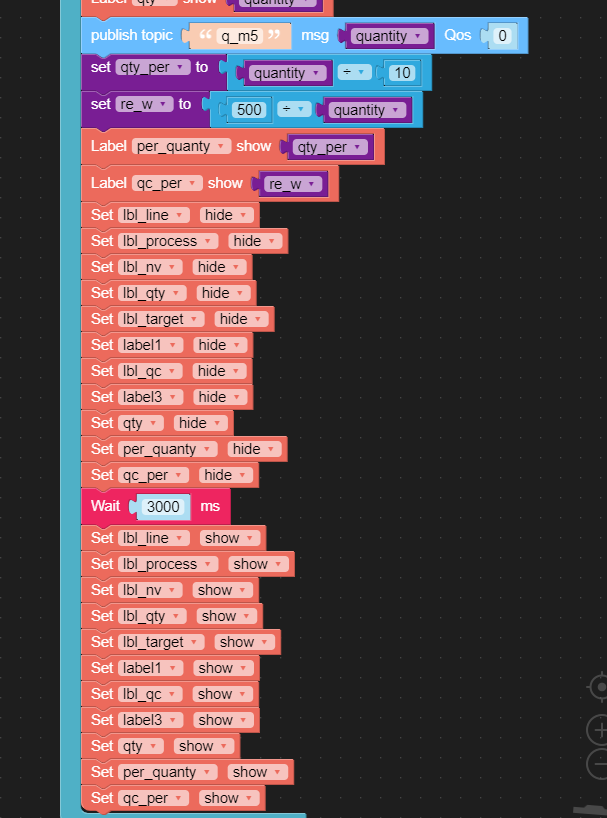
    Try having them in a function! This is working for me [image: 1681584685879-hide-lables.jpg]
  • This topic is deleted!

    1
    0 Votes
    1 Posts
    143 Views
    No one has replied
  • Wire maximum length (Ultrasonic sensor)

    1
    0 Votes
    1 Posts
    2k Views
    No one has replied
  • CAN 1000kHz error

    1
    0 Votes
    1 Posts
    2k Views
    No one has replied
  • UIFLOW Modbus TCP

    2
    1 Votes
    2 Posts
    5k Views
    C
    I have the same question with the CORE2 ? Any update ?
  • How to parse this JSON format in UIFlow blockly mode

    2
    0 Votes
    2 Posts
    2k Views
    ajb2k3A
    you use the JSON blocks in UIFlow
  • Initiating connection to AWS

    7
    1
    0 Votes
    7 Posts
    8k Views
    ajb2k3A
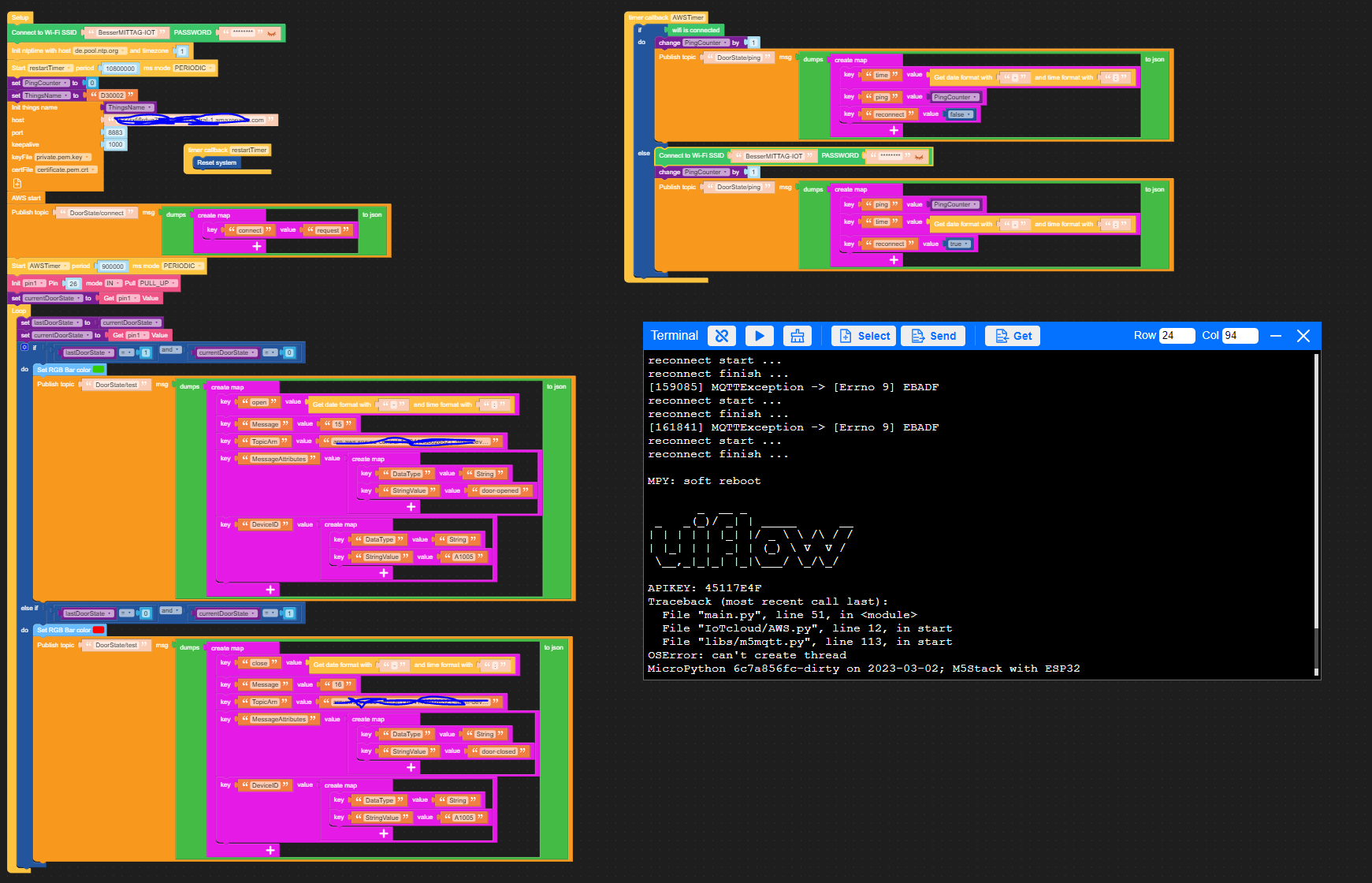
    Combination of error 09 (authentication acknowledgment error) and OS error shown in the command terminal
  • Unable to connect Core 2 to UIFlow Web

    4
    1 Votes
    4 Posts
    3k Views
    ajb2k3A
    Reset your web browsers temp files and cache as it could be a cookie or something blocking it
  • Scale accurate to 10g only

    3
    0 Votes
    3 Posts
    4k Views
    M
    Thank you .. sometimes it´s just my hope to get an easy solution running and waking up in the middle of to many micro learning.
  • How can an atom lite listen forever to a mqtt topic?

    2
    1
    0 Votes
    2 Posts
    4k Views
    B
    On a side-note, this is the programm im running on a seperate atom lite using the same UIFlow version. It just sends a request every once in a while. My code:[image: 1678358578450-forum_publish-resized.png] May be somebody has some thoughts for this as well. Kind regards TD
  • How can I download my old script from a device?

    4
    0 Votes
    4 Posts
    5k Views
    H
    You can use the "Device File Manager" in UiFlow. [image: 1678342098815-devman-resized.png]
  • Could you provide UIFlow release notes?

    Moved
    2
    0 Votes
    2 Posts
    4k Views
    ajb2k3A
    They already do, there is an option in the menus to view the update log.
  • This topic is deleted!

    3
    0 Votes
    3 Posts
    148 Views
  • No documentation for UDP ?

    1
    0 Votes
    1 Posts
    2k Views
    No one has replied
  • UIFlow Source

    4
    0 Votes
    4 Posts
    5k Views
    ajb2k3A
    I'm working on a book for the M5Stamp C3 using MP1.19.1 Going mainstream means a slimmer lighter faster MP but you loose access to the M5Stack specific libs and have to look for alternatives.
  • UIFlow - Micropython - USB plugged in

    4
    0 Votes
    4 Posts
    5k Views
    J
    The python version of the c function looks like its probably not available: >>> dir(hardware.axp192.Axp192) ['__class__', '__init__', '__module__', '__name__', '__qualname__', '__bases__', '__dict__', 'deinit', 'setBusPowerMode', 'powerAll', 'setLCDBrightness', 'setPowerLED', 'setSpkEnable', 'powerOff', 'CURRENT_100MA', 'CURRENT_190MA', 'CURRENT_280MA', 'CURRENT_360MA', 'CURRENT_450MA', 'CURRENT_550MA', 'CURRENT_630MA', 'CURRENT_700MA', 'getTempInAXP192', 'getChargeState', 'getBatVoltage', 'getBatCurrent', 'getVinVoltage', 'getVinCurrent', 'getVBusVoltage', 'getVBusCurrent', 'setChargeState', 'setChargeCurrent', 'setLDOVoltage', 'setLDOEnable', 'setDCVoltage', 'disableAllIRQ', 'clearAllIRQ', 'enableBtnIRQ', 'setESPVoltage', 'setLCDBacklightVoltage', 'setLCDEnable', 'setLCDReset', 'setVibrationIntensity', 'setVibrationEnable', '_regChar', '_read8bit', '_read12Bit', '_read13Bit', '_read16Bit'] >>> However, I found two alternative ways to detect this, i2c being my favorite: https://imgur.com/a/nscmAHF