🤖Have you ever tried Chat.M5Stack.com before asking??😎

Subcategories

  • Lessons and Guides for Uiflow

    125 Topics
    434 Posts
    A
    Hi, I'm a new user of M5stack products, having got an M5StickC Plus2 recently. It's a nice device, but the documentation isn't always accurate which makes learning how to use it a slow process. I tried to use the example for drawing a raw buffer to the screen here But it resulted in different garbled output each time and not a green rectangle. It seems that the len parameter is expecting 16-bit entries in the buffer so needs to be halved. Here's the code that works on my device (note the //2 for len parameter): width, height = 40, 30 green565 = 0x07E0 raw_buf = bytearray(width * height * 2) for i in range(width * height): raw_buf[2*i] = (green565 >> 8) & 0xFF raw_buf[2*i+1] = green565 & 0xFF Display.drawRawBuf(raw_buf, 100, 100, width, height, len(raw_buf)//2, swap=False) Hopefully this will help others and eventually get changed in the docs - assuming it's the same for all UIFlow2 supported devices? If anybody knows a fix to make it work properly for lower than 16bit depth screens so I can draw a raw buffer to a 1-bit canvas properly, please let me know!
  • 212 Topics
    790 Posts
    Y
    Hello I faced problem about digi-clock write charcter block. Problem is 3rd and 4th digit can not display with this block. I created below flow. Then Digi-Clock displays "0.1.:" for 1st and 2nd digit and colon. [image: 1778319992199-1aae8860-52c1-4c60-9097-5668ed98e2ee-image.jpeg] Howerver, index of write character block can be set only 0 to 4. Therefore it could not display 3rd and 4th digit. I think this index shoud be set 0 to 8. It doesn't work if index forced set to 5 to 8. (It was same behavior as 0 if index is set to 5.) I think the index for DigiClockUnit.set_char should be 0–8, not 0–4. https://uiflow-micropython.readthedocs.io/en/latest/unit/digi_clock.html Could you please kindly consider to fix this issue? (Or let me know please if any other solution available.) #Write raw data and write string blocks are works correctly. Using device -AtomS3 lite -Digi-clock UIFlow version:2.4.4 FW version:2.2.5 OS:Windows11 Thank you in advance Best Regards Yamada
  • 11 Topics
    33 Posts
    A
    @jeanfabre On web, just choice block type. [image: 1729260517944-86b7a25c93207d9a32e5b33471bb1f0.png] For code, add return description like this: def func(self) -> int: return 0
  • Support multiple files

    4
    0 Votes
    4 Posts
    8k Views
    m5stackM
    @jesuslg123 oh ~i see... you mean is hope user could create some page. and use block to control which page will display in the screen? right? .. that is a good idea , actually our engineer have ever considered this. so maybe this function will in the future release.
  • HTTP Get - Empty response body

    9
    0 Votes
    9 Posts
    18k Views
    J
    So, I could workaround this issue after some work and before close and forget this thread here forever, let me share it: The problem: GoPro wifi API is not fully following the HTTP protocol specifications. Headers and body content is separated by \n instead of \r\n uRequests library is very strict on response parsing, while mostly any other libraries/browser/etc handle requests with some "malformed" bodies, uRequests does not. UIFlow IDE solution: Upload to the Stick5C the modified version of uRequests [image: 1594223907346-screenshot-2020-07-08-at-17.39.09.png] Override the uRequests library usage with a new import using execute code block. [image: 1594223971529-screenshot-2020-07-08-at-17.37.42.png] From that moment on (only on this app) it will use the modified library. No UIFlow IDE solution: Stop using UIFlow IDE 😢 Upload to the Stick5C the modified version of uRequests Use Visual Studio code or any other IDE to continue the development. Override the uRequests library usage with a new import on the code. I hope this is useful to someone else, any suggestion is also more than welcome. Thanks 😄
  • upload via USB from the desktop-Version of UI-Flow

    5
    0 Votes
    5 Posts
    11k Views
    J
    @lukasmaximus Thank you, that helped
  • M5 Stick C - receiving data over WIFI

    3
    1
    0 Votes
    3 Posts
    9k Views
    N
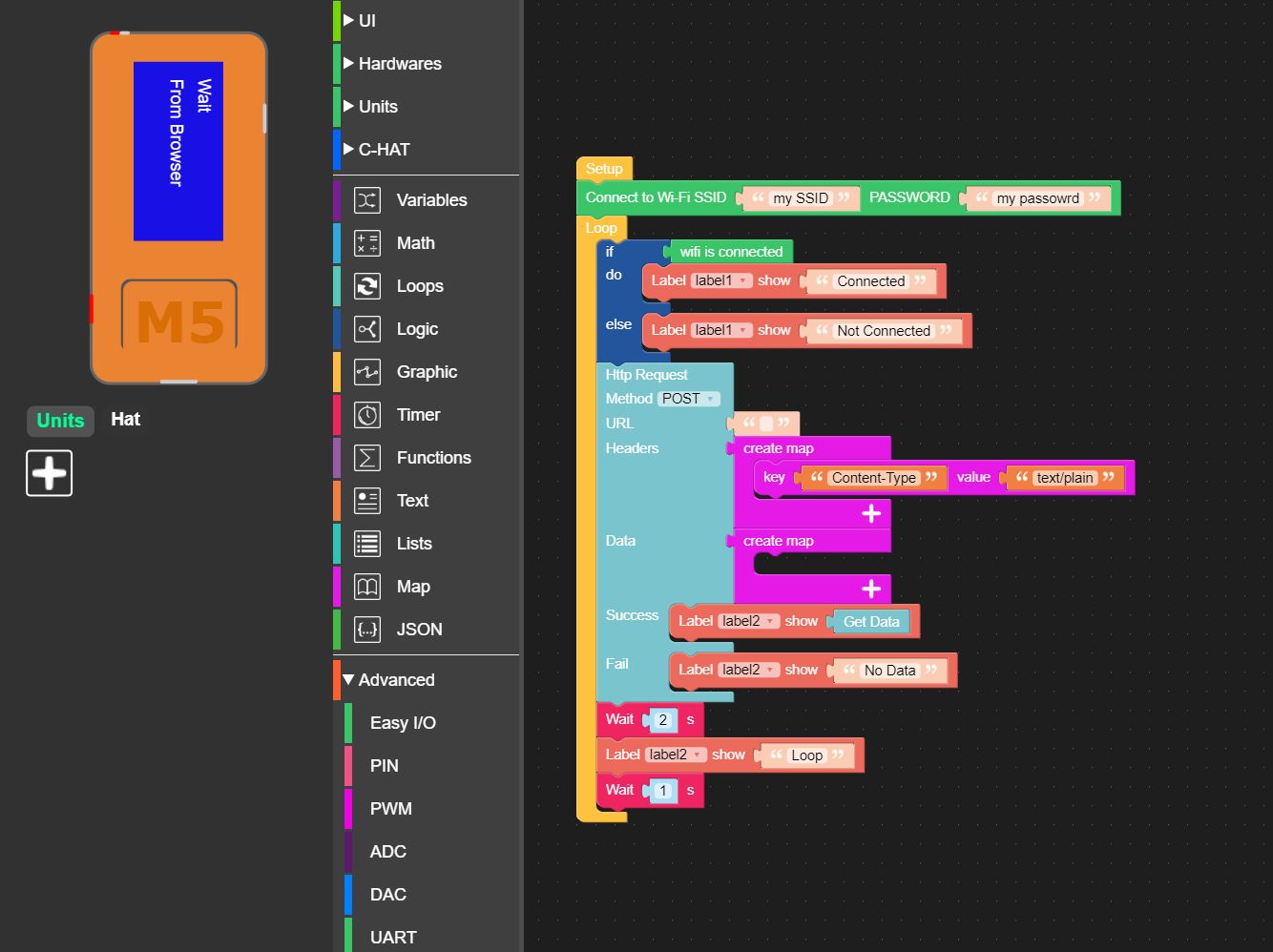
    Thanks for the swift answer dclaar. I completely ignored the Remote section as it had blocks referring to sliders and buttons. I should have realized! I have gotten that working without any problem. However from what I can see it uses the M5Stack WEB site to create a small WEB server or at least redirect traffic which would be fine for most applications. However, what I need is to be able to send something using POST from my PC on my local network. (It could be JSON or plain text). My M5StickC already has a fixed IP. I don't think any of the options you suggest will do what I need in Blockly, so am I stuck with moving to python, or do you have any more suggestions! Thanks
  • invert RX/TX serial lines (in UIFlow / Micropython)

    3
    0 Votes
    3 Posts
    6k Views
    J
    I have a very special board I need co communicate with. Currently I use the Arduino serial option to invert the signals. But I would prefer to prototype in UIFlow Are there any plans to upgrade to micro python 1.12, soon. I am really missing several options in your current implementation with micropython 1.11 al would easily work with 1.12: mDNS, BLE,, and inverting RX/TX in UART Thanks
  • uiflow non-volatile memory - save variables

    3
    0 Votes
    3 Posts
    6k Views
    B
    Thanks, I see eeprom option when I change ver to beta in UIFlow. Data in is stored as strings, that simplifies things.
  • Fall detection in M5Stick-C

    2
    0 Votes
    2 Posts
    4k Views
    ajb2k3A
    I started one and shared it on hackster.io but never had time to revisit the project !
  • TOF hat maybe not connect

    2
    0 Votes
    2 Posts
    4k Views
    J
    After some trys I made it work.
  • M5 StickC UI flow

    2
    0 Votes
    2 Posts
    4k Views
    m5stackM
    maybe you could package the block be a function. then use it in the main process
  • How to set data type and intial values.

    4
    1
    0 Votes
    4 Posts
    8k Views
    B
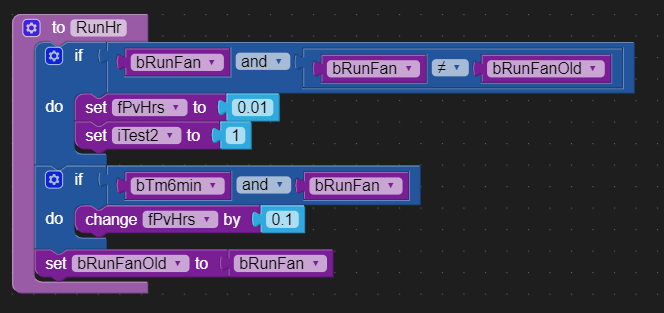
    [image: 1592860979153-40e7c48f-ca80-431d-82c3-efcb57ba89cd-image.png] Converts to; if bRunFan and bRunFan != bRunFanOld: fPvHrs = 0.01 if bTm6min and bRunFan: fPvHrs = fPvHrs + 0.01 bRunFanOld = bRunFan Thanks M5stack, this worked. I didn't want to divide by 10 because I would have to do that everywhere, slow the execution speed, its a slippery slope. The esp32 has very long divide instruction time compared to addition and multiplication.
  • Button Error

    4
    1
    0 Votes
    4 Posts
    7k Views
    B
    @m5stack Its ok thanks, problem solved. I gave the text label the name 'btnA' which is already a M5stack function, so renamingthe label cleared the problem.
  • Adding external libraries via uiflow

    25
    0 Votes
    25 Posts
    102k Views
    R
    If you use Visual Code you could install this extension https://marketplace.visualstudio.com/items?itemName=curdeveryday.vscode-m5stack-mpy Then transfer your modified library to flash. It would be good to change the name to another one, so that the import function does not load the built-in urequests library. Alternatively, you would have to look in what order and from which locations the libraries are imported.
  • What does m5base.app_start() do?

    3
    0 Votes
    3 Posts
    6k Views
    J
    @robalstona Yes I get that. But WHY? As I mentioned earlier, this makes testing code uploads a pain.
  • "Smart" network configuration from UIFlow?

    4
    0 Votes
    4 Posts
    9k Views
    J
    @devilstower have you tried using the scan method described here? https://docs.micropython.org/en/latest/library/network.html
  • Changing Networks in UIFlow?

    3
    0 Votes
    3 Posts
    6k Views
    D
    Yes, it sounds like this is what will be needed. It would be great if UIFlow would just roll up the whole sequence of switching to AP mode, collecting the info, and reconnecting. It's such a standard behavior for ESP-based devices, that it seems like it should be baked-in.
  • UiFlow MQTT topics

    5
    0 Votes
    5 Posts
    8k Views
    m5stackM
    @jhfoo yeah. i have ask our engineer. for the time being. UIFlow MQTT can't use ’topics/#‘ to subcribe all belong to "topics/....." topics.
  • M5StickC: Graduating from UiFlow: writing Python via REPL

    4
    0 Votes
    4 Posts
    8k Views
    J
    @lukasmaximus Not to be taken as Thonny being an inferior app; my Windows has a lot of crap inside. It seems pymakr on VS Code is more reliable on my Windows. pymakr has its own quirks; one of which is refusing to download binary files (eg. images). Will wait for more motivation to revisit Thonny again.
  • Fire PSRAM not recognized

    6
    1 Votes
    6 Posts
    8k Views
    lukasmaximusL
    @acuralegendz when you start uiflow desktop or m5 burner make sure to choose allow incoming network connections. The software needs to connect to the server so it can get the latest firmwares
  • This topic is deleted!

    1
    0 Votes
    1 Posts
    15 Views
    No one has replied
  • How to get UI Flow on to device?

    14
    0 Votes
    14 Posts
    31k Views
    P
    @kgobes Yes Visuino is block coding, I thought that what you were after wanting to use UiFlow. Of course the latter can display the dose as well. Cheers !